

Answered
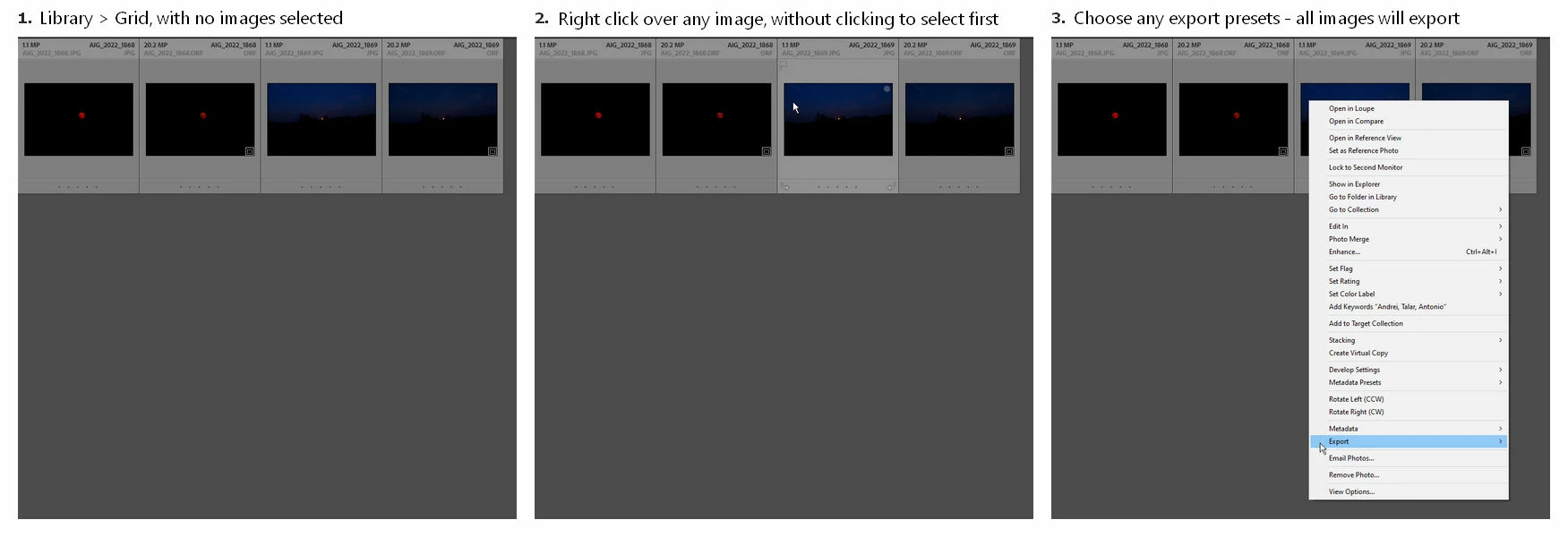
Right clicking and Exporting with no images selected exports all images in the grid.
When in Library > Grid view, if you do NOT have an image selected and you right click ANY image (without left clicking to select it) and choose an Export preset, it will export ALL the images in that grid view, and not just the image over which you right clicked.
I suppose that this could be a quick way to export all the images in the grid view without selecting them all first, but what may be misleading is the highlight on hover, before right-clicking, which may lead the user to believe that only the right clicked image will be targeted/exported.
I am not sure if this is intentional or not, so I am posting it here for review.
Is it a bug or a feature?


 AdChoices