Participant
December 11, 2016
Answered

Same raw,same monitor,new PC,different colour in LR,pls help!!

  • December 11, 2016
  • 2 replies
  • 562 views

I had build a new desktop for photo edit,

but very big different colour with same RAW photos and same monitor in Lightroom,

the image are very flat and dead colour,

Anyone can help me???Thanks Thanks Thanks a lot!!!!

Here is the strange colour with my new PC(same monitor)

view?usp=sharing

This is the normal colour with my old PC(same monitor)
view?usp=sharing

    This topic has been closed for replies.
    Correct answer Per Berntsen

    Lightroom needs a working monitor profile to display correct colors.

    Most other applcations don't use the monitor profile, and are therefore unaffected by a defective profile.

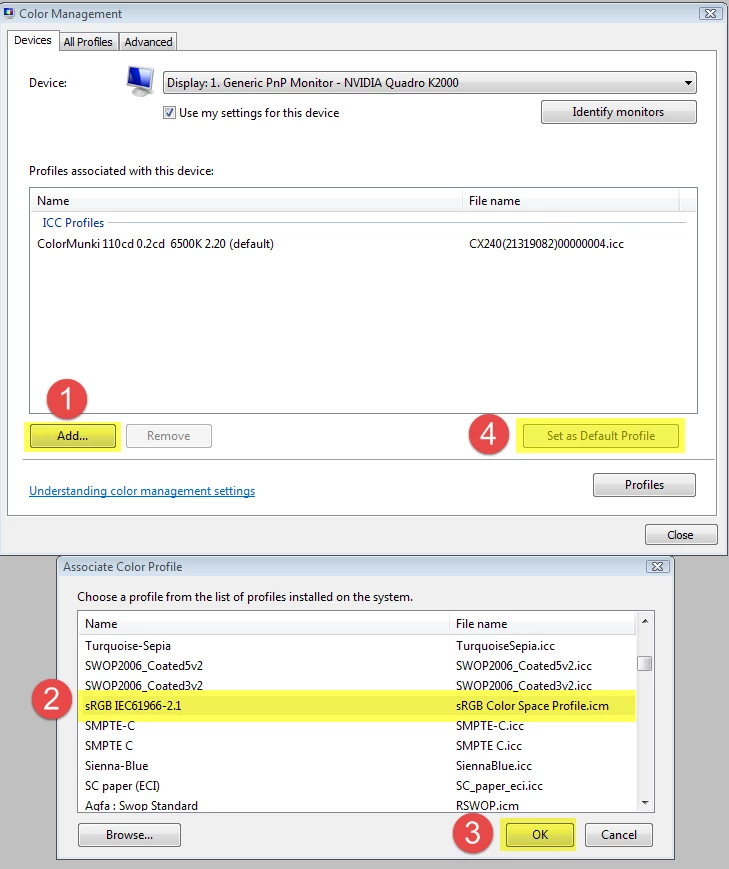
    Try setting the monitor profile to sRGB as described below.

    If this fixes the issue, you should ideally calibrate the monitor with a hardware calibrator.

    Press the Windows key+R, type colorcpl, and hit Enter.

    Add the sRGB profile, then set it as Default profile. See screenshot (from Windows 7) below.

    Make sure that Use my settings for this device is checked.

    2 replies

    dj_paige
    Legend
    December 12, 2016

    It could be that the monitor on the new computer needs to be calibrated. That should be the first thing you check.

    With regards to your two screen captures, we can see almost all of the sliders in the develop module are at zero in the screen capture from the new PC, but we can't see where the sliders are on the screen capture of the photo on the old PC. Depending on what you did, the problem could also be that the photos was properly edited on the old PC, but the edits didn't transfer on the new PC.

    Participant
    December 12, 2016

    Hi DJ,thx for your reply,

    i think no need to calibrate the monitor or tune the driver,

    because all the operation colour range are normal,like gaming or movie,

    the dead colour problem is in LR only compare with same raw files,

    and those photos are non edited form my wedding job,just read in to LR

    dj_paige
    Legend
    December 12, 2016

    Some applications use the monitor calibration profile, and some don't. So you can see nice colors in some programs, and the monitor still needs to be calibrated because other programs that do use the monitor calibration profile show poor colors. So you definitely should calibrate the monitor on the new PC.

    ManiacJoe
    Inspiring
    December 12, 2016

    At a quick glance, it would seem that the old PC had a calibrated monitor profile while the new one does not.

    Participant
    December 12, 2016

    Hi Joe,thanks for your reply:)

    I didn't edit any monitor profile of two pc,

    And i open the raw file was normal without LR,

    E.g. window photo viewer,It was same with my old PC,

    The dead colour problem only in LR only....:(