lostef
Participant
February 27, 2017
Answered

Same white space for all photo

  • February 27, 2017
  • 3 replies
  • 562 views

[ENG]

Hello, for e-commerce to our customer we editing some photos of belts.
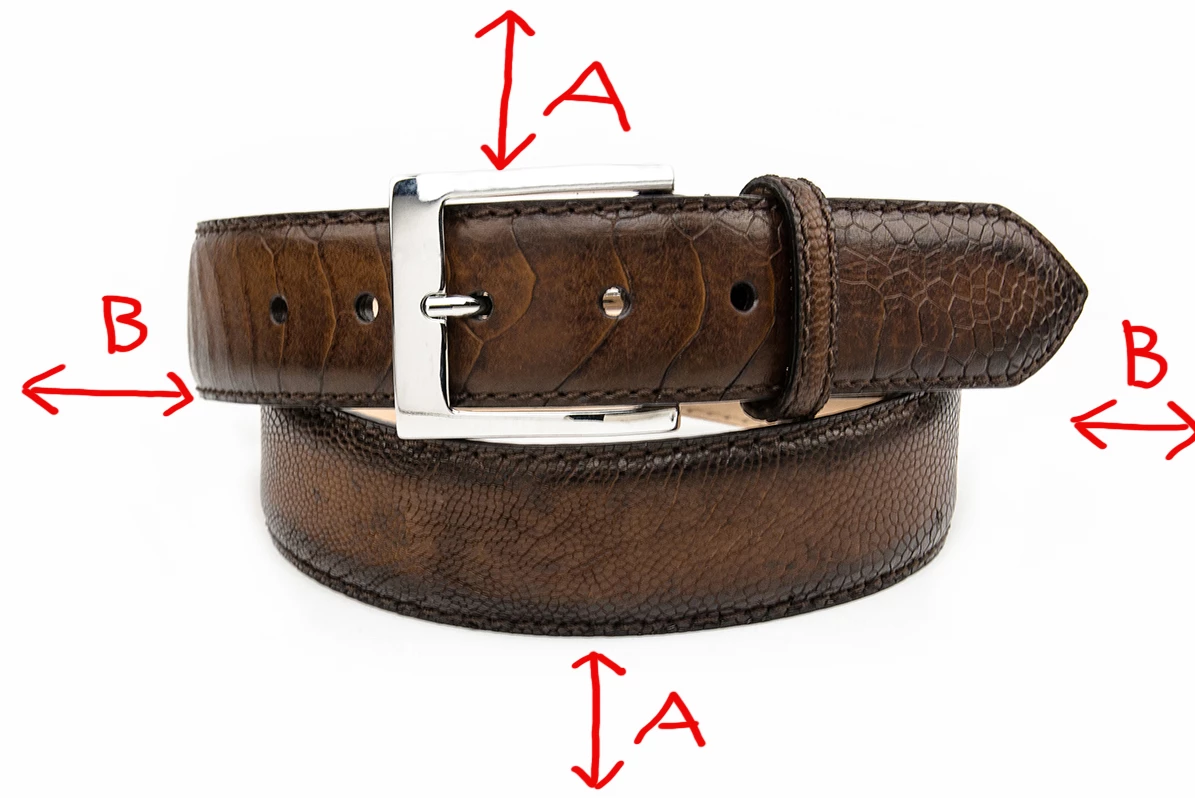
In particular we have the need to cut them so that the white area (A and B) around the belt is equal to the photos already online. How can I do?

Thanks

    This topic has been closed for replies.
    Correct answer effeegee

    Using LRmogrify2 as a plug in for LR you can extend the canvas with an equal border on all four sides. If I understand your enquiry correctly this will achieve what you need assuming of course you start with images which are the desired dimensions and want to place them in a white bounded box to customer specification. As post-processing plug in it works well with batches,  LRMogrify is a powerful tool but has a steep learning curve. Note: if you are working on a PC you have a more complicated install of a legacy version of ImageMagick.  

    3 replies

    lostef
    lostefAuthor
    Participant
    February 28, 2017

    Thank for your replies. I will try both ways…

    Bye

    effeegee
    effeegeeCorrect answer
    Inspiring
    February 27, 2017

    Using LRmogrify2 as a plug in for LR you can extend the canvas with an equal border on all four sides. If I understand your enquiry correctly this will achieve what you need assuming of course you start with images which are the desired dimensions and want to place them in a white bounded box to customer specification. As post-processing plug in it works well with batches,  LRMogrify is a powerful tool but has a steep learning curve. Note: if you are working on a PC you have a more complicated install of a legacy version of ImageMagick.  
    JP Hess
    Inspiring
    February 27, 2017

    If you want to do this using Lightroom then you would have to use the print module to specify the dimensions of the white area. Then you print to a file. It would probably be easier to do this using Photoshop if you have a lot of it to do.