
Participant
June 10, 2022
Question

saving from Ps

  • June 10, 2022
  • 1 reply
  • 98 views

Hello,

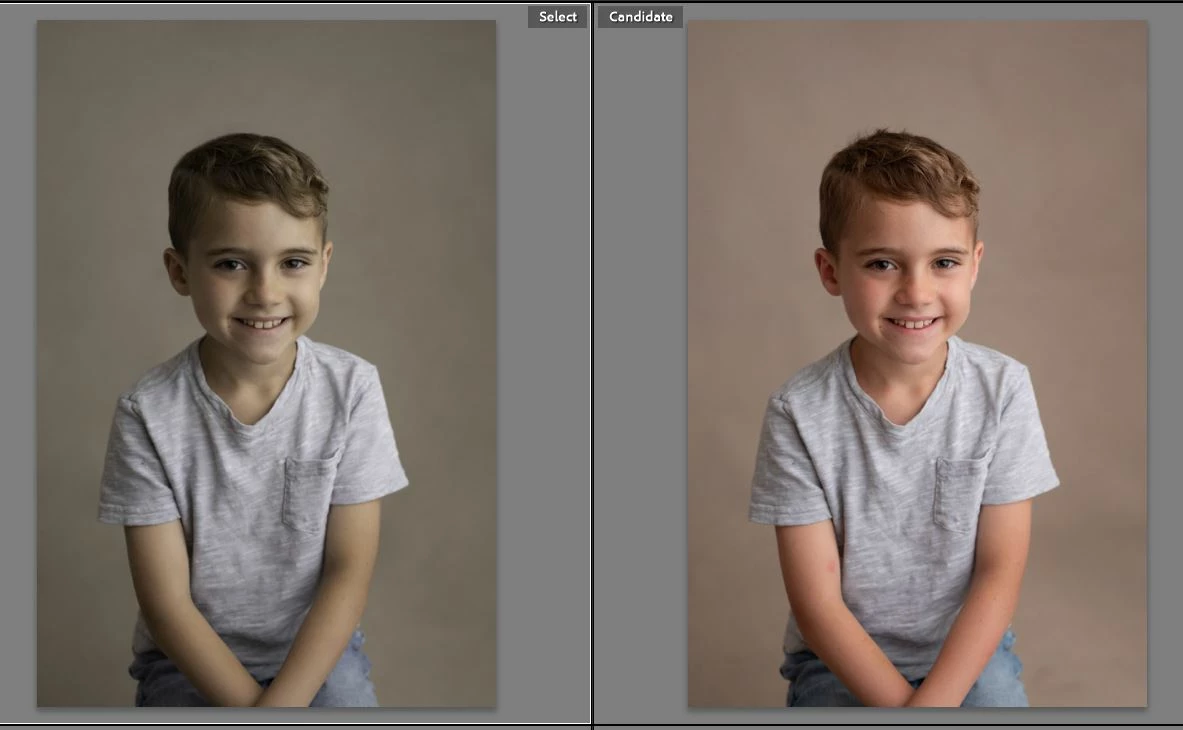
so when I start my images in Lr and open in Ps, then press save, It used to work perfect and now my photo is mudding looking (in another color space?) no idea what happened but I have to find out how to fix this hopefully without deleting Ps and starting over


Please Help!
This topic has been closed for replies.

1 reply

TheDigitalDog
Inspiring
June 10, 2022

It's a bug, resetting preferences in Photoshop should fix this for the time being. However, the bug messes up the embedded profiles from the edited images from Photoshop. So you'll need to open them in Photoshop and Assign the ICC profile you selected in the LR preferences (Edit In Photoshop prefs). So if you asked for say, Adobe RGB (1998), you'll need to open those images and use the Assign Profile command, pick Adobe RGB (1998). Now they should preview correctly. 
If you can save a copy of the preference from Photoshop before resetting, it would really help Adobe find a fix.


Please see this original thread about this issue and if possible, provide the original preference file to Adobe as requested here:

https://community.adobe.com/t5/photoshop-ecosystem-discussions/p-colors-shift-when-going-from-lrc-to-ps-and-back-to-lrc/m-p/12961154

Author “Color Management for Photographers" & "Photoshop CC Color Management/pluralsight"