mexinugget22
Participant
December 20, 2017
Answered

Saving Tethered Photos in Lightroom

  • December 20, 2017
  • 1 reply
  • 2829 views

Hello,

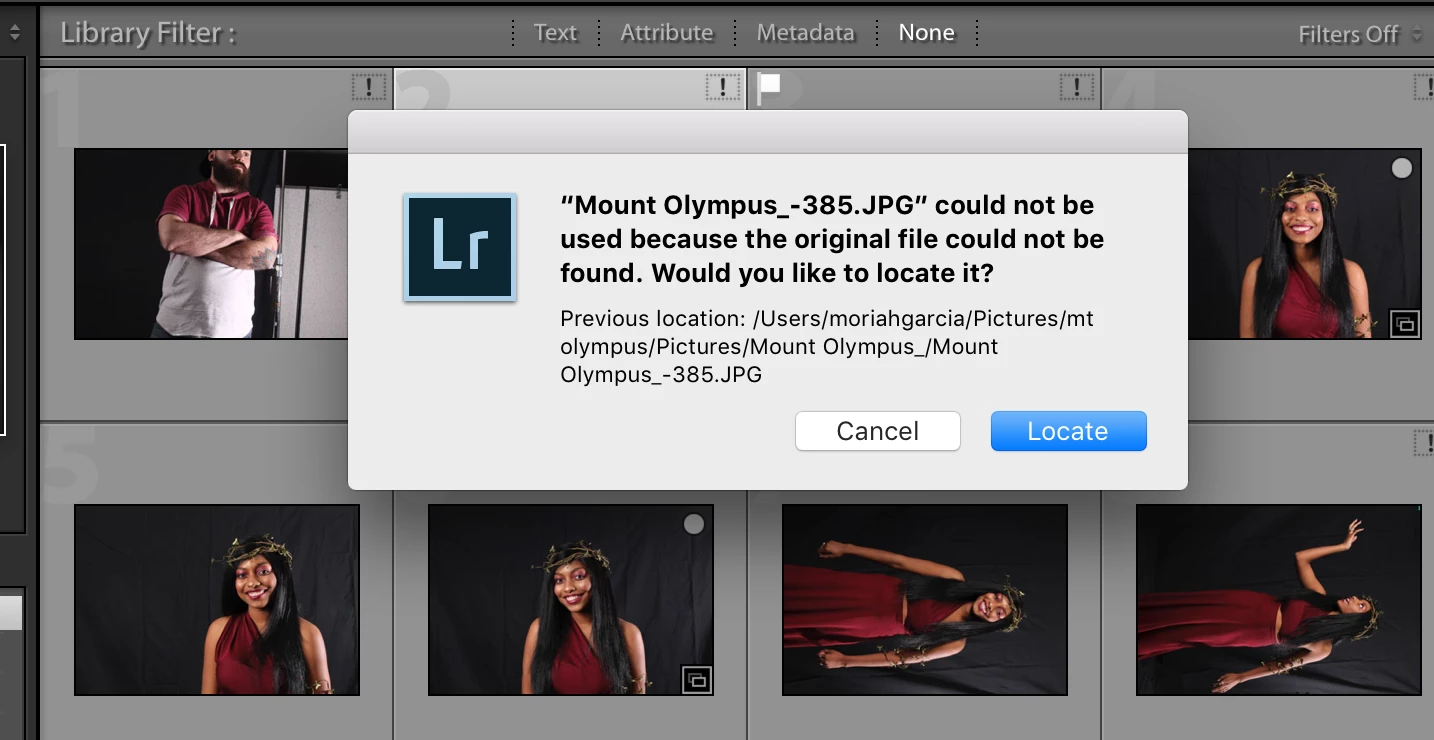
I had tethered files onto Lightroom. I want to save them to my computer but the files will not save because Lightroom says they cannot because they cannot detect the source of the file. Is there a way to export my files so I can edit?

Thank you,

Moriah Garcia

    This topic has been closed for replies.
    Correct answer Rob_Cullen


    The error message in the second screen-clip is looking for the files in-

    Previous location: /Users/moriahgarcia/Pictures.......etc..etc

    If you open Mac Finder and look in this folder - are the photo files there?

    Is this the Folder you chose as the Destination for the photos in the Tethered Capture setup dialog of Lightroom?

    Have you moved, re-named, or deleted the photos from the "Destination" folder shown in the error message Using Finder?

    Can you use Finder to locate { Mount Olympus_-636.jpg } ? report the location folder please.

    Lightroom reports your photos are "Missing"  with the [!] (could not be found) so the first steps are to locate the originals.

    https://www.lightroomqueen.com/lightroom-photos-missing-fix/

    1 reply

    Rob_Cullen
    Community Expert
    Community Expert
    December 20, 2017

    Hi Moriah, I think your explanation of the problem needs more clarification-

    I had tethered files onto Lightroom.

    Do you mean you used your camera with the Lightroom Tethered Capture?

    I want to save them to my computer but the files will not save because Lightroom says they cannot because they cannot detect the source of the file.

    Please screen-clip the exact error message.

    And what folder did you select as the "Destination"  (save)  location for the files in the setup for tethered capture?

    This folder must have full read/write permissions.

    Is there a way to export my files so I can edit?

    I am not sure what you mean by this statement.

    After Lightroom 'captures' files from the tethered camera they are saved to the "Destination" folder, then you select the file in the Library and choose the [Develop] module to edit.

    Regards. My System: Windows-11, Lightroom-Classic 15.1.1, Photoshop 27.3.1, ACR 18.1.1, Lightroom 9.0, Lr-iOS 10.4.0, Bridge 16.0.2 .
    mexinugget22
    Participant
    January 3, 2018

    My tether chord was plugged into my laptop and camera while taking pictures. It was on Auto Tether Capture so as I was photographing, they were also appearing on my laptop in Lightroom.

    I want to pull these files from Lightroom to edit, but Lightroom is telling me that they cannot detect the original file.

    Attached is an image of the error.

    mexinugget22
    Participant
    January 3, 2018