

SDK - Floating and modal dialog windows do not shrink to fit smaller content on reopen (save_frame)
Environment
- Adobe Lightroom Classic 15.5
- Lightroom SDK
- Windows 11 and macOS 26.5
- Standalone reproducer plugin attached
Summary
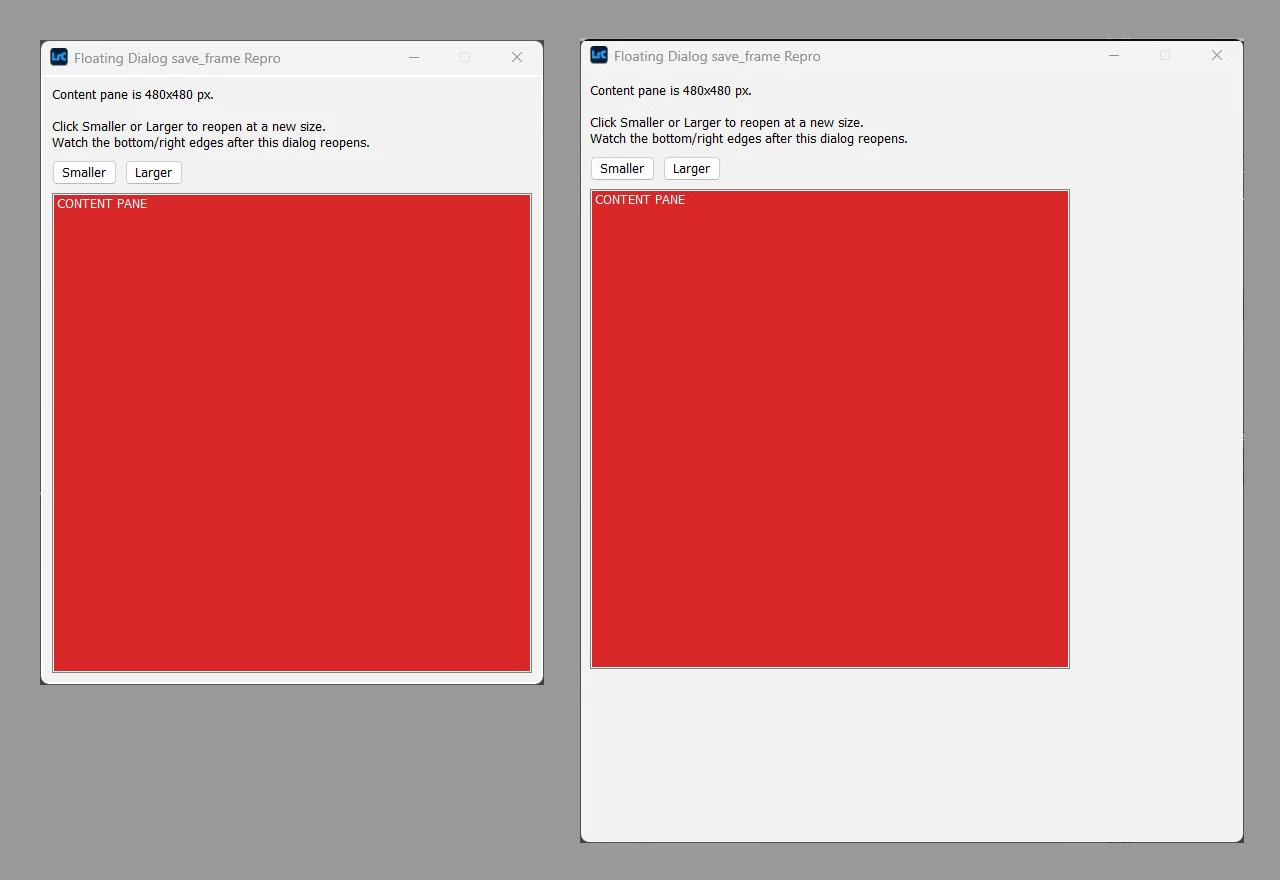
A dialog window created with a save_frame parameter does not always shrink to fit smaller content on reopen. When a dialog is closed and reopened with a smaller content view, the window keeps its previous (larger) frame instead of resizing down to match, leaving a strip of unpainted native window chrome along the right and/or bottom edges. Growing the content works correctly in every case tested.
This affects both presentFloatingDialog() and presentModalDialog(), and is platform-dependent:
| Dialog type | Platform | Shrinks window to fit smaller content? |
|---|---|---|
presentFloatingDialog() | Windows | No — border left |
presentFloatingDialog() | macOS | No — border left |
presentModalDialog() | Windows | Yes — correct |
presentModalDialog() | macOS | No — border left |
Windows + presentModalDialog() is the only combination found that resizes the window correctly to smaller content in every case tested.
Steps to Reproduce
- Install the attached reproducer plugin via File > Plug-in Manager > Add.
- Run File > Plug-in Extras > Floating Dialog (save_frame) Repro.
- A window opens with a red content pane filling it edge-to-edge, plus "Smaller" and "Larger" buttons.
- Click Larger a couple of times — each reopened window correctly grows to fit the bigger content (fully red, no border).
- Click Smaller — observe whether the reopened window shrinks to match the smaller content (fully red) or leaves a border of native window chrome along the right/bottom edges (part of the window is grey/white, not red).
- Repeat steps 2–5 with File > Plug-in Extras > Modal Dialog (save_frame) Repro.
- Repeat the whole test on both Windows and macOS.
The floating dialog also has resizable = true set, so as an alternative to step 5 the window edge can be dragged smaller by hand — this reproduces the same border artifact. (presentModalDialog() has no resizable parameter, so this alternative only applies to the floating case.)
A complete standalone reproducer plugin is attached.
Expected Result
When a dialog with save_frame is reopened with smaller content, the window frame should shrink to match the new content size on every platform and for both dialog types, the same way presentModalDialog() on Windows already does.
Actual Result
The window frame stays at its previous (larger) saved size in three of the four dialog-type/platform combinations tested (see table above). The content pane correctly reflects its new, smaller size, but the window around it does not shrink to match, leaving a visible border of native window background along the right and/or bottom edges. Growing the content back up always resizes the window correctly.
Additional Information
- The reproducer's floating and modal dialogs use an identical view hierarchy and identical
save_frameusage — only the presenting call (presentFloatingDialog()vs.presentModalDialog()) differs, isolating the behavior to the SDK's window-sizing logic rather than to anything in the content view. - The reproducer's "Smaller"/"Larger" buttons drive the resize by changing the content's pixel dimensions and reopening the dialog (rather than manual dragging), which matches how a real plugin dialog is normally resized — e.g. a photo/preview view created at specific pixel dimensions — rather than the user dragging an edge.
Impact
This prevents plugin dialogs that vary their content size across separate opens (e.g. a preview or data view that grows or shrinks depending on what's selected) from resizing their window to fit, on nearly every platform/dialog-type combination. Instead, once the window has been enlarged, it stays enlarged even when the plugin author intends a smaller window for smaller content — leaving a visible band of unused window space around the actual content.
Attachments
Standalone reproducer plugin SaveFrameResizeBug.lrplugin
Screenshot: Initial dialog.jpg
Screenshot: Dialog after 2x Larger, then 2x Smaller.jpg


 AdChoices