



johnrellis
Legend
November 29, 2025
Question

SDK: photo:saveMetadata() returns before saving metadata to disk

  • November 29, 2025
  • 4 replies
  • 412 views

In LR 15.0.1, photo:saveMetadata() often returns before the metadata is actually saved to disk. In LR 14.5.1 and earlier, it blocked until the metadata was saved to disk.


This causes significant problems for plugins that use Exiftool to update photo metadata, especially plugins that change capture date/time, e.g. Capture Time To Exif and Any Filter. (Notoriously, the SDK has never provided a method for plugins to change capture date/time.)


The script in the recipe below demonstrates the problem by saving the metadata to disk for a batch of photos, running Exiftool to change the rating of those photos, then reading the metadata from disk. In LR 14.5.1, it completes correctly. But in LR 15.0.1, the save to disk often completes after Exiftool executes, overwriting Exiftool's change to the rating.


To reproduce with LR 15.0.1 and 14.5.1 on Mac OS 15.7.1:


1. Install Exiftool if not already installed.


2. Download and unzip this catalog:

https://www.dropbox.com/scl/fi/2m0btdfabt7aul4dsec17/async-save-bug.2025-11-29.zip?rlkey=zqg0zpca48lrcadvyptmcrec9&dl=0


3. Place a copy of "async-save-bug.lua" in the Lightroom Scripts folder. If Exiftool is somewhere other than the default location /usr/local/bin/exiftool, edit "async-save-bug.lua" to use the correct path.


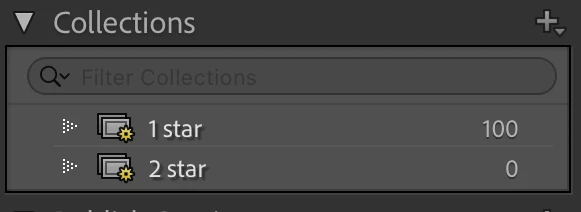
4. Open the catalog in LR 14.5.1.  Observe there are two smart collections, 1 Star and 2 Star, and that all 100 photos are in 1 Star.
866831iCFFF34DAC4E95BE3.png


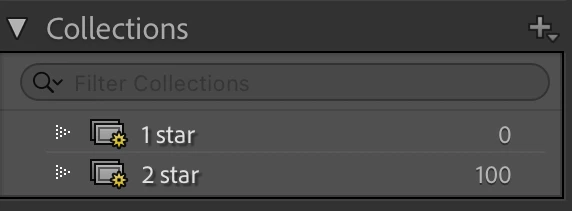
5. Select all the photos and do Scripts > async-save-bug.  Observe that all 100 photos are now in 2 Star (correct).
866830iB1D2F0C5F9C38C0F.png


6. Exit LR 14.5.1, delete the catalog folder, and unzip a fresh copy from the downloaded .zip.


7. Open the fresh copy in LR 15.0.1 (upgrading the catalog). Observe that all 100 photos are in 1 Star.


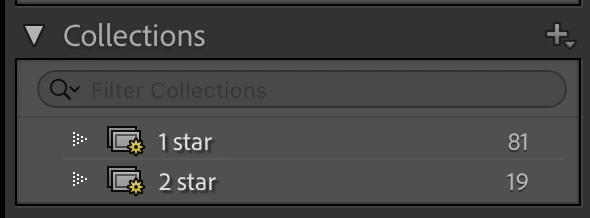
8. Select all the photos and do Scripts > async-save-bug.  Observe that most of the photos are in 1 Star (incorrect) and only some are in 2 Star (correct), e.g.
866832i6CD50D976F5A9909.png


9. Repeat steps 6 - 8 and observe differing numbers of photos in 1 Star, a sure sign of a race condition.

4 replies

Legend
January 7, 2026

@johnrellis 


Wondering why you are coding your script the way you are?


I coded it like this:


--[[----------------------------------------------------------------------------

This script demonstrates that in LR 15.0.1, photo:saveMetadata() often
returns immediately before the photo's metadata is saved to disk.

------------------------------------------------------------------------------]]

local ExiftoolPath = "/usr/local/bin/exiftool"

local LrProgressScope = import "LrProgressScope"
local LrTasks = import "LrTasks"

local catalog = import "LrApplication".activeCatalog ()
local format = string.format

LrTasks.startAsyncTask (function ()
    local photos = catalog:getTargetPhotos ()

    local scope = LrProgressScope {title = "photo:saveMetada"}
    for i, photo in ipairs (photos) do 
        photo:saveMetadata () 

        local command = format ("'%s' -rating=2 -overwrite_original '%s'", 
            ExiftoolPath, photo.path)
        local code = LrTasks.execute (command)
        assert (code == 0, "Exiftool failed")
        photo:readMetadata () 
        scope:setPortionComplete (i, #photos)
        end
    scope:done ()
    end)


The result of running this script is it completes with all selected photos having their rating updated to 2. Changing -rating=1 and running again updates all photos to rating = 1. Each time I change the -rating setting and run the script, no photos are missed, as I can confirm they are in your latest script.


johnrellis
Legend
January 7, 2026

@drtonyb: "Wondering why you are coding your script the way you are?"


The original script saves metadata to all the photos first, then modifies all the photos with a single Invocation of Exiftool, significantly reducing the considerable overhead of invoking Exiftool. When working with large batches of photos, that overhead can be quite noticeable to users.


"Each time I change the -rating setting and run the script, no photos are missed"


I observe the same thing with your modified script above and the original recipe steps.


However, if that script is run while there are already background metadata saves in the queue, then the race condition still occurs:


1. In the test catalog's "pics" subfolder, make 200 more copies of the .jpg and import them, for a total of 300 photos, all with 1 star.


2. Select all the photos and change their rating to 3. Observe "Saving Metadata for 300 photos" in the upper-left corner.


3. Immediately invoke your script. After it completes, observe that less than 300 photos have been assigned 2 stars.


See the attached recording.

C.Cella
Legend
January 9, 2026

I have been using photo:saveMetadata() extensively for one of my plugins and each save operation presents a progress scope for each image.


873667i993D2277444C3FA6.png


I do not do read metadata until all scopes clear out.

Files can be "very edited" with many snapshots so it can take long time for even one file to be saved (more than 10 seconds even) so I find that using a LrTasks.sleep to avoid race conditions does not work reliably.

Imo not only photo:saveMetadata() and photo:readMetadata() could be documented but the team could implement catalog:saveMetadata() and catalog:readMetadata() akin to catalog:updateAISettings() 

Under one scope save and read metadata operations would likely be immune or more immune to race conditions.


Rikk Flohr_Photography
Community Manager
December 9, 2025

Regarding this, the team is asking if this workaround helps: "Modify the script to invoke read-metadata inline after the exiftool write for each image. Basically, instead of exif-write to all 100 and then reading all 100, read inline soon after the exif write. I tried this approach. It works with auto-xmp on and leads to all 100 images now applying the write."

868633iB1886CCB4AEDC009.png "

Rikk Flohr: Adobe Photography Org
johnrellis
Legend
December 10, 2025

@Rikk Flohr: Photography, Thanks, I'll try this in the next day or so when I'm back in front of my main computer.

johnrellis
Legend
January 4, 2026

Oops, I neglected to follow up on this. 


I tested the workaround proposed by the team, running Exiftool on each photo individually and then doing photo:readMetadata() after that invocation of Exiftool completes.  (See the modified script below.)


Unfortunately, I still observe a race condition about 1/3 to 1/2 of the times I run the text script, with a few photos not getting updated to 2 stars.  See these screen recordings:

https://www.dropbox.com/scl/fi/upm09axt6tdtyjzwp58fp/async-save-bug.2026.01.04.1.mp4?rlkey=s54a6vtkaoho3xjhdnzskhrd8&dl=0

https://www.dropbox.com/scl/fi/5f7zrx6tnrr1qnxx1rwvw/async-save-bug.2026.01.04.2.mp4?rlkey=yit13c0xz5y0m211twqistrbi&dl=0 


The workaround I've used is to wait in a busy-loop for a change in file-modification time of the non-raw file or the raw's .xmp sidecar. This is obviously inefficient and less than optimal.


--[[----------------------------------------------------------------------------

This script demonstrates that in LR 15.0.1, photo:saveMetadata() often
returns immediately before the photo's metadata is saved to disk.

------------------------------------------------------------------------------]]

local ExiftoolPath = "/usr/local/bin/exiftool"

local LrProgressScope = import "LrProgressScope"
local LrTasks = import "LrTasks"

local catalog = import "LrApplication".activeCatalog ()
local format = string.format

LrTasks.startAsyncTask (function ()
    local photos = catalog:getTargetPhotos ()

        --[[ Save metadata for all selected photos ]]
    local scope = LrProgressScope {title = "photo:saveMetada"}
    for i, photo in ipairs (photos) do 
        photo:saveMetadata () 
        scope:setPortionComplete (i, #photos)
        end
    scope:done ()

    --LrTasks.sleep (10)

        --[[ Run Exiftool to set Rating = 2 for the photos ]]
    local scope = LrProgressScope {title = "ExifTool setting Rating = 2"}
    scope:setIndeterminate ()
    for i, photo in ipairs (photos) do 
        local command = format ("'%s' -rating=2 -overwrite_original '%s'", 
            ExiftoolPath, photo.path)
        local code = LrTasks.execute (command)
        assert (code == 0, "Exiftool failed")
        photo:readMetadata () 
        scope:setPortionComplete (i, #photos)
        end
    scope:done ()
    end)


Legend
November 30, 2025

@johnrellis 


Since photo:saveMetadata() is undocumented, I would think that reliance on its behaviour would be dubious.


DClark064
November 29, 2025

John, Adobe should put you on their payroll.  You do the work their engineers should be doing.