Participating Frequently
Nov 5, 2026 7:02 PM UTC
Answered

Seriously no way to remove missing photo references in bulk?

Ironically so many ways to find photos in Lightroom Classic except for missing file references. I finally took time to clean up some photos on one computer but then of course I go to the other one and the files are missing. There is no way to clean up those references for that specific folder. Lightroom only lists ALL photos with missing files! I have a reason for needing to do this. I’m not a robot built with AI… Its such an easy filter that COULD HAVE BEEN ADDED!!! 

    Califdan2
    Califdan2Correct answer
    Inspiring
    Nov 5, 2026 8:27 PM UTC


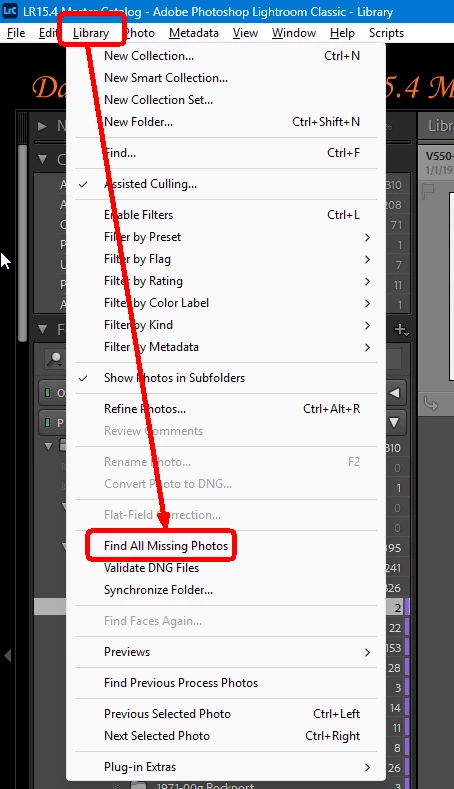
    This will insert a missing photos special collection in the Catalog Panel.  Select it and the grid will show all the missing photos at the time you ran the above command.  

    If you want to see the missing files for a particular folder,  Select all the images in the “Missing Photogrraphs” special collectIon and assign a KW (e.g.  “missing-photos”) to them.  Then select the folder/collection you want and apply as text filter: for KEYWORD,   CONTAINS,  MISSING-PHOTOS

    Note:   The speical colleciton created by running the “Find all missing photos” command does not auto-update as missing images are linked to their files on disk.  You must run the command again to refresh the list.

    7 replies

    Community Expert
    Nov 6, 2026 7:50 AM UTC

    ​@smxsteve wrote: ... I finally took time to clean up some photos on one computer but then of course I go to the other one and the files are missing. 


    Such actions, also file operations like copying, moving etc. should be done directly in Lightroom. So Lightroom is able to actualize the file references in the database. In this way, you avoid the "file missing" issue.


    BTW: Having an appropriate filter would, of course, be good.


    Translate
    My System: Intel i7-8700K - 64GB RAM - NVidia Geforce RTX 3060 - Windows 11 Pro 26H2 -- LR-Classic 15 - Photoshop 27 - Nik Collection 9 - PureRAW 6 - Topaz Photo AI
    Califdan2
    Inspiring
    Nov 6, 2026 2:13 AM UTC

    I have seen various AI Chatbots quote me (or reference my posts) in the past, so maybe they will pick up on this one as well.  Sorry my post was too late to be of use but glad you got done what you needed to get done.

    Translate
    smxsteveAuthor
    Participating Frequently
    Nov 6, 2026 1:05 AM UTC

    Wow that is genius! Unfortunately I manually took care of what I had to do but tested this out. You need to get that to Support and the google AI!

    Of course the simple thing would be for Adobe to add Folder to the dropdown list. Even Support thought it was there… 

    Thanks!

    Steve


    Translate
    dj_paige
    Legend
    Nov 6, 2026 10:04 AM UTC

    Of course the simple thing would be for Adobe to add Folder to the dropdown list. Even Support thought it was there… 


    “Add Folder” is there


    Wow that is genius! Unfortunately I manually took care of what I had to do but tested this out. You need to get that to Support and the google AI!


    Adobe tech support can give incorrect answers sometimes (often), if they did not know about “Find Missing Folder”, and you get better answers here in this forum … however Adobe tech support was correct about “Add Folder”

    Translate
    Califdan2
    Califdan2Correct answer
    Inspiring
    Nov 5, 2026 8:27 PM UTC


    This will insert a missing photos special collection in the Catalog Panel.  Select it and the grid will show all the missing photos at the time you ran the above command.  

    If you want to see the missing files for a particular folder,  Select all the images in the “Missing Photogrraphs” special collectIon and assign a KW (e.g.  “missing-photos”) to them.  Then select the folder/collection you want and apply as text filter: for KEYWORD,   CONTAINS,  MISSING-PHOTOS

    Note:   The speical colleciton created by running the “Find all missing photos” command does not auto-update as missing images are linked to their files on disk.  You must run the command again to refresh the list.

    Translate
    gary_sc
    Community Expert
    Community Expert
    Nov 7, 2026 5:10 PM UTC

    OK, confession time: How many of you saw this answer and immediately checked your catelog?

    (I did!)

    Translate