
Participant
February 13, 2019
Answered

Set Virtual copy as master

  • February 13, 2019
  • 2 replies
  • 2583 views

Is there a way to apply the adjustments made on a virtual copy onto the original so that the virtual copy could be removed. I tried editing a virtual copy and setting it as master. When I deleted the non-master copy (the originally edited version), both copies were deleted.

What I would like is to select the version I would like to keep. If the keeper is version 1 then deleting the virtual copy is a non-event. If however, one wants the result applied to the virtual copy, then there seems to be no way to get back to 1 copy. '

Would synchronize settings solve my problem? The problem with this process is I lose the steps I took to get to the end result.
    This topic has been closed for replies.
    Correct answer Rob_Cullen

    Virtual Copies are not physical files. There is only ever ONE copy of your original file.

    If you "Delete" then your original file and VCs are deleted permanently.

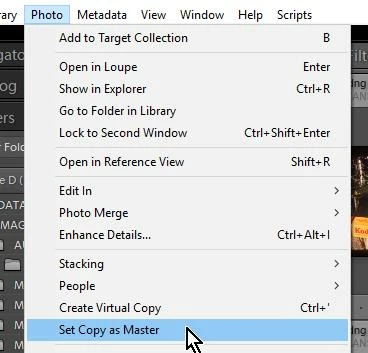
    You can make a selected VC the 'Master' easily from the menu-

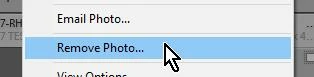
    And you can "Remove" a VC from the Library (but do not 'Delete from Disk')- Right-click menu:

    BUT- why bother? VCs take up negligible space as they are just a small text entry in the Catalog database.

    You can Stack all the previews of the one master image under one edited version,

    You can then change the topmost photo of the stack to any of the VC edited versions.

    2 replies

    JP Hess
    Inspiring
    September 18, 2021

    Might be worth mentioning that the option is only available in the library module. Highlight the virtual copy and it's possible to make the virtual copy results become the settings for the master.

    Participating Frequently
    September 18, 2021
    That helps, thanks!--
    *martha*
    Rob_Cullen
    Community Expert
    Rob_CullenCommunity ExpertCorrect answer
    Community Expert
    February 13, 2019

    Virtual Copies are not physical files. There is only ever ONE copy of your original file.

    If you "Delete" then your original file and VCs are deleted permanently.

    You can make a selected VC the 'Master' easily from the menu-

    And you can "Remove" a VC from the Library (but do not 'Delete from Disk')- Right-click menu:

    BUT- why bother? VCs take up negligible space as they are just a small text entry in the Catalog database.

    You can Stack all the previews of the one master image under one edited version,

    You can then change the topmost photo of the stack to any of the VC edited versions.

    Regards. My System: Windows-11, Lightroom-Classic 15.3, Photoshop 27.5, ACR 18.3, Lightroom 9.3, Lr-iOS 10.4.0, Bridge 16.0.3 .
    Participating Frequently
    September 17, 2021

    there is no "set copy as master" under my "photo" in LR classic

    Bob Somrak
    Legend
    September 18, 2021

    Adobe changed the name of the command.


    M4 Pro Mac Mini. 48GB