


Inspiring
November 3, 2023
Question

Setting up LR7 with catalog and library from LR6

  • November 3, 2023
  • 9 replies
  • 376 views

Hello 

I just downloaded LR7 on my Imac which has Sonoma 14.1 OS.

LR6 is on my old Imac and I stored all my photos and catalog etc on external hard drive.

I am now trying to point LR7 to these photos and catalog but cant see how to. Tried Migrate from but only shows options (not highlighted) on LR Classic catalog or Apple Photos library.

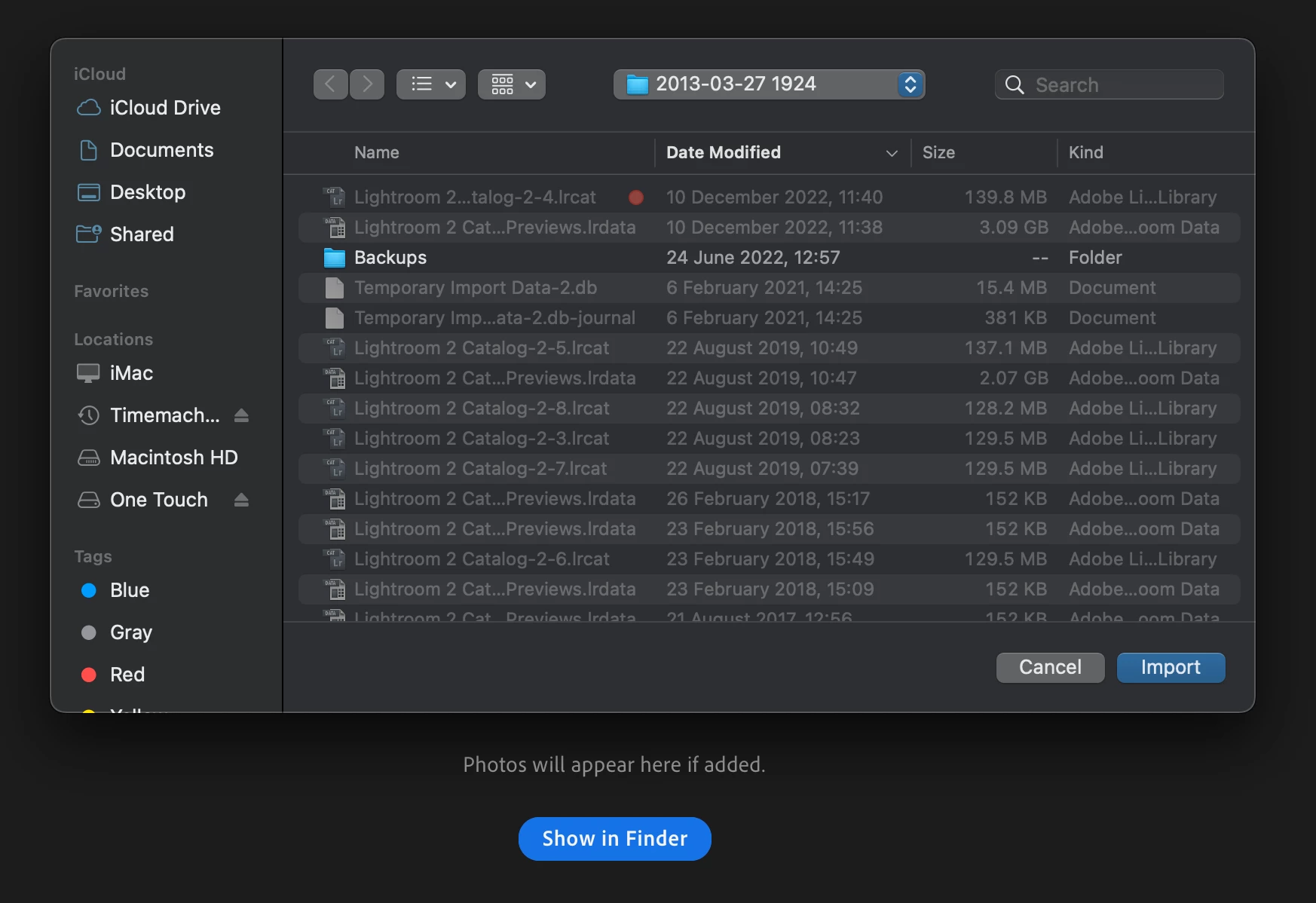
I have tried Import Profile and Presets and find the folder on external hard drive where catalog filed and can see catalog (the one with the red spot) but not highllghted to be able to click on. (see screenshot)


Not sure what else to try and cant find anything elsee on line.


Please can someone help, many thanks
This topic is closed to new replies. Start a new post to keep the conversation going.

9 replies

Rikk Flohr-Retired
Adobe Employee
November 3, 2023

It is likely you have mistakenly installed Lightroom Desktop 7.0, and you were using Lightroom (Classic) 6.x. Lightroom Classic 13.0.1 is the current version of the software you were using on your older Mac, I am guessing. 

Confirm this by going to Help>System Info… on your old Mac and copy and paste the contents of the Version Number in your reply. 

The likely correction is to uninstall Lightroom Desktop 7.0 and install Lightroom Classic 13.0.1 instead. 

Rikk Flohr: Adobe Photography Org
Inspiring
November 3, 2023

Hello Rikk and thanks for your reply.

I will paste details of LR7 version I just downloaded on my new Imac.

The LR 6 version which I used on my old Imac I will also paste.

I think the LR 7 I have downloaded is the cloud version and I think I would prefer the LR 7 version that is desk top and files held on external drive. Does that make sense and is that Lightroom Classic of is the a desktop version of LR7?


Many thanks

Rikk Flohr-Retired
Adobe Employee
November 3, 2023

Confirmed that is what happened. If you want to use the successor to your older Lightroom 6.0. You want Classic 13.0.1 instead of the Lightroom 7.0 you've downloaded. In the Creative Cloud Desktop app it is the program with the [LrC] Icon - not the [ Lr ] icon. 

I will move this post to Lightroom Classic forum. 

Rikk Flohr: Adobe Photography Org