Inspiring
May 1, 2021
Answered

Severe Image Artifacts in Lr Library Module

  • May 1, 2021
  • 3 replies
  • 868 views

I am getting severe image artifacts mostly in the sky in the library module of Lightroom Classic.  I am using version 13.2 but this is not the first time I have seen this.  It goes away in the develop module or if I view at 100%.  After viewing the image at 100% looks OK when fit to screen.  It also looks OK if I build 1:1 previews.  When I import I only build smart previews.  This is extremely annoying and is occurring on multiple RAW images.  Once I export to a jpg it looks OK.  The attached image was taken with a screen capture program.  As you can see it is really bad.  I see other post about this subject but the are all old back in 2018.  I have been using LR Classic for many years and this only showed up reciently.  I am on Windows 10 64 bit.
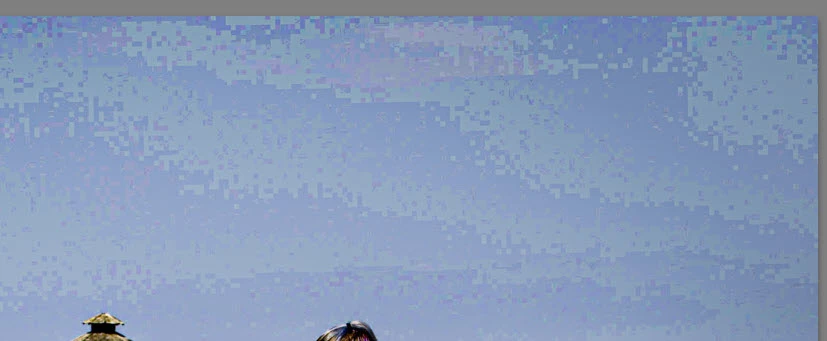
This topic has been closed for replies.
Correct answer johnrellis

"When I import I only build smart previews."


Others have reported artifacts and banding in smooth-gradient skies with both Library standard previews and in smart previews (both of which are 8 bits/channel), with the artifacts and banding disappearing when you export to 8-bit JPEGs. LR is using an inferior algorithm for generating these 8-bit previews.  


For example, see this bug report:

https://feedback.photoshop.com/conversations/lightroom-classic/photos-show-banding-when-viewed-in-the-cloud-but-not-in-lightroom-classic/605cd28bc7571a4888e303c4 


Experimenting with the sample DNG in that bug report, I see the sky banding in both Library standard previews and smart previews.


I think your only workaround is to generate 1:1 previews on import. Consider setting Catalog Settings > Automatically Discard 1:1 Previews: After One Week or Day if the disk size of the preview cache is a concern.


Please add your constructive opinion to the bug report, and be sure to click Like and Follow at the bottom of the first post. That will make it a little more likely that Adobe will prioritize a fix, and you'll be notified when the bug's status changes. Product developers rarely participate in this forum and won't see your feedback.  Be sure to upload an original sample photo to Dropbox or similar and include the sharing link in that bug report.


3 replies

johnrellis
johnrellisCorrect answer
Legend
May 1, 2021

"When I import I only build smart previews."


Others have reported artifacts and banding in smooth-gradient skies with both Library standard previews and in smart previews (both of which are 8 bits/channel), with the artifacts and banding disappearing when you export to 8-bit JPEGs. LR is using an inferior algorithm for generating these 8-bit previews.  


For example, see this bug report:

https://feedback.photoshop.com/conversations/lightroom-classic/photos-show-banding-when-viewed-in-the-cloud-but-not-in-lightroom-classic/605cd28bc7571a4888e303c4 


Experimenting with the sample DNG in that bug report, I see the sky banding in both Library standard previews and smart previews.


I think your only workaround is to generate 1:1 previews on import. Consider setting Catalog Settings > Automatically Discard 1:1 Previews: After One Week or Day if the disk size of the preview cache is a concern.


Please add your constructive opinion to the bug report, and be sure to click Like and Follow at the bottom of the first post. That will make it a little more likely that Adobe will prioritize a fix, and you'll be notified when the bug's status changes. Product developers rarely participate in this forum and won't see your feedback.  Be sure to upload an original sample photo to Dropbox or similar and include the sharing link in that bug report.


cpgillesAuthor
Inspiring
May 2, 2021

A couple notes.  I do not use smart previews I use "Embedded & sidecar".  Not sure if that makes any difference.  Thanks you for the comment on building 1:1 and deleting after a week.  Building 1:1 does work but the previews I am using was working just fine in the past.  I will also create a bug report.  I am seeing this on complete different computers with different videos cards.  All video cards have latest drivers.  These are very high end computer built specifically for photo editing.  Apparently others have seen this in the past with older versions of LR Classic but I have rarely seen it before just recently.


johnrellis
Legend
May 2, 2021

"I do not use smart previews I use "Embedded & sidecar". "


OK, just for our better understanding, what did you mean when you said, "When I import I only build smart previews."?

TheDigitalDog
Inspiring
May 1, 2021

First, try disabling GPU in the preferences (Preformance tab). Any better?
If not, recalibrate and build a new ICC display profile, the old one might be corrupted.
If you are using software/hardware for this task, be sure the software is set to build a matrix not LUT profile, Version 2 not Version 4 profile.
If turning OFF GPU works, it's a GPU bug and you need to contact the manufacturer or find out if there's an updated driver for it. 
Also see: https://helpx.adobe.com/photoshop/kb/acr-gpu-faq.html

Author “Color Management for Photographers" & "Photoshop CC Color Management/pluralsight"
dj_paige
Legend
May 1, 2021

Please include your screen capture by clicking on the "Insert Photos" icon. Many people (including me) will not download attachments.