Participant
May 11, 2019
Answered

Shortcuts don't work

  • May 11, 2019
  • 4 replies
  • 375 views

I recently installed lightroom classic to edit some photos, some shortcuts (before-after) don't work.

All of my languages are German (Lightroom, Keyboard and Windows).

Lightroom still shows the " / " as before-after shortcut in the dropdown menu,

But the "Translatedstrings.txt" is showing "Shift + v " as shortcut.

Sadly this does'nt seem to work either and now I can't access this shortcut.

I even tried the before-after as left-right with the same result, Lightroom doing absolutely nothing.
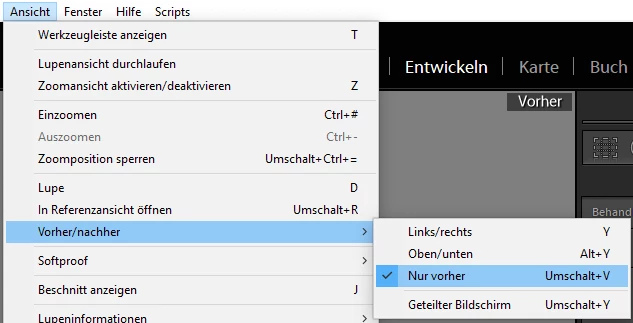
This topic has been closed for replies.
Correct answer johnrellis

Hmm, my LR 8.2.1 / Windows 10 behaves differently. Both "\" (not "/") and Shift + V invoke the menu command View > Before / After > Before Only, and the menu displays Shift + V:

The results from your Help > System Info will verify the version of LR you're running.

4 replies

Participant
May 12, 2019

Thank you for all you help, but this morning I reinstalled lightroom about 4 times and adobe creative cloud twice and that seems to have fixed the issue.

johnrellis
johnrellisCorrect answer
Legend
May 11, 2019

Hmm, my LR 8.2.1 / Windows 10 behaves differently. Both "\" (not "/") and Shift + V invoke the menu command View > Before / After > Before Only, and the menu displays Shift + V:

The results from your Help > System Info will verify the version of LR you're running.

GoldingD
Legend
May 11, 2019

Oh, and. what version? Adobe may have fixed for some languages. Please provide this info via the following preferred method.

In Lightroom, click on Help, click on System Information, click on Copy. Paste first 12 lines in your reply.

GoldingD
Legend
May 11, 2019

Are you using a Germanic language keyboard ? Appears Adobe has issues with non English in some languages.

https://www.lightroomqueen.com/shortcuts-dont-work-language-version-non-english-keyboard-can-fix/