


nicmart
Inspiring
August 14, 2026
Question

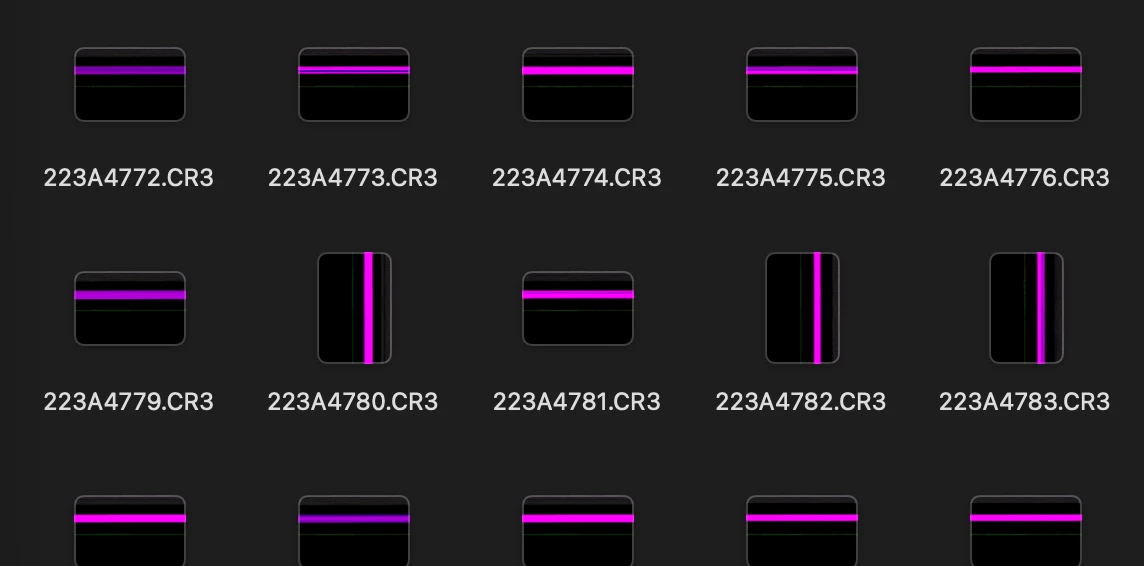
Since latest Camera Raw update, icons all show only purple lines.

  • August 14, 2026
  • 7 replies
  • 43 views

Since the most recent Camera Raw update, all CR3 thumbnails show as purple lines on MacBook Air. Tried trashing and reinstalling Camera Raw and deleting a Mac thumbnail file in the library, but no change.
 

    7 replies

    johnrellis
    Legend
    August 15, 2026

    Attach one of the .CR3 files here, and we can see if the issue occurs on other LR installations. (The forum allows attachments up to 47 MB in size.)

    nicmart
    nicmartAuthor
    Inspiring
    August 15, 2026

    After reading too much online about the problem, it might well be a corrupted SD card.

    nicmart
    nicmartAuthor
    Inspiring
    August 15, 2026

    After reading too much online about the problem, it might well be a corrupted SD card.

    Wrong. Thumbnails on an identical card are the same.

    Conrad_C
    Community Expert
    Community Expert
    August 15, 2026

    It isn’t clear from your screen shot, are those icons in the Mac Finder or in an Adobe application?

    If the screen shot is how it looks inside an Adobe application, then the correct thing to do depends on which application that view is in. Because preview generation (and troubleshooting it) works differently in Lightroom Classic, Lightroom, and Bridge.

    If the screen shot is now the icons look in the Mac Finder, then the answer is probably outside of any Adobe application, maybe in something to troubleshoot in macOS. Because if those are Canon CR3 files, thumbnail previews in the Mac Finder should be derived from the previews embedded in the camera (not from thumbnails generated by any editing software), unless there is a problem in the Mac Finder. Adobe applications don’t alter raw files directly, their edits are applied only in separate metadata. (If the files were not raw, such as JPEG or TIFF, the thumbnail could be changed by the last application that edited/exported it.)

    The bottom line is, for camera raw files, how the Mac and Adobe applications generate previews is completely separate, and Adobe applications don’t alter raw files.

    One way to try and isolate the problem is viewing the same folder in other software that isn’t by Apple or Adobe, such as GraphicConverter or XnView MP.

    Do the raw files look OK when opened in Camera Raw or in the Lightroom Classic Develop module, like is the only problem in the thumbnails?

    nicmart
    nicmartAuthor
    Inspiring
    August 15, 2026

    The screenshot is of Lightroom Classic. Clare H. didn’t say which version for me to go to, and I explained my process. 

    Only the thumbnails are awry, and only after the latest Raw update.

    I do have Bloom as a Finder alternative, and it also doesn’t display the thumbnails.

    Claire H.
    Community Manager
    Community Manager
    August 14, 2026

    Hi ​@nicmart, Welcome to the Photoshop Community Forum! Let's try a few things to see if we can fix these icons.

    1. Delete the Previews. lrdata File:

      • Navigate to the location of your Lightroom catalog.

      • Find the Previews.lrdata file and delete it. This file may be corrupted, causing display issues with thumbnails.

    2. Purge Camera Raw Cache:

      • Open Lightroom Classic.

      • Go to Lightroom > Preferences > File Handling.

      • Click on Purge Cache under the Camera Raw Cache Settings.

    3. Reduce the Number of Presets:

      • If you have a large number of presets (especially over 2,000), consider reducing them to improve performance.


    If none of these steps work for you, we can continue to troubleshoot if that works for you. I hope this helps! ^CH

    nicmart
    nicmartAuthor
    Inspiring
    August 14, 2026

    I found 8 files ending in Previews.lrdata and deleted them all. Does Adobe ever delete obsolete files on a drive? They date back to 2013.

    I never use Lightroom, but I found File Handling in Classic, but did not find Camera Raw Cash Settings > Purge Cache in File Handling. I don’t find File Handling in Lightroom CC Preferences.

    I don’t know what you mean by presets, but if I have any I could probably count them on two hands.