

Skewed image preview
Sometime over the last month, my lightroom classic previews (Library and Develop panes) have appeared "skewed. That is, if you took a pic of a rectangle, it would be a trapezoid. I figured my lens, an 85mm Canon 1.2, had something going on as I use a 16-35mm Canon 2.8 as well for Architectural and didn't notice it as I'm always correcting perspective with the Transform tool. After sending my 85mm lens to Canon for repair, I noticed it with my 16-35mm!? So a bit of testing this evening:
When viewing in LR, preview in Library pane is skewed (trapezoidal).
When viewing with Mac Preview, no skew
When viewing with Luminar, no skew
Further, the preview clips a bit of the image, even when the Zoom Leve is set to fit. I've enclosed a screen capture of the LR view, Preview view, and Luminar view.
I'd like to know if anyone else is having this issue, or if I've messed up a setting somewhere that makes this occur. Any thoughts appreciated!
cd...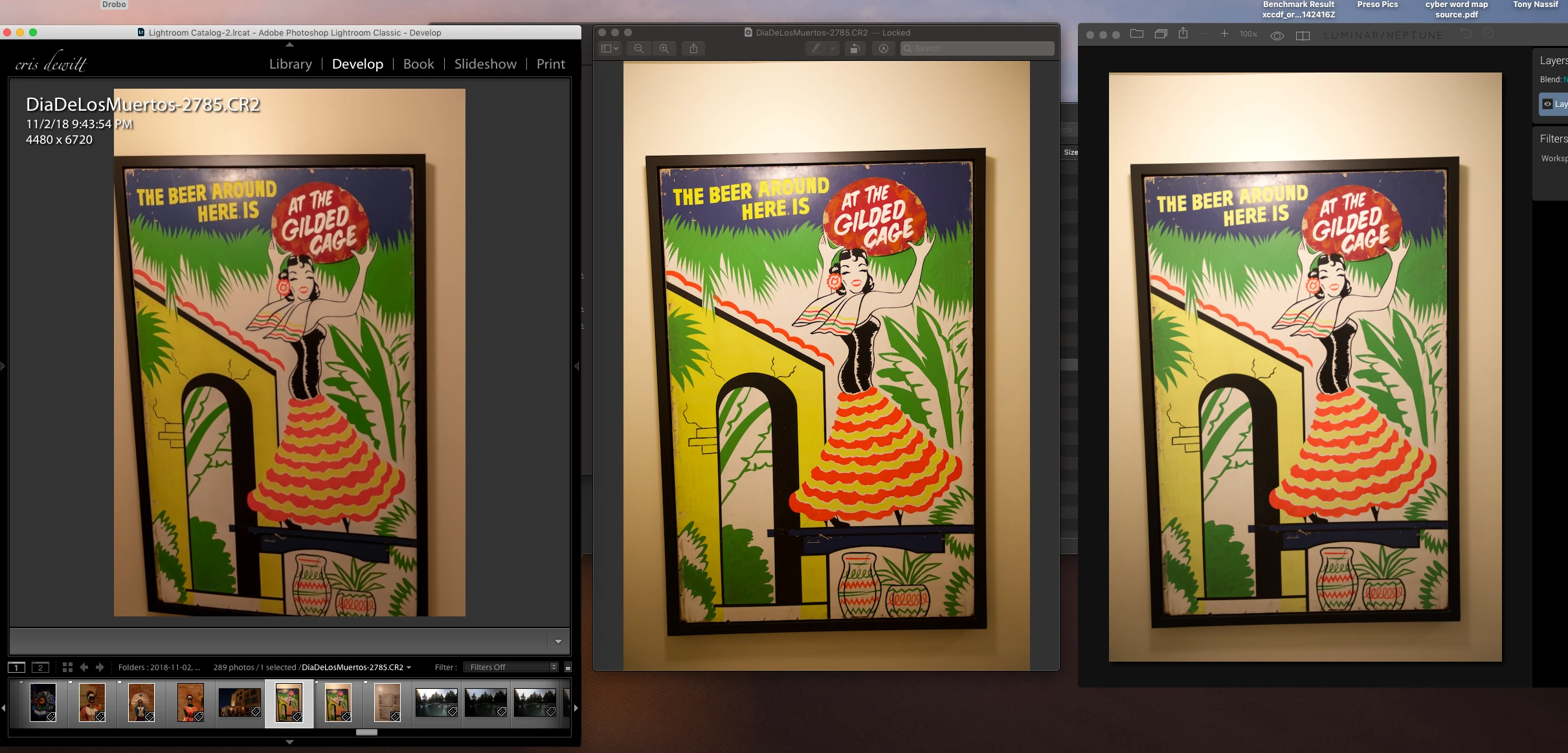
 AdChoices