
adolfboluda
Inspiring
November 12, 2020
Answered

Slightly color shift from Lr to Ps, RAW format, same color space checked

  • November 12, 2020
  • 3 replies
  • 886 views

Hello there,
I detected this problem recently, don't know if it was because new updates from Lr and Ps or my graphics drivers... but the photos look slightly different in Ps than in Lr, and the same when I save it in Ps and get back to Lr. I checked everything and I'm unable to find what is causing it.


There are my system and software:
- Windows 10 64 up to date, Nivida Gforce GTX 1050 with the latest Studio Drivers.

- Adobe Creative Cloud up to date: Lightroom v10, Photoshop v22.0, Camera Raw v13.0.2


The configuration:
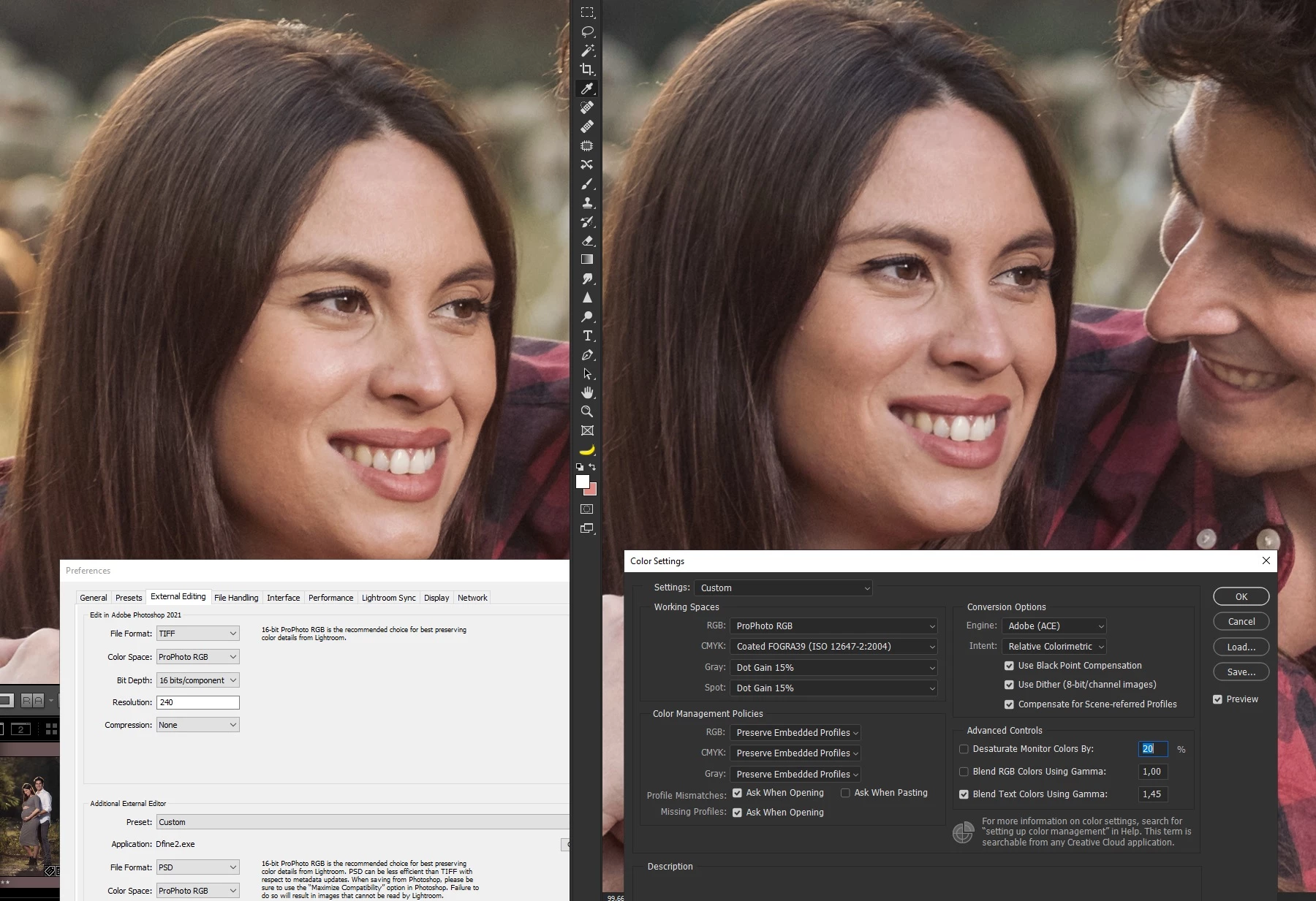
- Lr preferences to edit in Photoshop in TIFF, ProphotoRGB and 16 bits.
- Photoshop Color Settings in ProphotoRGB working space and all options to preserve embedded profiles, also checked that I'm not in proof colors mode.


See the problem below: left is Lr with the preferences panel, right is Ps with the color settings. See the slightly change in color on the face? Ps is more magenta and Lr is more yellowish

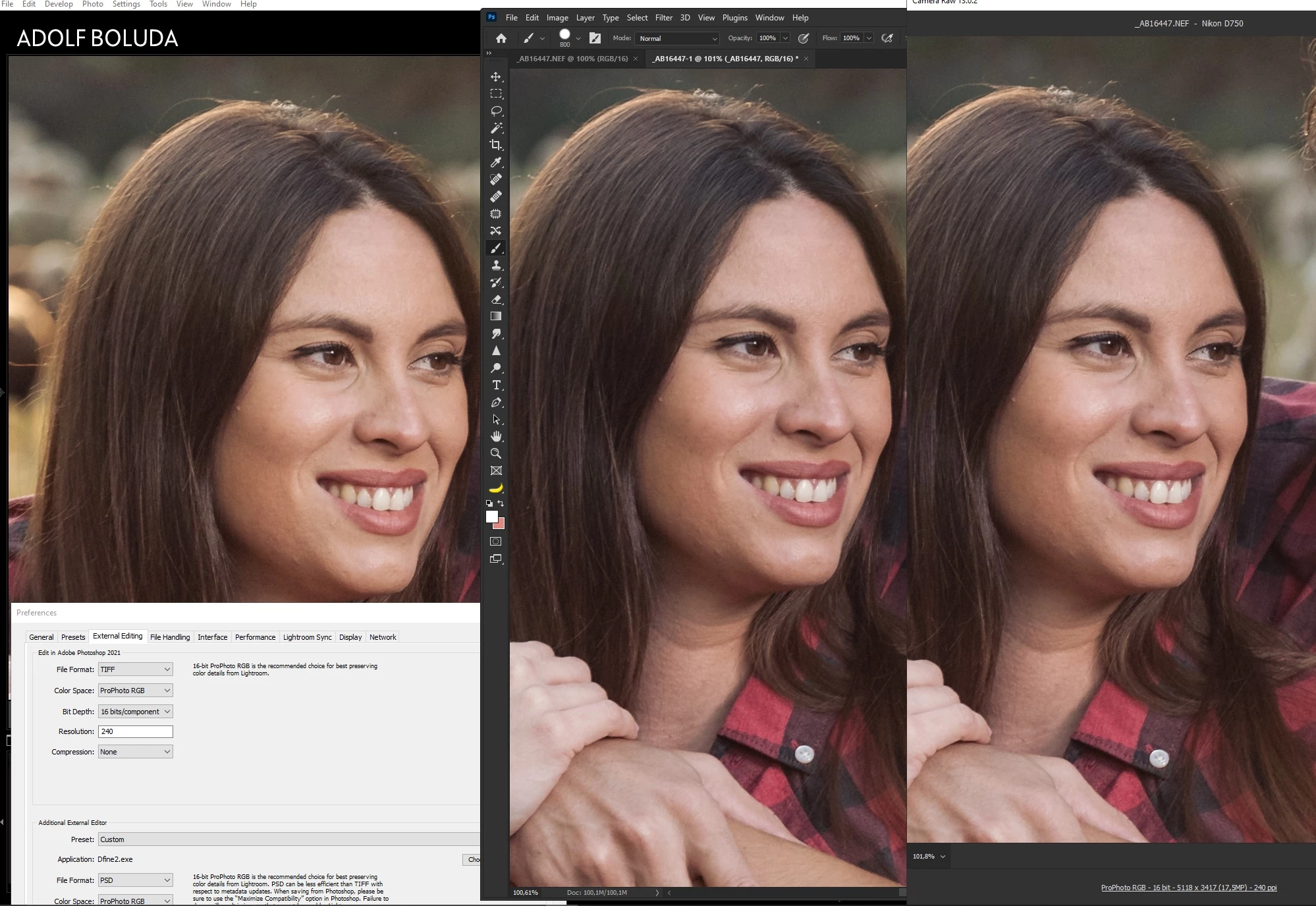
So I tried to edit directly from Lr in Ps and open as a smart object, same results. Even in smart object when I open de Adobe Camera Raw the shift in colors still there.


See below the Lr RAW at left, Photoshop (open as smart object) in the center, and the ACR when I open from Ps.
 

Any idea what is causing this and how to solve it? Thanks!

This topic has been closed for replies.
Correct answer adolfboluda

SOLVED!


As the other custom profiles didn't have this problem, I opened them with a text editor to see the differences (xmp files are text files), and the only thing I saw is the following text line that my profila had and the others not:


crs:CameraProfile="Adobe Standard"


So I deleted this line, saved under a different name, checked and this time no problems detected.

3 replies

johnrellis
Legend
November 14, 2020

[This post contains formatting and embedded images that don't appear in email. View the post in your Web browser.]


"I have never tried this, but a priori there's a big problem here: any given adjustment has very different meaning to a raw file and a rendered RGB file. Any fixed numerical adjustment will produce vastly different results. That has nothing to do with Photoshop, ACR or Lightroom - but is a result of how a raw file is constructed vs how an RGB file is constructed.


For that matter, it will also give different results in Photoshop on an sRGB file, an Adobe RGB file and a ProPhoto file."


The creative profiles added to LR 7.3 / ACR 10.3 are intended to produce the same look with raws and non-raws, including non-raws in different color spaces, even if the profiles include LUTs. When you define a creative profile in ACR that includes a LUT, you have to specify the color space of that LUT.  This allows Camera Raw to translate the LUT into its internal working color space and provide consistent results, regardless of whether the image is raw or non-raw (and regardless of the non-raw's color space).


For example, I defined a creative profile from a LUT and applied it to a raw, a TIFF exported from the raw in Prophoto RGB, and a TIFF exported from the raw in sRGB:

When you compare these in Loupe, the Prophoto and sRGB TIFFs are nearly identical, though the raw has a little less contrast than the TIFFs.


Here's the original from which the TIFFs were produced:


[Use the blue reply button under the first post to ensure replies sort properly.]

D Fosse
Community Expert
Community Expert
November 14, 2020

OK, got it. I said I hadn't tried it 🙂


JohanElzenga
Community Expert
Community Expert
November 13, 2020

I believe this issue is a known bug that will be solved in an update.


-- Johan W. Elzenga
adolfboluda
Inspiring
November 12, 2020

Keep trying things and narrowed the problem.


The thing is that I use a custom profile in Lightroom made by me (based on the Adebe Color profile with some twicks in Photoshop, then saved as a LUT and then saved as a color profile in ACR), well, the problem only appears when I use this color profile, using a standard profile or other external profiles (Adobe Color or any other I downloaded) the photos look the same.


I used this profile a lot in the past, is my main go to profile when edditing, and I never had this problem until now.


Any idea?

adolfboluda
adolfboludaAuthorCorrect answer
Inspiring
November 12, 2020

SOLVED!


As the other custom profiles didn't have this problem, I opened them with a text editor to see the differences (xmp files are text files), and the only thing I saw is the following text line that my profila had and the others not:


crs:CameraProfile="Adobe Standard"


So I deleted this line, saved under a different name, checked and this time no problems detected.