
Participant
September 24, 2023
Answered

Smart collection for Lens Corrections data

  • September 24, 2023
  • 1 reply
  • 563 views

Hi,

I'm trying to create a smart collection that pulls the data from the Lens Corrections panel in the Develop tab, specifically the Make and Model of the camera and lens and focal length of the lens. However, I'm unable to find any of these fields in the Smart Collection criteria.

Is it possible to create a smart collection based on Lens Corrections data? If so, how?

Thanks,

Kaiya
This topic has been closed for replies.
Correct answer Michael J. Hoffman

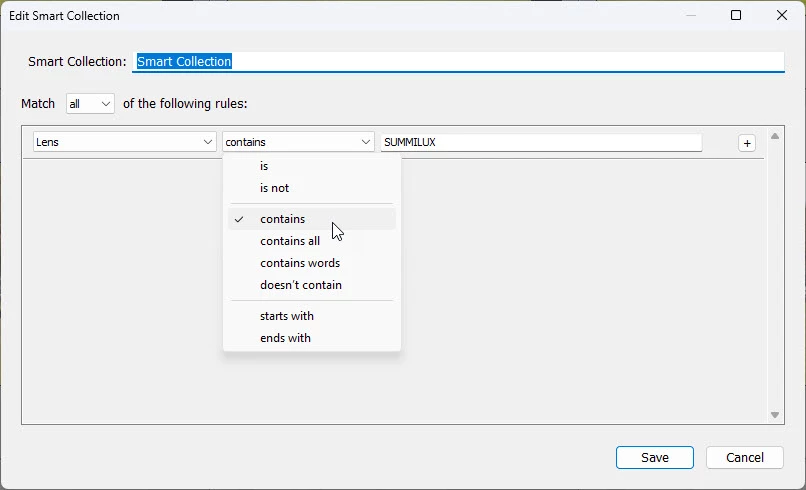
This is a bit of a tricky question, since the Lens correction data might be set arbitrarily to a value that isn't the actual lens you used. You definitely can use a Smart Collection to identify photos that have been taken with a specific lens, using something like the parameters below. However, if you changed the lens correction to another lens value, I don't think there's any way to pick that up. The only value for Lens Corrections that is available in the Smart Collection rules is whether Lens Corrections are applied ("true" or "false").


Here's how you can pick up the lens from the EXIF metadata:


1 reply

Michael J. Hoffman
Community Expert
Michael J. HoffmanCommunity ExpertCorrect answer
Community Expert
September 24, 2023

This is a bit of a tricky question, since the Lens correction data might be set arbitrarily to a value that isn't the actual lens you used. You definitely can use a Smart Collection to identify photos that have been taken with a specific lens, using something like the parameters below. However, if you changed the lens correction to another lens value, I don't think there's any way to pick that up. The only value for Lens Corrections that is available in the Smart Collection rules is whether Lens Corrections are applied ("true" or "false").


Here's how you can pick up the lens from the EXIF metadata:


tyrannonAuthor
Participant
September 24, 2023

This solves my problem thank you 🙂

Michael J. Hoffman
Community Expert
Community Expert
September 24, 2023

Glad I could help! If you're all set, please mark the answer as "correct" so that anyone else searching for this issue will see it has been answered.