Inspiring
May 31, 2019
Answered

Smart folders and source folders

  • May 31, 2019
  • 3 replies
  • 1965 views

I am trying to develop a smart folder where one of the quarteira specifies a source folder but it needs to include the path from the drive to the folder. Examples

G:/trips/beach/cameras/Apple/Media/

G:/trips/beach/cameras/Bee/Media/

G:/trips/beach/cameras/Cesna/Media/

Smart folder would point to G:/trips/beach/cameras/Apple/Media/.

There are also other folders which have been added to lightroom containing Apple, so wondering how can I proactively point the smart folder to this drive?
Correct answer johnrellis

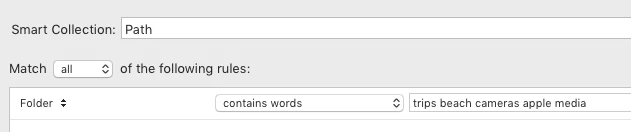
You can use a smart collection with the criterion:

Folder contains words "trips beach cameras apple media"

This will match all photos whose folder path (the immediate folder and all containing folders) contains all of the given "words" (punctuated-separated strings).

This could match more than the desired paths, but it might be good enough for your purposes. For example, it would match all of these paths:

g:\media\apple\cameras\beach\trips

g:\trips\beach\cameras apple media

g:\my trips\my beach\your cameras\your apple\your media\your favorite things

If you want exact match of the path, you'd have to use a plugin. Rob Cole passed away several years ago, and though many of his plugins are available on Github, I can't find TextMeta there. You could use Any Filter or Data Explorer to search based on the full path (though those two plugins would let you use smart collections).

3 replies

johnrellis
johnrellisCorrect answer
Legend
June 1, 2019

You can use a smart collection with the criterion:

Folder contains words "trips beach cameras apple media"

This will match all photos whose folder path (the immediate folder and all containing folders) contains all of the given "words" (punctuated-separated strings).

This could match more than the desired paths, but it might be good enough for your purposes. For example, it would match all of these paths:

g:\media\apple\cameras\beach\trips

g:\trips\beach\cameras apple media

g:\my trips\my beach\your cameras\your apple\your media\your favorite things

If you want exact match of the path, you'd have to use a plugin. Rob Cole passed away several years ago, and though many of his plugins are available on Github, I can't find TextMeta there. You could use Any Filter or Data Explorer to search based on the full path (though those two plugins would let you use smart collections).

Inspiring
June 3, 2019

This is what I am looking for, I ended up creating a smart collection and just match all with multiple path options.

Community Expert
May 31, 2019

There are ways. I use a plugin from the late Rob Cole called TextMeta which exposes the parent of the image folder, also the grandparent of the image folder, among other additional fields - allowing these to be referred to specifically, in Smart Collection criteria.

I expect other plugins can be used toward a similar result.

Just Shoot Me
Legend
May 31, 2019

There are no Smart Folders in LR.

There are smart collections which are basically permanent filters.

Both normal collections and Smart collections can only include images that are already imported into the LR catalog.

The Folder name does not need a PATH statement because the specified folder, IE the name of the folder, has to be one already listed in the LR Folders section.

LR is not a File Manager like Mac Finder or Windows Explorer. It only knows about drives, folders, and files (Image files) that have been imported into the LR catalog.

You may be able to get what you are looking for by using the Auto Import feature.