



Jürgen H.
Participant
May 19, 2026
Answered

Smart Sammlung als Vorgabe für jeden neuen Katalog ändern

  • May 19, 2026
  • 2 replies
  • 37 views

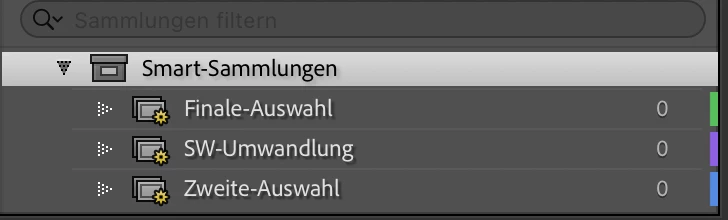
Hallo, ich erstelle für jede Hochzeit einen neuen Katalog und passe mir die Sammlung Vorgabe an:

  1. Finale Auswahl
  2. Zweite Auswahl
  3. SW-Umwandlung

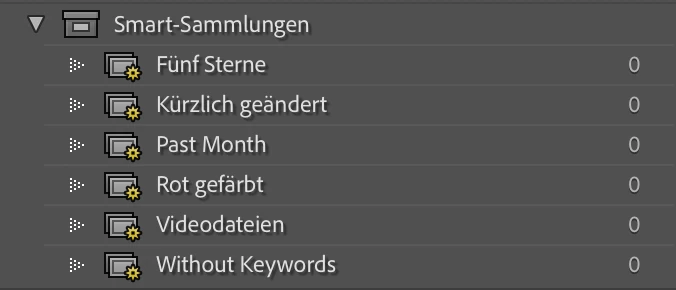
Jetzt ist es ja so das bei jedem neuen Katalog von Lightroom eigene Vorgaben schon vorgegeben sind.

Kann ich die Vorgabe so umschreiben das meine Vorgaben immer gleich geladen werden? Es wäre so entspannt wenn ich nicht jedesmal die alten vorgaben löschen muss um dann meine zu erstellen. Ich hoffe das jemand eine Lösung für mich hat
 

    Correct answer Anshul_Saini

    Hi ​@Jürgen H.,

    Thank you for your question. Just to confirm, are you referring to Collection Sets / Smart Collections in Lightroom Classic?

    If so, Lightroom Classic does not currently provide a built-in way to define your own custom Collection Set structure as the default for every new catalog.

    The only possible workaround is to create a sample “catalog” and treat it as a template containing:

    • Your preferred Collection Sets/ Smart Collections(Finale Auswahl, Zweite Auswahl & SW-Umwandlung)
    • Metadata presets
    • Folder structure

    Then, for each new wedding, make a copy of that catalog, rename it, and import the wedding photos into it.

    I hope that clarifies and helps you out.

    Best,
    Anshul Saini

    2 replies

    dj_paige
    Legend
    June 4, 2026

    You can create a “template catalog”, let me explain.


    Create a brand new empty catalog using the LrC command File->New Catalog, name it “Template Catalog” or something similar in your language. Set up your presets or collections however you would like. Do not Import photos into this empty catalog. Close this catalog. 


    Now for each wedding, find this template catalog in your operating system, make a copy using your operating system, and open the copy in your OS by double clicking on it. Your presets and/or collections will be as you created them in the template catalog. Now you can import. You can also change the file name to something more meaningful (like Smith-Williams wedding) by using the menu command File->Rename Catalog.


    Another suggestion, I know some people don’t like it when I give a different solution to the one they want, but other people appreciate the idea and the ability to think about this in different way. I would import all weddings into a single catalog, so there’s no need to create different catalogs each time you want to use these presets. You can still separate the weddings by either keywords or by collections. With everything in one catalog, you have the advantage of being able to create a portfolio of “best shots” (let’s say shots you gave five star rating to) across all weddings, or a portfolio of best bride photos (shots with 5 star ratings that show the bride), etc.

    Anshul_Saini
    Community Manager
    Anshul_SainiCommunity ManagerCorrect answer
    Community Manager
    June 3, 2026

    Hi ​@Jürgen H.,

    Thank you for your question. Just to confirm, are you referring to Collection Sets / Smart Collections in Lightroom Classic?

    If so, Lightroom Classic does not currently provide a built-in way to define your own custom Collection Set structure as the default for every new catalog.

    The only possible workaround is to create a sample “catalog” and treat it as a template containing:

    • Your preferred Collection Sets/ Smart Collections(Finale Auswahl, Zweite Auswahl & SW-Umwandlung)
    • Metadata presets
    • Folder structure

    Then, for each new wedding, make a copy of that catalog, rename it, and import the wedding photos into it.

    I hope that clarifies and helps you out.

    Best,
    Anshul Saini
