

Iconic Capture
Participating Frequently
April 30, 2021
Answered

Soft Proofing - Can't Click "Simulate Paper & Ink"

  • April 30, 2021
  • 1 reply
  • 3453 views

Hey y'all,

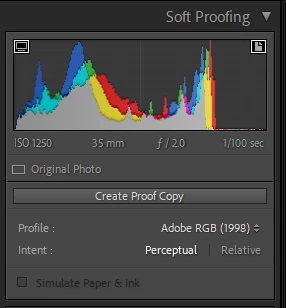
So for some reason Lightroom Classic is not giving me the option to click on the "Simulate Paper & Ink" while I'm Soft Proofing a photo. Any suggestions??? 


Thanks, 

Nick D.


{Moved from Lightroom Cloud to Lightroom Classic Forum by Moderator} 

This topic has been closed for replies.
Correct answer Jao vdL

You need to select a printing profile that has paper color defined instead of a color space profile such as adobe RGB.

1 reply

Jao vdLCommunity ExpertCorrect answer
Community Expert
May 1, 2021

You need to select a printing profile that has paper color defined instead of a color space profile such as adobe RGB.

Iconic Capture
Participating Frequently
May 1, 2021

Ooooooooh. Thanks!