
Participant
July 23, 2018
Answered

Soft proofing checkbox no longer visible

  • July 23, 2018
  • 2 replies
  • 823 views

I have been using Lightroom through lots of releases so I am experienced user.  Recently, there have been a couple of changes to my screens.  In the Develop module, the softproof checkbox is no longer showing on the bottom left of the screen so I can't use soft proofing.  Also, the file size no longer shows on the upper left of the Library module.  Must be a setting I have changed somehow but can't find it.  Also, I am up to date with the latest release.  Thanks

Chuck Klingsporn
    This topic has been closed for replies.
    Correct answer Mohit Goyal

    Hi ChuckKlingsporn,

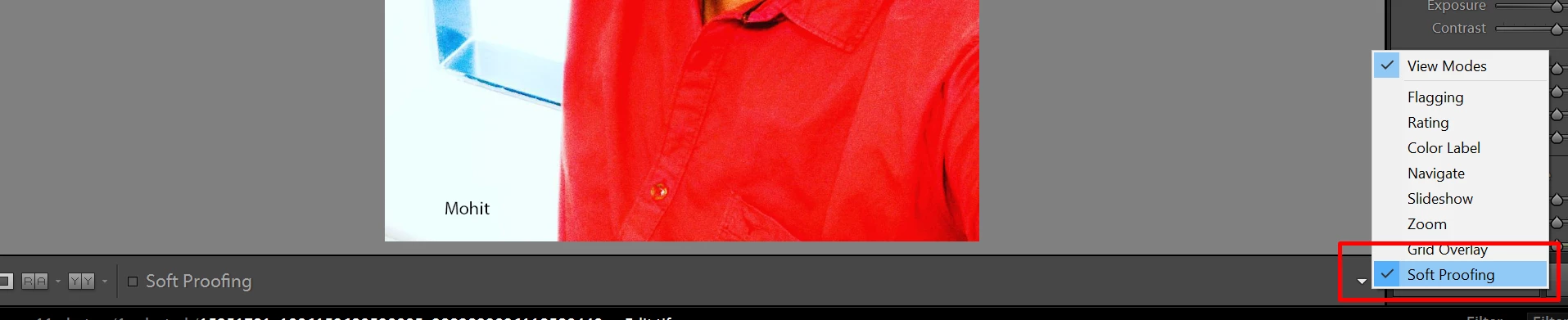
    We're really sorry for all the hassle. May the soft proofing option is unchecked. Refer the below screenshot.

    For the time stamp on the images in develop module you can press letter "i" Or you can go to View menu on the top > Loupe info > select info 1

    Regards,

    Mohit

    2 replies

    Mohit Goyal
    Community Manager
    Mohit GoyalCommunity ManagerCorrect answer
    Community Manager
    July 23, 2018

    Hi ChuckKlingsporn,

    We're really sorry for all the hassle. May the soft proofing option is unchecked. Refer the below screenshot.

    For the time stamp on the images in develop module you can press letter "i" Or you can go to View menu on the top > Loupe info > select info 1

    Regards,

    Mohit

    JoeKostoss
    Community Expert
    Community Expert
    July 23, 2018

    On the right hand side, click the small downward facing arrow.  The Soft Proofing box should be checked.