
Greg898
Participant
January 16, 2023
Answered

Soft Proofing - Difference between 'Current State' and 'Before State'

  • January 16, 2023
  • 1 reply
  • 497 views

Hello,

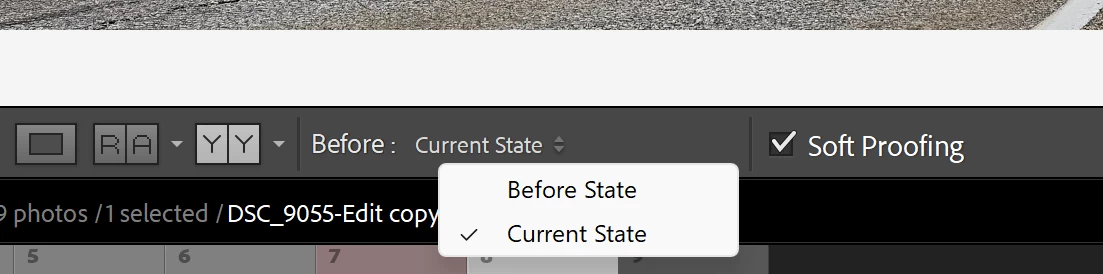
When soft proofing there are 2 'Before:' options which apply to the image on the left - 'Before: Current State' and 'Before: Before State'.  There doesn't appear to be any difference between these 2 options and so I've always left it on the 'Current State'.  So, the question is - what is the purpose of these 2 states?  Just want to make sure I'm not overlooking something.  Thanks!


This topic has been closed for replies.
Correct answer richardplondon

If I remember rightly, when you softproof, if you make any adjustment you are prompted for the creation of a new Virtual Copy - a proofing copy.


It is the image with these proofing adjustments you will see on the right of Before/After view, with softproofing.


What you see on the left in Before / After view, can either be:

  • the image with any further adjustments made to this proofing copy (Current), without softproofing
  • the starting image without these proofing adjustments (Before), and without softproofing.


to repeat though - IIRC; I may be mistaken. I would guess, if you haven't made any proofing adjustments or if they are very subtle, then yes results with these two options might be indistinguishable. But they'll not alter the output anyway, this is just a viewing setting.

1 reply

richardplondonCommunity ExpertCorrect answer
Community Expert
January 16, 2023

If I remember rightly, when you softproof, if you make any adjustment you are prompted for the creation of a new Virtual Copy - a proofing copy.


It is the image with these proofing adjustments you will see on the right of Before/After view, with softproofing.


What you see on the left in Before / After view, can either be:

  • the image with any further adjustments made to this proofing copy (Current), without softproofing
  • the starting image without these proofing adjustments (Before), and without softproofing.


to repeat though - IIRC; I may be mistaken. I would guess, if you haven't made any proofing adjustments or if they are very subtle, then yes results with these two options might be indistinguishable. But they'll not alter the output anyway, this is just a viewing setting.

Greg898
Greg898Author
Participant
January 16, 2023

Hi Richard,

Thank you for the reply - I did an extreme proofing adjustment and the 'Current' option does follow the adjusted image.  Should have tried that 1st. 🤦‍♂  Appreciate your help! 🙂

Thanks!Greg