mariosd75058115
Inspiring
June 5, 2020
Answered

Soft proofing not working

  • June 5, 2020
  • 3 replies
  • 1755 views

There is no difference when i press on the soft proofing button. I have the profile on srgb.

when i export to srgb the color changes but not with soft proofing.

My lightroom is up to date.

This topic has been closed for replies.
Correct answer mariosd75058115

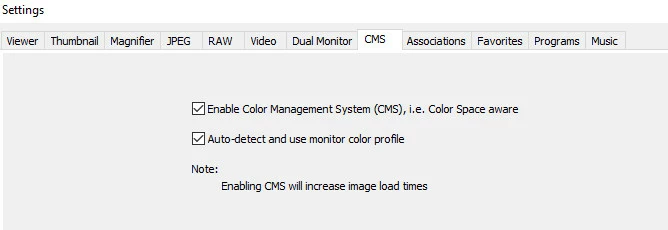
Thank you guys for your answers. Yes i was using faststone to view the images and it was not color managed. In the setting i ticked the box that said "auto-detect and use monitor color profile" and now it looks correct. Firefox also shows it correct.
3 replies

mariosd75058115
mariosd75058115AuthorCorrect answer
Inspiring
June 6, 2020

Thank you guys for your answers. Yes i was using faststone to view the images and it was not color managed. In the setting i ticked the box that said "auto-detect and use monitor color profile" and now it looks correct. Firefox also shows it correct.

Community Expert
June 5, 2020

You should not see any change in color normally when soft proofing to sRGB. You will only see a difference when the some colors in your image are outside of sRGB and you have a wide gamut monitor. This might happens for certain images of flowers, sunsets, etc but rarely for most images. On a normal gamut monitor you will never see a difference. As per notes, if you don't use a color managed app to view your exports, you will not see the correct color in there. Only color managed apps will ever show you the correct color. Lightroom is color managed and shows you correct color (if your display is correctly calibrated and profiled) regardless of what color space your image is in.

Per Berntsen
Community Expert
Community Expert
June 5, 2020

In what application are you viewing the exported image?

If it is not color managed (like for instance the Windows 10 Photos app), it will most likely not display correct colors.