
Known Participant
March 15, 2018
Answered

Soft proofing problem

  • March 15, 2018
  • 1 reply
  • 688 views

When using Soft proofing, the printer gamut warning does not seem to work.

When I tick the soft proofing box, the picture changes to show the print version, and then when I click on the printer gamut warning icon, the picture changes back to the original, rather than high-lighting the out of gamut colours.

Am I missing something, or is there a problem with the soft proofing?
    This topic has been closed for replies.
    Correct answer JP Hess

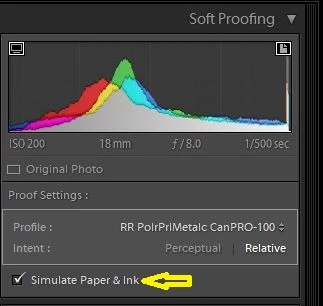
    Have you enabled "Simulate Paper and Ink"?

    1 reply

    JP Hess
    JP HessCorrect answer
    Inspiring
    March 15, 2018

    Have you enabled "Simulate Paper and Ink"?

    Rufus2015Author
    Known Participant
    March 16, 2018

    Hi Jim,

    Yes, that is ticked.

    The picture also reverts to the original when I click on the Monitor Gamut warning icon.

    Ian

    Rufus2015Author
    Known Participant
    March 16, 2018

    Ah, the penny drops.

    Uncheck the Simulate paper and ink box to see the out of gamut colours.....

    Ok, thanks.