
Participating Frequently
October 28, 2023
Answered

Solo Mode not working in masking section of LRC

  • October 28, 2023
  • 1 reply
  • 1102 views

Why can't I get solo mode to work in the masking panel section of LR classic 13.0.1 when it works perfectly in the global panel section of LRC? I've tried right clicking on a panel but it just opens the panel and doesn't show any option to choose solo mode. I tried resetting the preferences but that made no difference. Running Mac OS 14.1 (Sonoma). Any suggestions would be greatly appreciated.
This topic has been closed for replies.
Correct answer Sean McCormack

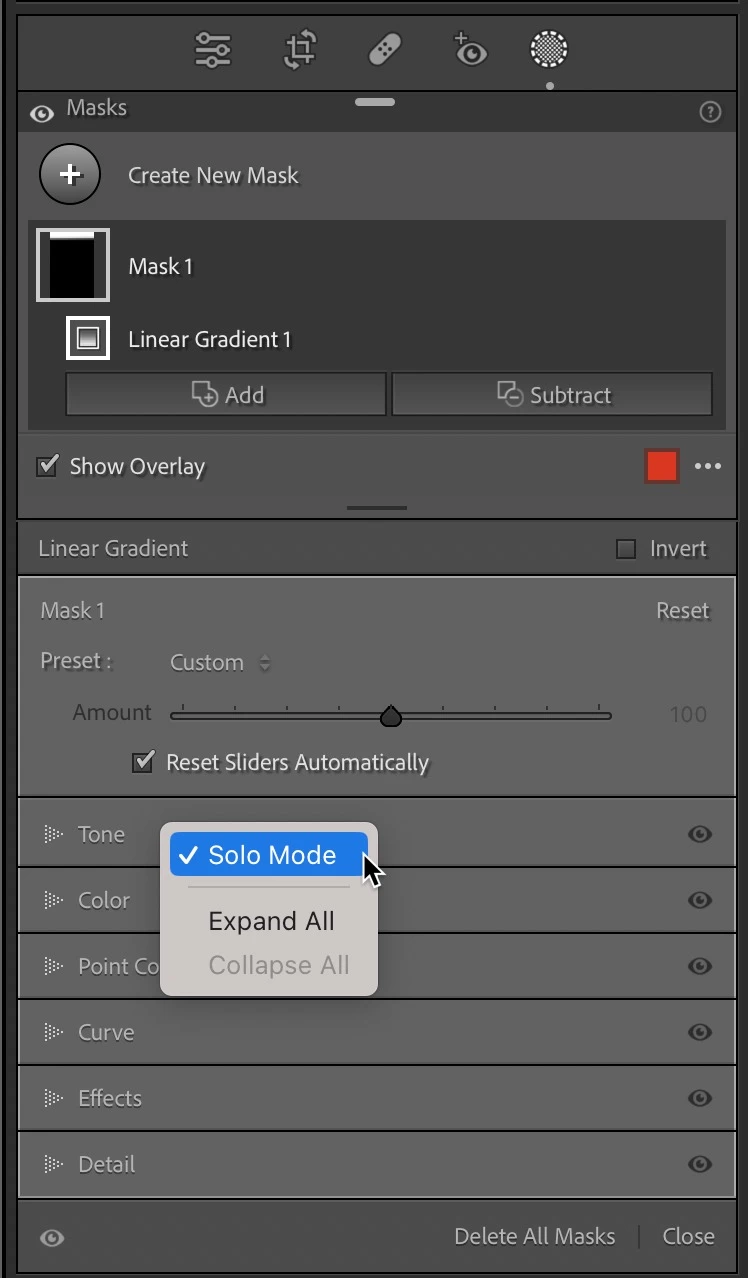
You need to right click on one of the panel headers inside masking to select Solo Mode for Masking.  Here I right clicked on Tone. 


1 reply

Sean McCormack
Community Expert
Sean McCormackCommunity ExpertCorrect answer
Community Expert
October 29, 2023

You need to right click on one of the panel headers inside masking to select Solo Mode for Masking.  Here I right clicked on Tone. 


Sean McCormack. Author of 'Essential Development 3'. Magazine Writer. Former Official Fuji X-Photographer.
nclevenAuthor
Participating Frequently
October 29, 2023
Thanks for your reply. That is exactly what I have tried but it doesn’t bring up the contextual menu to choose solo mode, it just opens the panel I right click on. I’ve reset prefs and done a reinstall of LRC, but the menu to use solo mode does NOT show up in the masking section but does in the global section of LRC. I use solo mode all the time in the global editing section and would love to have it work in the masking section also.
nclevenAuthor
Participating Frequently
October 29, 2023

Here is what it looks like when I right click on a header in the masking panel.