Some export operations not performed, yet they did?
Hello everyone I hope you're all well 🙂
Recently in the last 2 days, lightroom classic v 10.3 has been playing up. I'm hooked up to a 2015 macbook pro using the latest big sur v 11.4, external monitor is a Benq sw270c
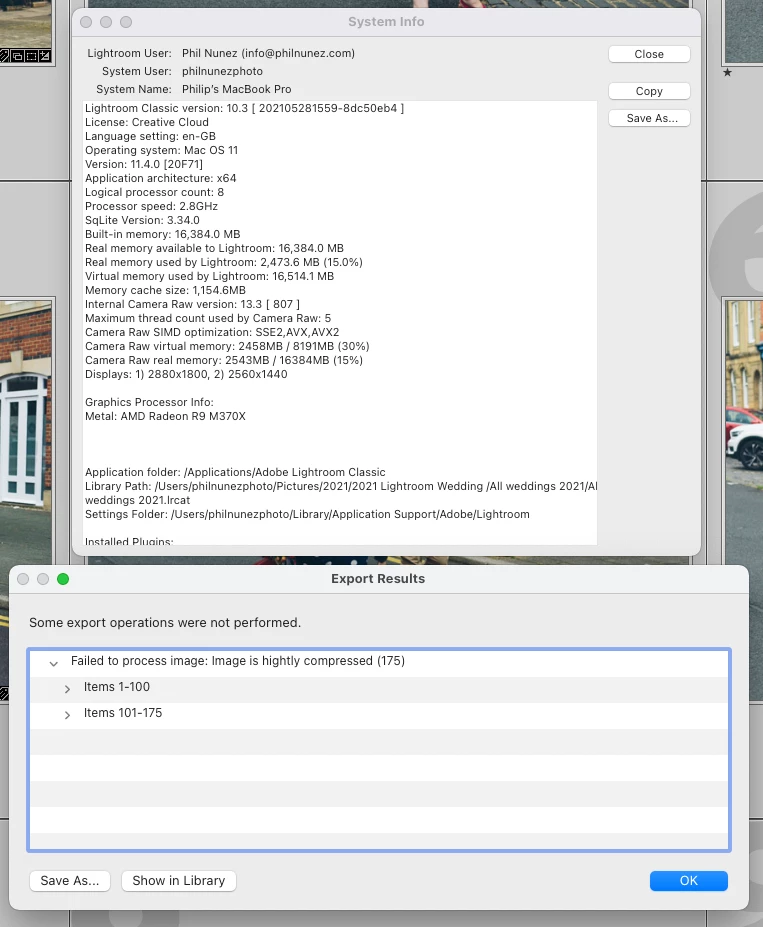
I've just attempted to export some images 2000 px longest side @14451451 and after completion I get this message below, yet when I check the destination folder they're all present and correct? I've tried several variations for example I limited the file size to 400kb on one set, slightly different px size on another, yet they all came with an error message? I must also add, that the high res set at 300dpi full size all exported with no issues. One thing that has changed dramatically is the time it takes to do an export, 175 files took an hour or so which seems really excessive.
Am I missing something here?
I've also screen grabbed the system info for reference too.
Many thanks
Phil
 AdChoices