
Participant
June 2, 2023
Question

Some photos turned green

  • June 2, 2023
  • 2 replies
  • 805 views

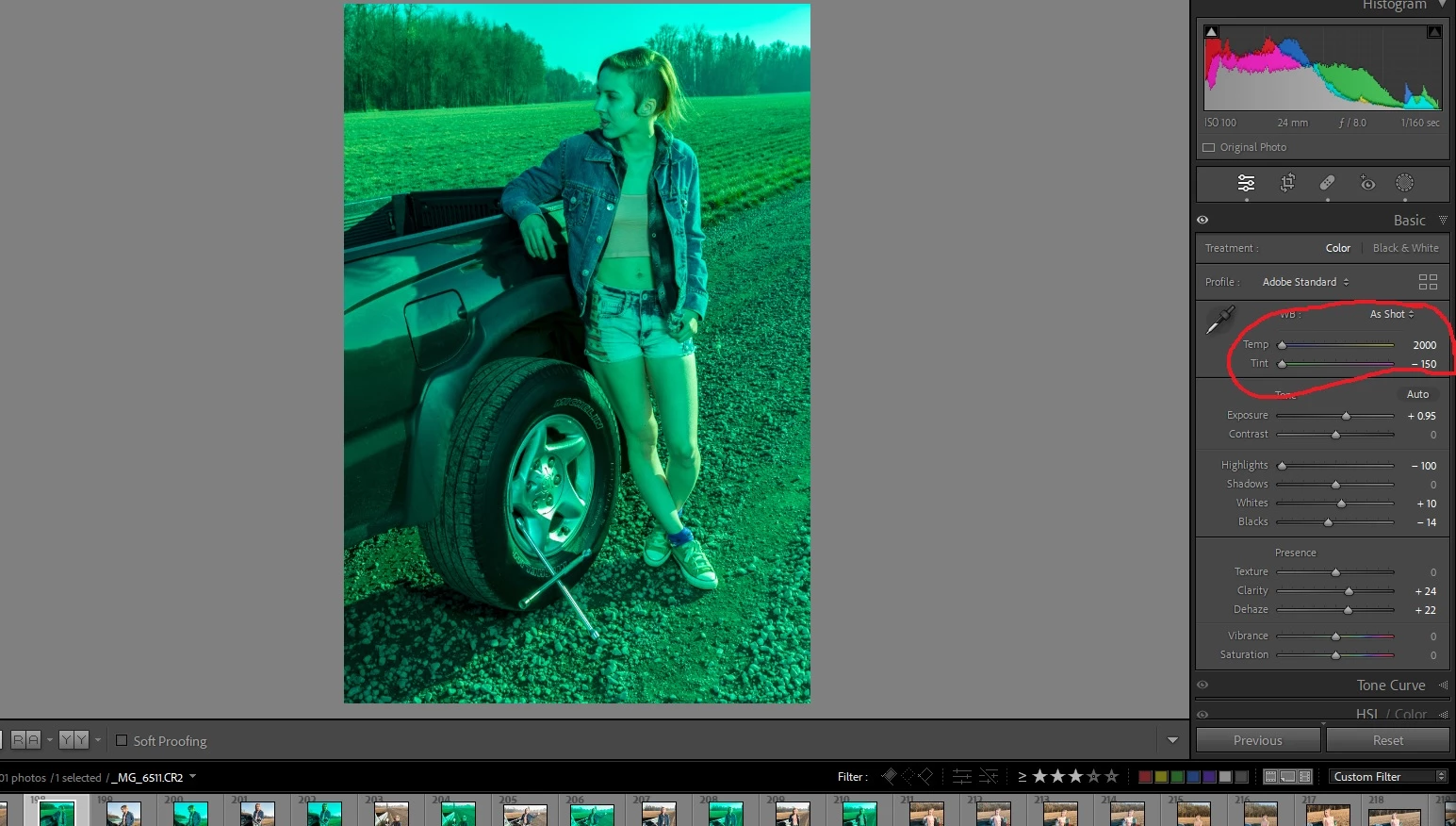
Running Lightroom Classic 12.3, current build. I was organizing some folders in the library module and an odd thing happened that I have not been able to reproduce, but I wondered if anyone had an idea. After dragging the folder into a new one, some of the photos experienced what seems to be corruption of the metadata, leading to images with a defective white balance. The issue is shown in the attached image. The Temp and Tint sliders were fully pegged to the left even though the descriptions was "As Shot", and both the thumbnails and the images had turned green. I was able to recover by creating a custom balance with the correct settings and syncing to all the affected ones, then writing new XMP files and creating new standard previews. Very bizarre, and as I said, not reproducable so not reported as a bug. The only other thing I noticed was that only images with star ratings were affected.
This topic has been closed for replies.

2 replies

DdeGannes
Community Expert
Community Expert
June 3, 2023

@Gary3006894592l9 ,

Hi Gary, if I had to guess as to what caused the issue, I would say that reflecting sunlight off the rim of the vehicle fooled the camera sensor which was set to apply auto white balance. LrC was attempting to apply the white balance settings from the raw file produced by the camera. The image appears to have areas that are way overexposed.


Regards, Denis: Laptop Win 11, ver 24H2, LrC 15.4 PS 27.8;
Participant
June 3, 2023

Definately NOT that. These were files I had worked on MANY times before, and they were originally shot 8 years ago. They all appeared normal until the folder was moved in the library module.

Keith Reeder
Participating Frequently
June 3, 2023
sam_Focused
Inspiring
June 2, 2023

Same - This evening i've tried to export an album and its coming out as a smashed out negative effect. What is going on? 

Keith Reeder
Participating Frequently
June 2, 2023

Most likely not the same.


What you're seeing is generally attributed to a hardware problem - either with the files themselves being somehow corrupted, or with the memory card/reader, or with your computer RAM.


Can you check the integrity of your RAM please, and provide a link to one of the affected RAW files?


What happens if you export the files with "Use GPU for Export" turned off in Preferences?