Joshyi3
Known Participant
September 17, 2024
Question

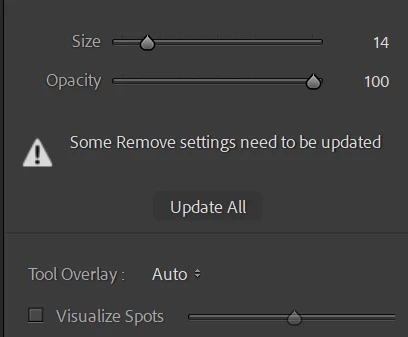
Some remove settings  need to be updated

  • September 17, 2024
  • 1 reply
  • 1041 views

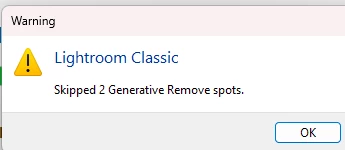
First off, when starting Lightroom, it lags during startup. I also noticed that all of my content-aware edits and removals on 300 of my photos became undone. I had to redo everything, only to realize I had to do it once more, which made me feel like there's a glitch, bug, or error. I keep getting a message saying, "Some remove settings need to be updated." it also keep saying  skipped 2 or so geneative spot .. WHY ?!?! 

I would like to know why this is happening and how I can fix these frustrating issues. Thanks!
 

This topic has been closed for replies.

1 reply

Participating Frequently
September 18, 2024

Hey Joshyi3, We're sorry for the trouble. 


I'll need more details to help you. What version of Lightroom Classic and operating system are you working on? Does this happen after an application or software update? Does the error occur when you are using Generative Fill in Lightroom Classic? 


Try these steps:


1. In Lightroom Classic, do Edit > Catalog Settings > General > Show. That will open Windows File Explorer on the current catalog folder.


2. Exit Lightroom Classic.


3. Move the file <catalog>.lrcat-data to the Desktop.


4. Start Lightroom Classic.  


5. In the Library, select all photos and do Photo > Develop Settings > Update AI Settings. That will recompute all the AI masks, which could take a while. But it won't update Generative Removes, so you'll have to go to each photo with Remove, click on Remove, and then Update.


6. If the above steps don't work, then please try if it helps to reset the preferences, 

https://adobe.ly/3MShjRz


Let us know how it goes. 

Thanks, 

Shivani 

Joshyi3
Joshyi3Author
Known Participant
September 18, 2024

can you give me more details what you mean by 3. Move the file <catalog>.lrcat-data to the Desktop. ??  i don't see a <catalog>.lrcat-data .... i am following this step to a T 

perhap a video maybe to show me how this is done ? i am a computer idiot lol