
Participant
January 18, 2017
Answered

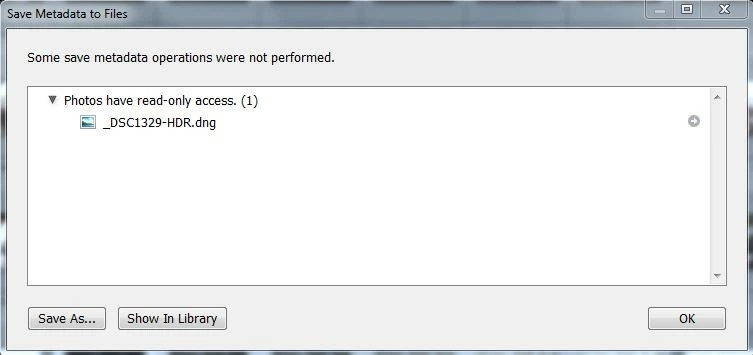
Some Save Metadata Operations Were Not Performed

  • January 18, 2017
  • 7 replies
  • 3143 views

Please see attached image. I've been getting this 'error' pop-up for a couple days which seemed to come out of nowhere. I'm only seeing this on DNG files created using Photomerge to HDR. The error appears at the moment Lr is importing the new DNG.  Where to start?

Thanks,

Kevin
This topic has been closed for replies.
Correct answer Kevin Childress

Just for the record in case anyone else is reading along, I was very specific and did not ask you to check whether the FOLDER was read-only, I did specify that you check to see if the PHOTO was marked as read-only.


dj_paige,

Sorry for any misunderstanding. Considering Lr actually created the new DNG (as a result of Photomerge), and assuming the trouble images were marked as read-only, it seems to me that Lr was responsible for setting that property. But in any case, the issue seems to have disappeared so that's the end of it.

Thanks again for trying to help.

Kevin

7 replies

sylvain_l8938024
Participant
April 26, 2023

Try to desactivate face recognition and adress lookup during the process. It seems that these process are launched maybe a little to quickly after DNG creation and some kind of interlock occurs. Something similar.

sjgruning
Known Participant
June 14, 2019

I am having the same issue, I have used photomerge in the past and do not recall seeing this. I am using Mac High Sierra 10.3 with LR6. What is odd is that is does not do this with every HDR merge I perform. It is random.

Inspiring
February 28, 2019

Saw the same message for the first time, trying to make a DNG panorama. Windows 10 is current  (0.0.17134), LR is a bit (Classic CC 7.2). Source file permissions, under Properties > General attributes and Properties > Security permissions, were no different than other files stitched. They are not changed for the "problem" DNG either, so the meaning of "read-only" is unclear.

Another thread discussed turning off face recognition and address suggestions under Catalog Settings. I had address suggestions checked, but clearing it did not work for me. Rebooting Windows cleared the problem for now.

sjgruning
Known Participant
September 18, 2019
I have the same issue. I am on Mac with High Sierra and CC.......I thought cc would have been better than this.
sjgruning
Known Participant
September 18, 2019
And it does not look like there is a resolution.
NightSkyGuy
Inspiring
June 22, 2018

I have the same problem. Images created by Merge to Panorama (dng) files that LR has just created itself.

Windows 10.0.17134 Pro

With Dropbox (I save directly into Dropbox) which is a "subst" drive called I: that points like this to a hard disk on D:

  C:\Users\myuser>subst

   I:\: => D:\Users\myuser\Dropbox\Images

This works really well to allow me to share my catalog and images across computers by mapping all images to the "I:" drive, the catalog stays correct (meaning no matter which computer I use, the images are on the I: drive.

Merge is the only operation where I get this problem... and it ALWAYS occurs.

Funny but Microsoft ICE and Photoshop itself do NOT have any trouble with this arrangement.

markusl70478955
Participant
January 5, 2019

exact same issue here on Win 7 / Lightroom build 1193777

dj_paige
Legend
January 24, 2017

kdcphoto wrote:

Please see attached image. I've been getting this 'error' pop-up for a couple days which seemed to come out of nowhere. I'm only seeing this on DNG files created using Photomerge to HDR. The error appears at the moment Lr is importing the new DNG. Where to start?

Thanks,

Kevin

This means the photo has read-only access in your operating system. You have to change the read-only status to "not read-only" by unchecking the box in Properties of this file in your operating system, so the metadata can be written.

Participant
January 26, 2017

dj_paige,

I had looked at that previously and verified the destination folder had full access (was not checked for read-only). And as I mentioned before, the error only occurred when Lr was importing new DNG files after performing the Photomerge to HDR process. I had never seen the error occur when writing metadata to any other file type.

Last night I used Photomerge to HDR on several sets of images I captured this week and the 'error' did not occur again on any of those projects. The 'error' has stopped occurring as mysteriously as it began.

Thanks for trying to help!

Kevin

dj_paige
Legend
January 26, 2017

Just for the record in case anyone else is reading along, I was very specific and did not ask you to check whether the FOLDER was read-only, I did specify that you check to see if the PHOTO was marked as read-only.

Sahil.Chawla
Adobe Employee
Adobe Employee
January 24, 2017

Hi Kdcphoto,

May I know what operating system are you using and Is the issue occurring when your are exporting or importing the image?

Regards,

Sahil

Participant
January 26, 2017

Sahil,

My apologies for this delayed reply - been traveling this week.  My operating system is Windows 7 Professional (64-bit).  This 'error' was occurring at the moment Lightroom 'auto imports' the new DNG file into the library after performing the Photomerge to HDR process.

Last night I used Photomerge to HDR on several sets of images I captured this week and the 'error' did not occur again on any of those projects. The 'error' has stopped occurring as mysteriously as it began.

Thanks for trying to help!

Kevin

Participant
January 19, 2017

bump