maltje1962
Inspiring
August 10, 2025
Answered

Something strange in LR classic 14.4

  • August 10, 2025
  • 1 reply
  • 252 views

I'm in LR,I select a photo and choose to proces the photo in photoshop.

I make the changes in PS and save the photo.

Then I go backt to LR and see that my photo is put as the first photo of all.

So not on the write timeline.

Anyone an idea?

Correct answer Ian Lyons

Where can I find "sort order" ?

I have the dutch version.

In library modus?


Yes, the Library module.

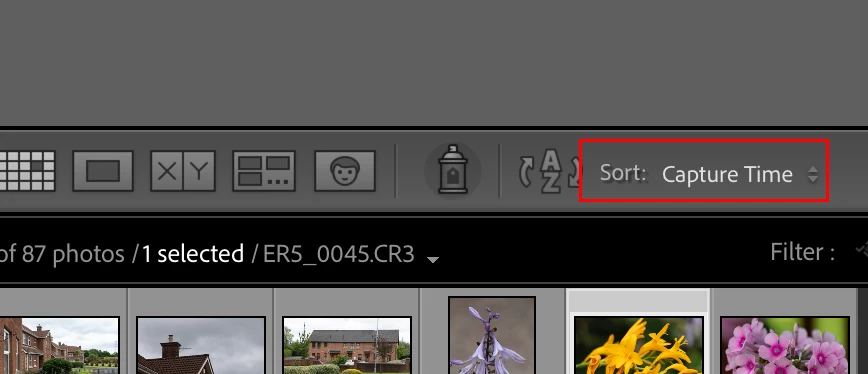
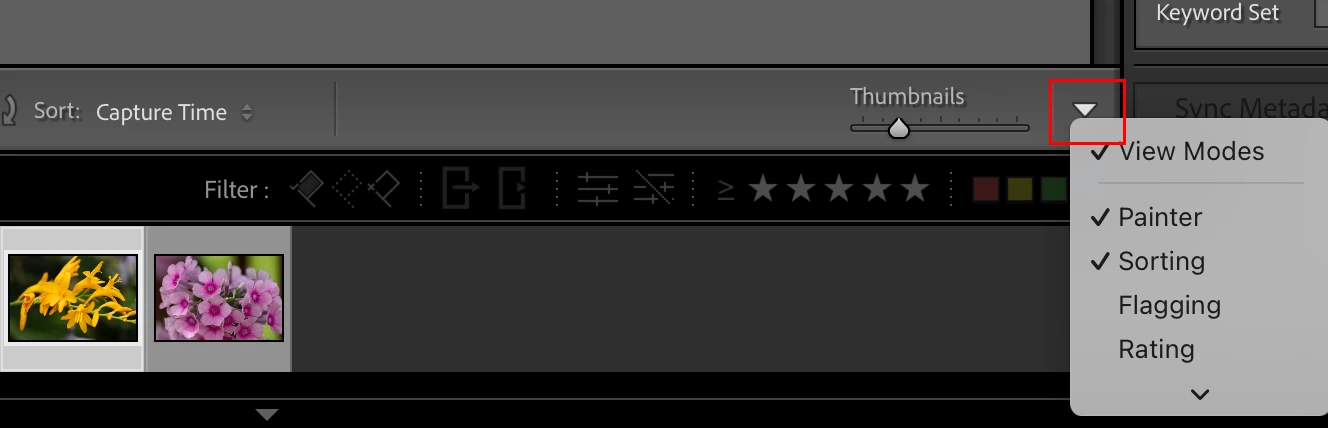
As explained above, it can be found on the toolbar above the filmstrip. Hopefully, first screenshot below is more hepful than the last. 


If you don't see 'Sort' on the toolbar, then second screenshot below shows where it can be enabled.


1 reply

Ian Lyons
Community Expert
Community Expert
August 10, 2025

Check the 'Sort Order' is set to show photos in the order you prefer. Attached screenshot shows location of sort order on toolbar above filmstrip.


maltje1962
Inspiring
August 10, 2025

It is just with the photo's I proces in PS,that I have the problem.And not all off the time,very strange.

My steps:

Import photo in LR

Right click on photo

Choose progress in PS

change something

Save

back to LR,and sometimes photo is the FIRST photo in my list.Not on the day taken,NOT on the day changes were made.


kind regards

JohanElzenga
Community Expert
Community Expert
August 10, 2025

Did you check the sort order like Ian suggested? It sounds like you sort on 'Added Order'.


-- Johan W. Elzenga