Participating Frequently
August 14, 2025
Answered

Sorting by capture

  • August 14, 2025
  • 2 replies
  • 375 views

My wife shoots Nikon, I use Sony...when I upload both sets of photos to a folder in LRc and sort by capture time, it sorts by time only within the respective file types (.NEF vs .ARW)...does anyone know how to fix this so all the photos are sorted by capture time?

Correct answer Rob_Cullen

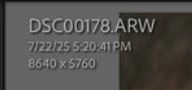
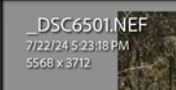
Can I suggest- Your cameras appear to be set to different YEAR dates -  2024 vs 2025

Naturally then the 2024 camera will sort totally all files before the 2025 camera in 'Capture time/date'

If I am correct you will need to modify the YEAR date for the Nikon files

LrC Menu- Metadata > Modify Capture time.


2 replies

Rob_Cullen
Community Expert
Rob_CullenCommunity ExpertCorrect answer
Community Expert
August 16, 2025

Can I suggest- Your cameras appear to be set to different YEAR dates -  2024 vs 2025

Naturally then the 2024 camera will sort totally all files before the 2025 camera in 'Capture time/date'

If I am correct you will need to modify the YEAR date for the Nikon files

LrC Menu- Metadata > Modify Capture time.


Regards. My System: Windows-11, Lightroom-Classic 15.1.1, Photoshop 27.3.1, ACR 18.1.1, Lightroom 9.0, Lr-iOS 10.4.0, Bridge 16.0.2 .
Participating Frequently
August 20, 2025

Am I an idiot!!!!   Thanks, Rob...simple fix...

Rob_Cullen
Community Expert
Community Expert
August 21, 2025

Hehe! It's called "Tunnel Vision" -not seeing the obvious (wood for the trees?)

Pleased you have it 'sorted' 


Regards. My System: Windows-11, Lightroom-Classic 15.1.1, Photoshop 27.3.1, ACR 18.1.1, Lightroom 9.0, Lr-iOS 10.4.0, Bridge 16.0.2 .
Community Manager
August 14, 2025

Hi @James_McDonough5868, welcome to the community!

Could you let us know which version of Lightroom Classic you're currently using?

Also, when you get a chance, please go to View > View Options > Grid View, and make sure Capture Date/Time is selected for both Compact Cell Extras and Expanded Cell Extras. Then go to View > Sort > Capture Time and share a  screenshot of your entire Lightroom window.

Lastly, if you could select one photo of each file type and post a screenshot of the Metadata panel with the EXIF tagset selected, that would be super helpful.

Thanks so much!
Alek

*(If you mention me with an @, like @Aleke, I’ll get a notification and can respond faster.)*
Participating Frequently
August 15, 2025

@Aleke   

Here are some screenshots....I'm on LrC 14.4 at the moment...

Community Manager
August 15, 2025

Hi @James_McDonough5868, really appreciate the screenshots!

Would you mind sharing a few sample files from each format? That’ll help us run some tests on our end and get a better idea of what’s going on.

Thanks so much!

Alek

*(If you mention me with an @, like @Aleke, I’ll get a notification and can respond faster.)*