
Rob_Cullen
Community Expert
Community Expert
July 25, 2026
Answered

Stacking Auto-Stack not working

  • July 25, 2026
  • 2 replies
  • 28 views

LrC v15.4.1 Windows-11:   I am trying the Auto-Stack ‘by Visual similarity’ on a folder of images with many images I consider similar. 

Why am I getting the message- “Current slider settings doesn’t allow Auto-stacking”? and the [Stack] button is greyed out. Although the previews suggest that stacks will be created.
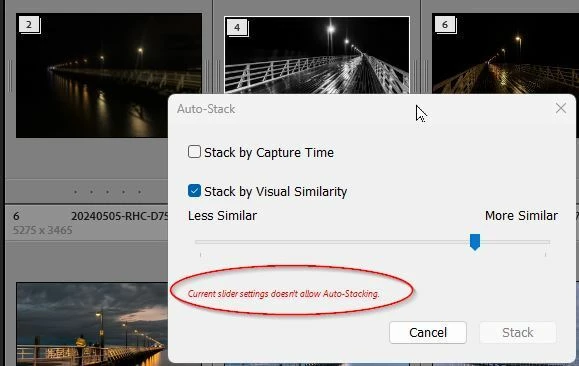
 

This message appears for any position of the slider- except for the far right end when [Stack] appears but result is “0 stacks,...”
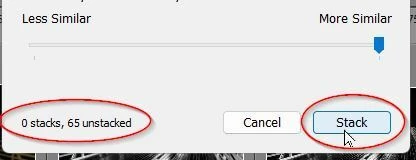
Something I am missing?


    Correct answer johnrellis

    Are you sure you’ve selected exactly one folder and not multiple folders, including child folders?


    That very unhelpful error message, “Current slider settings doesn’t allow Auto-stacking”, occurs when Auto-Stack is trying to stack two visually similar photos that are in two different folders, which isn’t allowed by LR’s silly stacking design. A better error message would be, “Some of the photos to be stacked are in different folders, so they can’t be stacked”.


    If you want to search for visually similar photos across folders, put all the photos into a single collection, select the collection, and then run Auto-Stack.

    2 replies

    johnrellis
    johnrellisCorrect answer
    Legend
    July 25, 2026

    Are you sure you’ve selected exactly one folder and not multiple folders, including child folders?


    That very unhelpful error message, “Current slider settings doesn’t allow Auto-stacking”, occurs when Auto-Stack is trying to stack two visually similar photos that are in two different folders, which isn’t allowed by LR’s silly stacking design. A better error message would be, “Some of the photos to be stacked are in different folders, so they can’t be stacked”.


    If you want to search for visually similar photos across folders, put all the photos into a single collection, select the collection, and then run Auto-Stack.

    Rob_Cullen
    Community Expert
    Community Expert
    July 26, 2026

    Bingo, correct answer, thanks John.  Yes I often/frequently export JPGs to a sub-folder (don’t ask why) and it only takes one JPG in a sub-folder to render Auto-stack unusable.

    I want to preserve the sub-folders, so I need to uncheck [Show photos in sub-folders] for Auto-stack to work.

    Maybe a Feature Request to place the option to [Show Photos…..] on the Auto-Stack dialog?


    Regards. My System: Windows-11, Lightroom-Classic 15.4.1, Photoshop 27.8, ACR 18.4, Lightroom 9.4, Lr-iOS 10.4.0, Bridge 16.0.3 .