Ken Nielsen
Legend
January 6, 2026
Answered

Start of new year, Library shows folder brought in not under the new year 2026 folder

  • January 6, 2026
  • 1 reply
  • 579 views

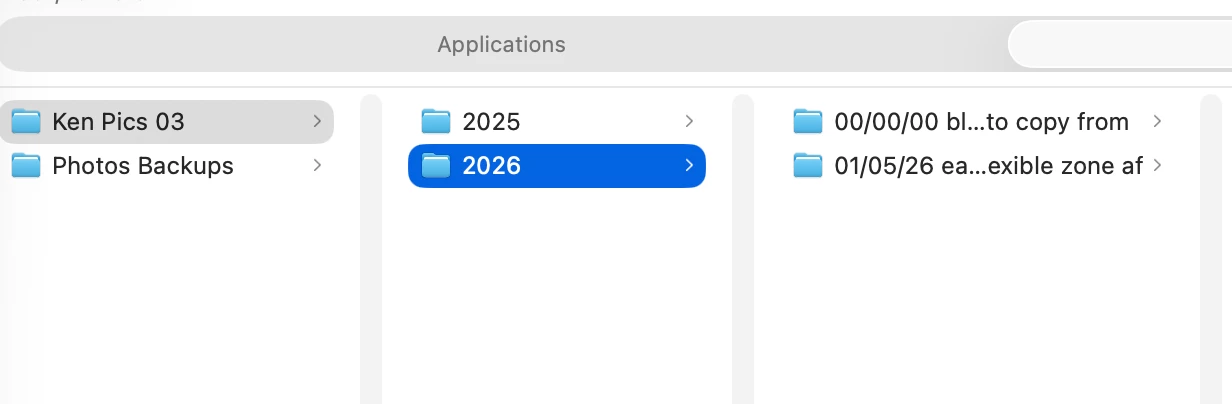
For some reason, importing the first folder for the new year, which should be showing in library inside the folder for 2026, came in showing the 'originals' folder outside on its own and not properly nested. How can I fix this?
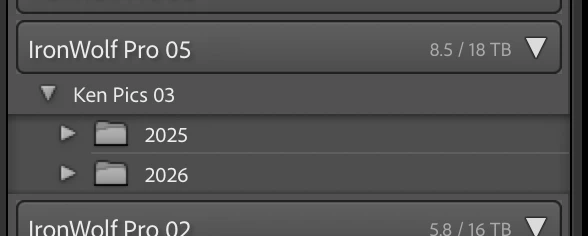
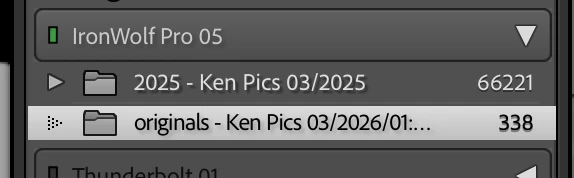
Screenshot 2026-01-05 at 4.49.41 PM.pngScreenshot 2026-01-05 at 5.04.22 PM.pngScreenshot 2026-01-05 at 5.07.45 PM.png

Correct answer Ken Nielsen

Okay, Fixed and all I did, thanks to your insight, is to right click on the folder hanging out on its own and choose 'Show Parent Folder.' That did it. It now shows the wayward folder as a sub folder of the year, which, in fact, it is in at the finder level. Thank you for leading me to the. solution.

1 reply

Ken Nielsen
Legend
January 6, 2026

It does not even show the 2026 Folder, where it is supposed to be inside of. I've tried shutting down the computer and restarting,but everything is the same. I don't want to go on for the rest of the shoots I have planned until this is resolved. It's like Lightroom has its own idea of how things should be and I have no control over it.

JohanElzenga
Community Expert
Community Expert
January 6, 2026

If a folder shows nested in a different way than on disk, you probably are the victim of the 'capitalization error'. Basically, what happens is that you have two different folders, one called ‘XXXX’ (or a combination of upper- and lower cast) and the other one called ‘xxxx’. In other words, the names are the same, except for the capitalisation of at least one letter. Because MacOS and Windows are case-insensitive, your OS sees those two folders as one and the same folder and so it deals with this without you even being aware of it. You will only see one single folder in the Mac Finder or Windows Explorer!!! But Lightroom is case-sensitive, so Lightroom does see two different folders. Please be aware that this folder is not necessarily the folder you are looking at. It could also be a parent folder (that Lightroom may not show). Here's how to fix the problem. https://www.lightroomqueen.com/capitalization-catalog-error/


P.S. Your screenshots are inconclusive, however. The first screenshot seems to show the correct folder hierarchy. The second screenshot shows something that cannot be verified because there is no Finder screenshot showing the disk hierarchy.


-- Johan W. Elzenga
Ken Nielsen
Legend
January 6, 2026

I will tackle this. I wasn't sure if I should delete the files that were transferred and start over again, but your link and comments here are more encouraging that this can be fixed. I don't see any difference in spelling 'yet' and I'll follow the path as you suggest. Mostly, I want to thank you for responding as, yes, this seems daunting. I will set the time aside this afternoon to do a proper job of sorting it out.