Participant
February 7, 2023
Question

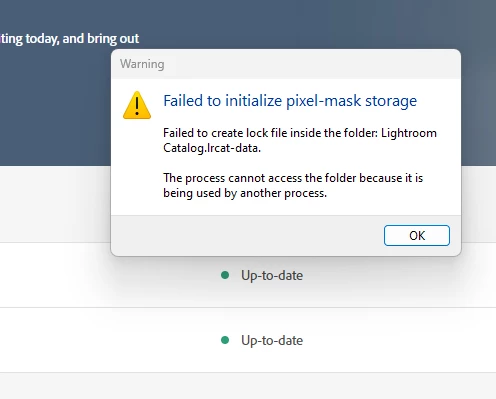
start problem Classic
  • February 7, 2023
  • 1 reply
  • 134 views

this is my first week with lightroom classic; so far in workt oke, till now. Restarted the laptop. Same result. Please advise. with kind regards

Koert

This topic has been closed for replies.

1 reply

AxelMatt
Community Expert
Community Expert
February 7, 2023

When Lightroom is running and has a catalog open it creates a lrcat.lock file next to the lrcat file. 

This is to ensure there is no other access to the catalog when he is in use. WhenLightroom is shutdown the lock file is automatically deleted.

IfLightroom is not shut down properly this file remains in the folder next to the lrcat file preventing it from opening. WhenLightroom is closed go to the folder where the lrcat file resides (normally user name>pictures>lightroom). If there is a file there lrcat.lock delete the file and then try and restartLightroom . 


Please take a look here: https://helpx.adobe.com/lightroom-classic/kb/lightroom-error-catalog-cannot-be-opened-lrcat-lock.html


My System: Intel i7-8700K - 64GB RAM - NVidia Geforce RTX 3060 - Windows 11 Pro 25H2 -- LR-Classic 15 - Photoshop 27 - Nik Collection 8 - PureRAW 6 - Topaz Photo AI
Participant
February 7, 2023
Wonderful,thanx!

Verzonden vanuit Mail<> voor Windows