Participant
July 3, 2023
Answered

Start up problemen
  • July 3, 2023
  • 3 replies
  • 484 views

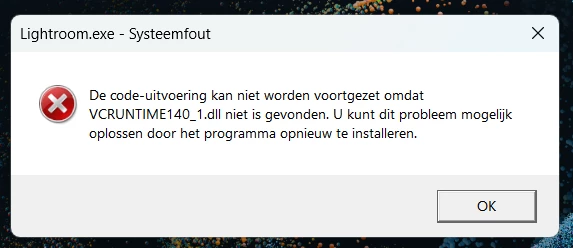
Hi I can't start Lightroom classic annymore and I  get this erroe, what to do?

Kind regards,

Pieter van de Ruit

Mokumgraaf

This topic has been closed for replies.
Correct answer Sameer K

Hey, @Pieter30718163o3ca. Welcome to the Lightroom Community. I'll help you figure this out. As suggested by @GoldingD, this error is directly related to Microsoft Visual Studio.


Try these steps to manually recreate the MSVC++ Libraries & let us know how it goes.
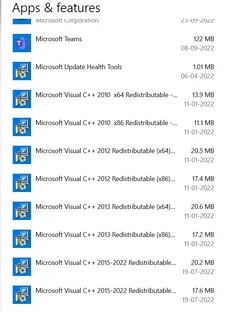
  •  In the Creative Cloud app, press CTRL + ALT + T (Win) to launch Creative Cloud Troubleshooter & select 'Close Creative Cloud and related processes' > click on Go.
  • Go to 'Add or Remove programs' in Windows search & find all the installations of Microsoft Visual C++ Redistributable (all years).

  • Uninstall them completely. Even if there is an option to repair them, please uninstall all the existing MSVC++ packages.
  • Download a fresh package of installers for MSVC++ from this link: https://adobe.ly/3DkgAVF
  • Right-click the downloaded file and select Extract All.
  • Reinstall all packages (32bit & 64bit) one by one & then restart the computer once.

Let me know how it goes from here. Thanks!

Sameer K

3 replies

Sameer K
Community Manager
Sameer KCommunity ManagerCorrect answer
Community Manager
July 3, 2023

Hey, @Pieter30718163o3ca. Welcome to the Lightroom Community. I'll help you figure this out. As suggested by @GoldingD, this error is directly related to Microsoft Visual Studio.


Try these steps to manually recreate the MSVC++ Libraries & let us know how it goes.

  •  In the Creative Cloud app, press CTRL + ALT + T (Win) to launch Creative Cloud Troubleshooter & select 'Close Creative Cloud and related processes' > click on Go.
  • Go to 'Add or Remove programs' in Windows search & find all the installations of Microsoft Visual C++ Redistributable (all years).

  • Uninstall them completely. Even if there is an option to repair them, please uninstall all the existing MSVC++ packages.
  • Download a fresh package of installers for MSVC++ from this link: https://adobe.ly/3DkgAVF
  • Right-click the downloaded file and select Extract All.
  • Reinstall all packages (32bit & 64bit) one by one & then restart the computer once.

Let me know how it goes from here. Thanks!

Sameer K

Participant
July 4, 2023

Thanks for your feedback.
Lightroom is working again.

Kind regards,

Peter van de Ruit

GoldingD
Legend
July 3, 2023

That file is part of Visual C++, required for Visual Studio. LrC uses that. Basically something got damaged in your copy of Visual Studioon your PC. Tyically you need to reinstall Visual Studio.


Use Google or another search engine to search the web on "How to fix VCRuntime140_1.dll error?"


Participant
July 4, 2023

Thanks for your Feedbak.

it still doesn't work i try the bottom option

JohanElzenga
Community Expert
Community Expert
July 3, 2023

Did you uninstall and reinstall Lightroom as the error message suggests?


-- Johan W. Elzenga
Participant
July 4, 2023

Dit werkt niet.

inmiddels weer aan de praat Thanks