Participant
August 23, 2024
Answered

store fixed custom values

  • August 23, 2024
  • 2 replies
  • 360 views
Goodmorning , 

is it possible to save the values ​​in the cutting tool when adjusted,
for example for social media with the optimal photo dimensions in lightroom classic

thanks in advance

reto
This topic is closed to new replies. Start a new post to keep the conversation going.
Correct answer Rob_Cullen

Yes. Lightroom-Classic can store up to five Custom Crop RATIOS.

When you [Enter Custom] you can state the ratio and it will store.

If you enter more that five custom ratios - the oldest is deleted.  'First in - First out'.
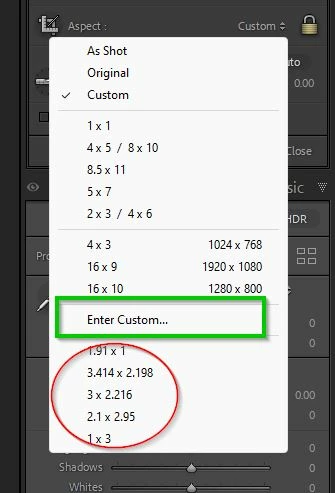
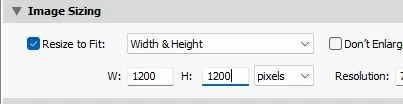
These are RATIOS only. To set the PIXEL dimensions you set the RESIZE options in the EXPORT dialog.

A RESIZE in the EXPORT dialog will FIT your image ( of any RATIO) into the PIXEL DIMENSIONS set.
 

2 replies

Rob_Cullen
Community Expert
Rob_CullenCommunity ExpertCorrect answer
Community Expert
August 24, 2024

Yes. Lightroom-Classic can store up to five Custom Crop RATIOS.

When you [Enter Custom] you can state the ratio and it will store.

If you enter more that five custom ratios - the oldest is deleted.  'First in - First out'.

These are RATIOS only. To set the PIXEL dimensions you set the RESIZE options in the EXPORT dialog.

A RESIZE in the EXPORT dialog will FIT your image ( of any RATIO) into the PIXEL DIMENSIONS set.


Regards. My System: Windows-11, Lightroom-Classic 15.4.1, Photoshop 27.8, ACR 18.4, Lightroom 9.4, Lr-iOS 10.4.0, Bridge 16.0.3 .

Participant
August 24, 2024
Thank you Rob, much appreciated

