


Known Participant
Nov 4, 2026 1:33 PM UTC
Question

Strange result with Denoise: ON1 NoNoise 2021 helped.

This is not an excellent photo—far from it. However, I’m making this post to highlight a curious, poor-quality result I encountered while using Lightroom’s "Denoise" feature.

Usually, I get amazing results with Denoise.

This is the original image, at 100%, before any adjustments in Lightroom:
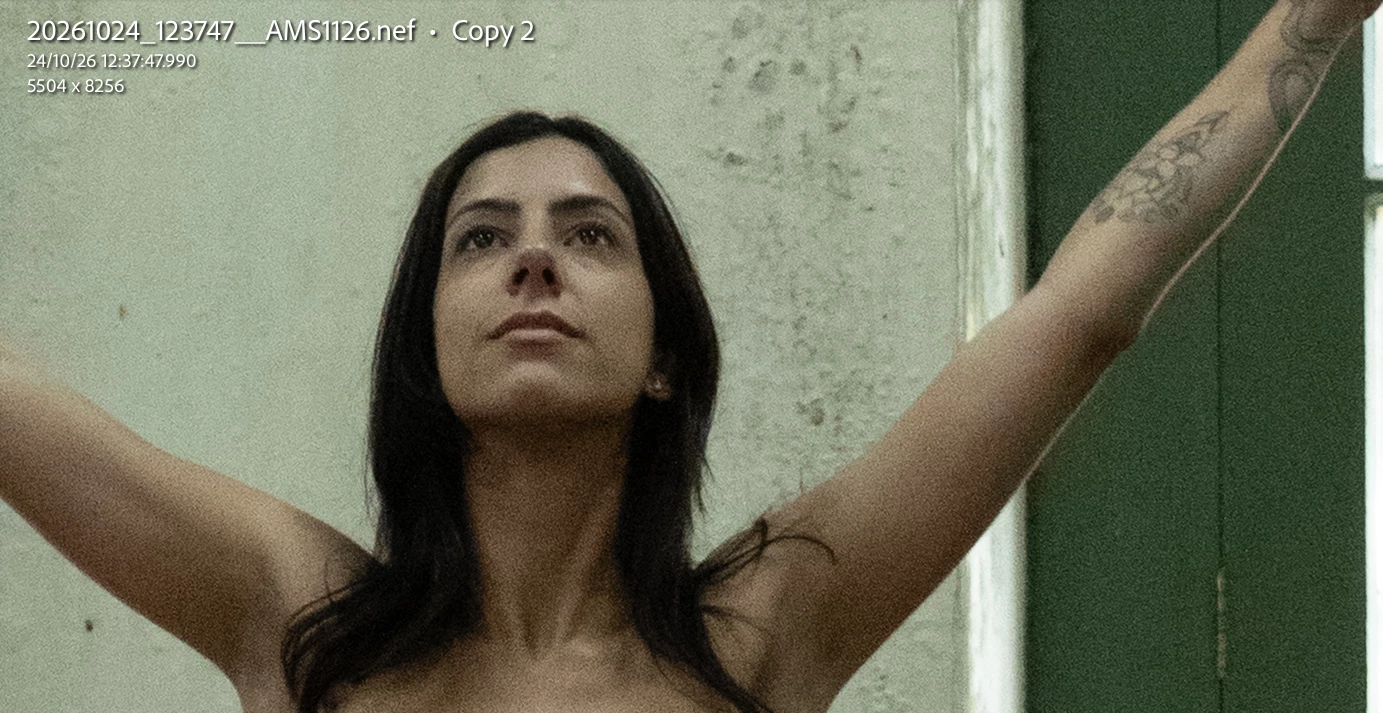


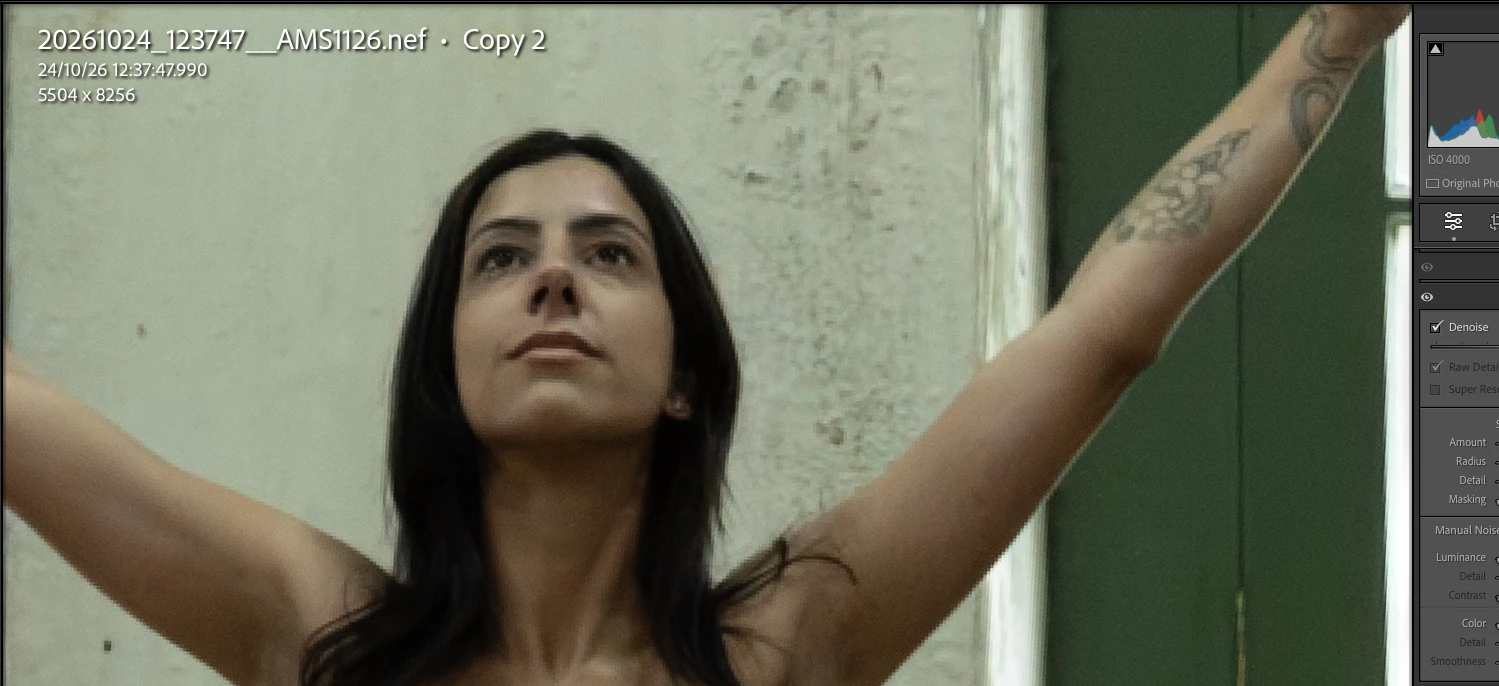
I was trying to edit this image to salvage it, but Denoise produced a strange, visibly ugly result—the model’s eyebrows ended up heavily pixelated. I tried various adjustments, but none yielded a good outcome.

Here, the image at 100% after Denoise:


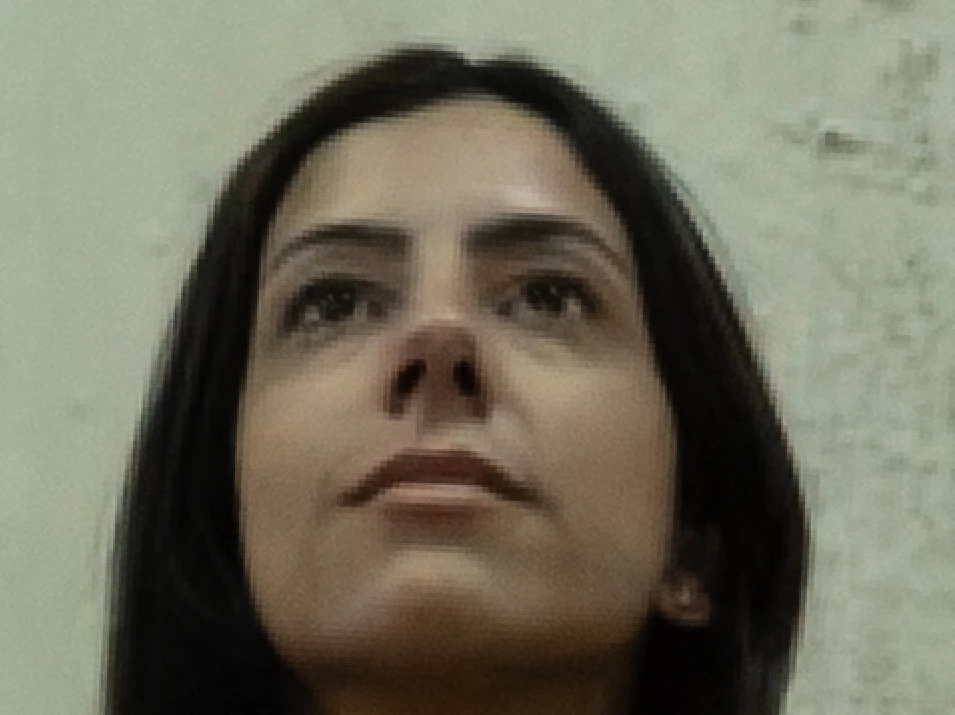
Here, with zoom, highlighting the real, actual pixelation caused by Denoise:
 

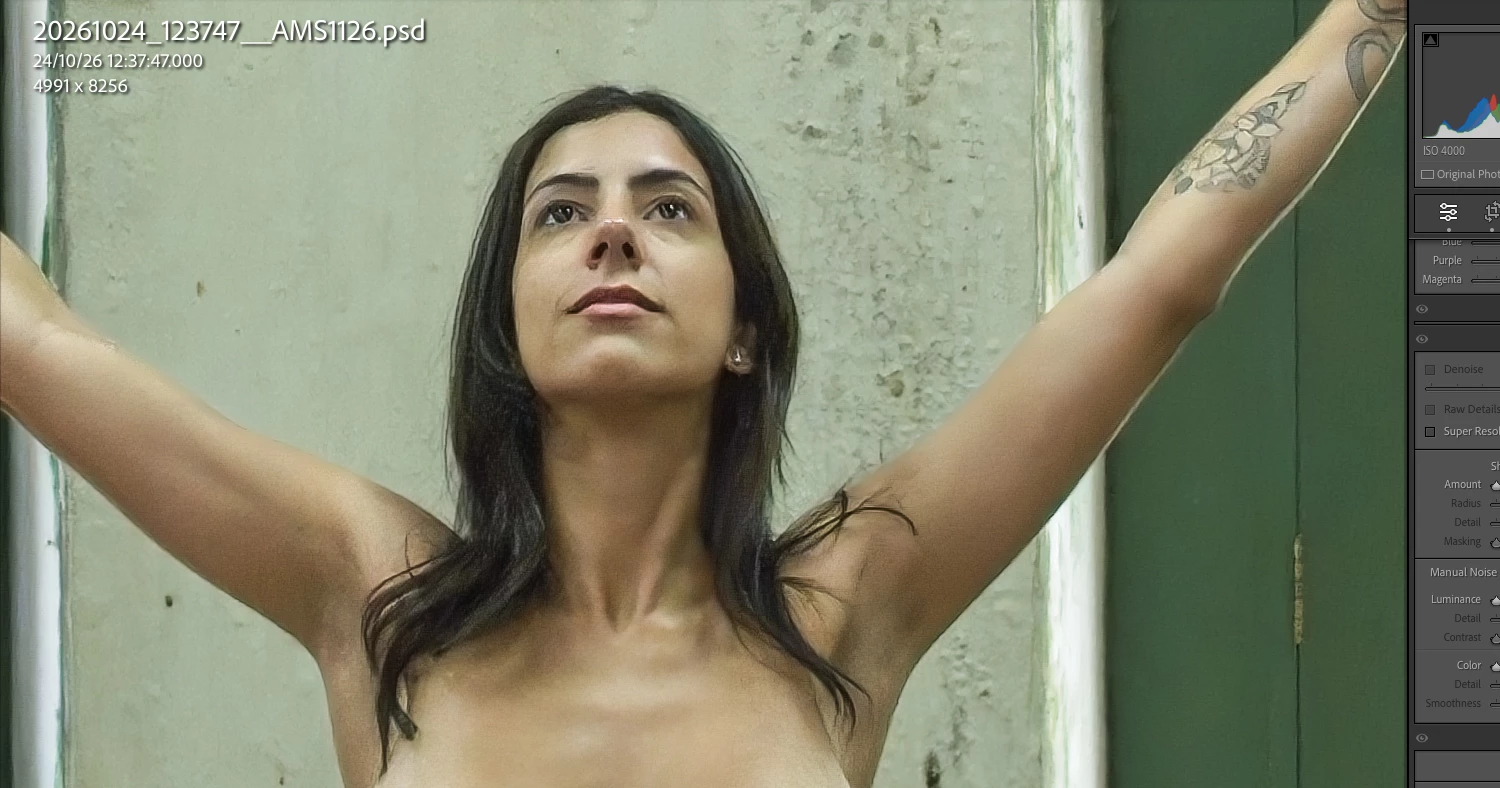
I decided to reinstall ON1 NoNoise—which I had purchased back in 2021 (!!!) and hadn’t touched since—just to run a quick test. Take a look; it turned out significantly better! I didn’t make any manual adjustments; I simply used the program’s default settings. I just opened the image in NoNoise, let the software process it, and exported it back as a PSD file.


Is there a known bug with the Denoise feature in the latest versions of Lightroom?

Is there any known workaround?

I’d really like to keep using Lightroom’s Denoise—I’d prefer not to have to install yet another piece of software on my computer!

If anyone has any suggestions, I’d appreciate it!

Thanks !!!


    14 replies

    Legend
    Nov 8, 2026 6:25 AM UTC

    ​@AndreMotta 

    This looks to me like a preview issue; sometimes it is not showing a 1:1 preview, but a low resolution preview that will inevitably appear pixelated, just like your screen shot shows.


    Translate
    Known Participant
    Nov 5, 2026 11:29 PM UTC

    Dear friends, thank you for your replies, and please accept my apologies for the delay in getting back to you.
    I had a minor health issue—just a bit of an indisposition.
    At 62, things like this happen from time to time...

    Dear ​@Srishti Bali , I don’t think it would be appropriate to make the original RAW file available for download. Since it’s a full-frontal female nude—showing everything—it’s not advisable. To answer your question, however, the Denoise setting used was 50, which is the default value suggested by the software. In the images I posted—even though they are screenshots—no other parameters were adjusted; only the Denoise function was enabled. I did perform further edits later on the PSD file exported from ON1 NoNoise. I also posted a black-and-white edited version on my Instagram, with the model’s private parts appropriately obscured (@andremotta_ensaios).

    Interestingly, I applied the Denoise tool to other images from the same sequence (there were 12 in total). In some cases, the results are satisfactory—as seen in the example below—but in others, the same artifacts appear that were present in the image that prompted this post.


    Another image:  in the Left, before Denoise, Right, after Denoise. No more adjustments.


    It is truly quite strange that the Denoise function performed so poorly in this instance.
    Let’s hope a solution comes along!


    Translate
    Srishti Bali
    Community Manager
    Community Manager
    Nov 4, 2026 7:04 PM UTC

    Hi ​@AndreMotta 


    Thanks for sharing the detailed explaination. Could you please share:

    • The original RAW file, preferably through a download link.
    • The Denoise amount used.
    • Close-up screenshots of the eyebrow area before and after Denoise.

    If possible, please also try Denoise on a fresh copy of the RAW with other edits disabled and let us know whether the artifact persists.

    The ON1 result is a useful comparison and a workaround for this image, though it doesn’t yet identify the cause of the Lightroom result. Thank you for helping us narrow this down.

    Translate
    Thanks, Srishti Bali | Community & Engagement Strategist, Digital Imaging | Adobe
    Known Participant
    Nov 4, 2026 3:10 PM UTC

    Lightroom Classic version: 15.6 [ 202609251514-f839cde9 ]
    License: Creative Cloud
    Language setting: en-BR
    Operating system: Mac OS 26
    Version: 26.6.2 [25G83]
    Application architecture: arm64
    Logical processor count: 10
    Processor speed: NA
    SqLite Version: 3.45.1
    Adobe GSDK Version: 1.4.0.213

    Built-in memory: 32.768,0 MB
    Dedicated GPU memory used by Lightroom: 12.575,9MB / 25.559,0MB (49%)
    Real memory available to Lightroom: 32.768,0 MB
    Real memory used by Lightroom: 3.666,0 MB (11,1%)
    Virtual memory used by Lightroom: 463.637,9 MB
    Memory cache size: 579,4MB
    Internal Camera Raw version: 18.7 [ 2743 ]
    Maximum thread count used by Camera Raw: 5
    Camera Raw SIMD optimization: SSE2
    Camera Raw virtual memory: 3729MB / 16383MB (22%)
    Camera Raw real memory: 8565MB / 32768MB (26%)

    Cache1:
    Final1- RAM:893,0MB, VRAM:10.100,0MB, 20261024_123747__AMS1126.psd
    Final2- RAM:622,0MB, VRAM:1.402,0MB, 20261024_123747__AMS1126.psd
    Final3- RAM:352,0MB, VRAM:0,0MB, 20261024_123747__AMS1126.nef
    NT- RAM:1.867,0MB, VRAM:11.502,0MB, Combined:13.369,0MB

    Cache2:
    m:579,4MB, n:1.054,3MB

    U-main: 434,0MB

    Standard Preview Size: 1024 pixels
    Displays: 1) 2560x1440

    Graphics Processor Info:
    Metal: Apple M2 Pro
    Init State: GPU for Export supported by default
    User Preference: Auto
    Enable HDR in Library: OFF
    GPU for Preview Generation: Auto (S5_24)

    Application folder: /Applications/Adobe Lightroom Classic
    Library Path: /Users/andremottadesouza/Pictures/motta-new-allcatalog-nov2024/motta-new-allcatalog-nov2024.lrcat
    Settings Folder: /Users/andremottadesouza/Library/Application Support/Adobe/Lightroom

    Installed Plugins:
    1) AdobeStock
    2) Aperture/iPhoto Importer Plug-in
    3) Canon Print Studio Pro
    4) DxO PhotoLab 5
    5) DxO PhotoLab 5 Importer
    6) DxO PhotoLab 7
    7) DxO PhotoLab 7 Importer
    8) DxO PureRAW 3
    9) DxO PureRAW 3 Importer
    10) Flickr
    11) JPEGmini
    12) Luminar Neo
    13) Negative Lab Pro v3
    14) Nik 6 HDR Efex
    15) ON1 NoNoise AI 2022
    16) Perfectly Clear Complete v3
    17) Plugin Parameters
    18) Topaz Photo AI

    Config.lua flags:

    Translate
    KR Seals
    Community Expert
    Community Expert
    Nov 5, 2026 1:49 AM UTC

    One thing I see is that your standard previews are 1024 pixels but you display is 2560x1440. That is probably not related to the de-noise issue, but creating 2560x1440 should result in a better preview display experience with better on screen detail. 

    You can adjust preview size in: “Catalog Settings → Previews” “Auto” is a good setting.

    Of course, when you zoom in to 100% view, you are not seeing the standard preview.

    Translate
    Ken Seals - Nikon Z 9, Z 8, 14mm-800mm. Computer Win 11 Pro, I7-14700K, 64GB, RTX3070TI. Travel machine: 2021 MacBook Pro M1 MAX 64GB. All Adobe apps.
    Known Participant
    Nov 4, 2026 3:02 PM UTC


    Translate
    johnrellis
    Legend
    Nov 4, 2026 3:42 PM UTC

    I don’t see anything in the System Info that looks amiss -- LR 15.6 / Mac OS 26.6.2, Apple M2 Pro GPU (very similar to my configuration), LR thinks the GPU is enabled.

    Translate
    Known Participant
    Nov 4, 2026 2:21 PM UTC

    Lightroom Classic version: 15.6 [ 202609251514-f839cde9 ]
    License: Creative Cloud
    Language setting: en-BR
    Operating system: Mac OS 26
    Version: 26.6.2 [25G83]
    Application architecture: arm64
    Logical processor count: 10
    Processor speed: NA
    SqLite Version: 3.45.1
    Adobe GSDK Version: 1.4.0.213

    Built-in memory: 32.768,0 MB
    Dedicated GPU memory used by Lightroom: 12.575,9MB / 25.559,0MB (49%)
    Real memory available to Lightroom: 32.768,0 MB
    Real memory used by Lightroom: 3.666,0 MB (11,1%)
    Virtual memory used by Lightroom: 463.637,9 MB
    Memory cache size: 579,4MB
    Internal Camera Raw version: 18.7 [ 2743 ]
    Maximum thread count used by Camera Raw: 5
    Camera Raw SIMD optimization: SSE2
    Camera Raw virtual memory: 3729MB / 16383MB (22%)
    Camera Raw real memory: 8565MB / 32768MB (26%)

    Cache1: 
    Final1- RAM:893,0MB, VRAM:10.100,0MB, 20261024_123747__AMS1126.psd
    Final2- RAM:622,0MB, VRAM:1.402,0MB, 20261024_123747__AMS1126.psd
    Final3- RAM:352,0MB, VRAM:0,0MB, 20261024_123747__AMS1126.nef
    NT- RAM:1.867,0MB, VRAM:11.502,0MB, Combined:13.369,0MB

    Cache2: 
    m:579,4MB, n:1.054,3MB

    U-main: 434,0MB

    Standard Preview Size: 1024 pixels
    Displays: 1) 2560x1440

    Graphics Processor Info: 
    Metal: Apple M2 Pro
    Init State: GPU for Export supported by default
    User Preference: Auto
    Enable HDR in Library: OFF
    GPU for Preview Generation: Auto (S5_24)

    Application folder: /Applications/Adobe Lightroom Classic
    Library Path: /Users/andremottadesouza/Pictures/motta-new-allcatalog-nov2024/motta-new-allcatalog-nov2024.lrcat
    Settings Folder: /Users/andremottadesouza/Library/Application Support/Adobe/Lightroom

    Installed Plugins: 
    1) AdobeStock
    2) Aperture/iPhoto Importer Plug-in
    3) Canon Print Studio Pro
    4) DxO PhotoLab 5
    5) DxO PhotoLab 5 Importer
    6) DxO PhotoLab 7
    7) DxO PhotoLab 7 Importer
    8) DxO PureRAW 3
    9) DxO PureRAW 3 Importer
    10) Flickr
    11) JPEGmini
    12) Luminar Neo
    13) Negative Lab Pro v3
    14) Nik 6 HDR Efex
    15) ON1 NoNoise AI 2022
    16) Perfectly Clear Complete v3
    17) Plugin Parameters
    18) Topaz Photo AI

    Config.lua flags: 


    Translate
    Known Participant
    Nov 4, 2026 2:18 PM UTC

    SYSTEM INFO:


    Lightroom Classic version: 15.6 [ 202609251514-f839cde9 ]
    License: Creative Cloud
    Language setting: en-BR
    Operating system: Mac OS 26
    Version: 26.6.2 [25G83]
    Application architecture: arm64
    Logical processor count: 10
    Processor speed: NA
    SqLite Version: 3.45.1
    Adobe GSDK Version: 1.4.0.213

    Built-in memory: 32.768,0 MB
    Dedicated GPU memory used by Lightroom: 12.575,9MB / 25.559,0MB (49%)
    Real memory available to Lightroom: 32.768,0 MB
    Real memory used by Lightroom: 3.666,0 MB (11,1%)
    Virtual memory used by Lightroom: 463.637,9 MB
    Memory cache size: 579,4MB
    Internal Camera Raw version: 18.7 [ 2743 ]
    Maximum thread count used by Camera Raw: 5
    Camera Raw SIMD optimization: SSE2
    Camera Raw virtual memory: 3729MB / 16383MB (22%)
    Camera Raw real memory: 8565MB / 32768MB (26%)

    Cache1: 
    Final1- RAM:893,0MB, VRAM:10.100,0MB, 20261024_123747__AMS1126.psd
    Final2- RAM:622,0MB, VRAM:1.402,0MB, 20261024_123747__AMS1126.psd
    Final3- RAM:352,0MB, VRAM:0,0MB, 20261024_123747__AMS1126.nef
    NT- RAM:1.867,0MB, VRAM:11.502,0MB, Combined:13.369,0MB

    Cache2: 
    m:579,4MB, n:1.054,3MB

    U-main: 434,0MB

    Standard Preview Size: 1024 pixels
    Displays: 1) 2560x1440

    Graphics Processor Info: 
    Metal: Apple M2 Pro
    Init State: GPU for Export supported by default
    User Preference: Auto
    Enable HDR in Library: OFF
    GPU for Preview Generation: Auto (S5_24)

    Application folder: /Applications/Adobe Lightroom Classic
    Library Path: /Users/andremottadesouza/Pictures/motta-new-allcatalog-nov2024/motta-new-allcatalog-nov2024.lrcat
    Settings Folder: /Users/andremottadesouza/Library/Application Support/Adobe/Lightroom

    Installed Plugins: 
    1) AdobeStock
    2) Aperture/iPhoto Importer Plug-in
    3) Canon Print Studio Pro
    4) DxO PhotoLab 5
    5) DxO PhotoLab 5 Importer
    6) DxO PhotoLab 7
    7) DxO PhotoLab 7 Importer
    8) DxO PureRAW 3
    9) DxO PureRAW 3 Importer
    10) Flickr
    11) JPEGmini
    12) Luminar Neo
    13) Negative Lab Pro v3
    14) Nik 6 HDR Efex
    15) ON1 NoNoise AI 2022
    16) Perfectly Clear Complete v3
    17) Plugin Parameters
    18) Topaz Photo AI

    Config.lua flags: 


    Translate
    johnrellis
    Legend
    Nov 4, 2026 2:12 PM UTC

    Please do the LR menu command Help > System Info, click the Copy button in the upper right corner, and paste into your reply here, so we can see exactly which versions of hardware and software LR thinks you're running and important LR options that are set.
     

    Translate
    Known Participant
    Nov 4, 2026 2:19 PM UTC

    Thank you, John !

    I did it, is in the post below !

    Translate
    johnrellis
    Legend
    Nov 4, 2026 2:52 PM UTC

    Looks like the forum isn’t letting you paste System Info -- that happens now and then. Save it to a .txt file and attach it to your reply here using the paperclip button at the bottom of the reply window.

    Translate
    Known Participant
    Nov 4, 2026 2:08 PM UTC

    I’m not sure what’s going on with this post, but the first two images aren’t showing up.

    They appear when I go into "Edit" mode, but they don’t show up in the published post.


    (Problem solved. I made a crop of the images. It seems the forum’s software likely flagged them as containing "female nudity"—even though nothing of the sort is visible...)

    Translate