Participating Frequently
January 7, 2024
Question

Structure de dossiers

  • January 7, 2024
  • 3 replies
  • 275 views

Bonjour, j'ai récemment décidé de prendre un abonnement avec Lightroom classic et depuis je me familiarise avec ses possibilités. J'avais une question. Je me demande pourquoi ma structure de dossiers dans la bibliothèque n'est pas la même que celle sur mon disque dur.
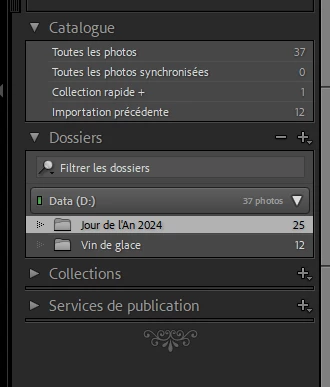
 

 Dans la bibliothèque, j'ai cette structure (image en dessus). Par contre dans le disque dur, j'ai un dossier nommé Photos 2024 avec deux sous-dossier: Jour de l'An 2024 et Vin de glace 2024. Alors que je n'ai pas de sous-dossier dans le module Bibliothèque. J'avoue que j'ai de la difficulté à comprendre la notion d'importation et surtout dans quel destination envoyer les images. Merci de m'éclairer sur ces deux sujets.

This topic has been closed for replies.

3 replies

dj_paige
Legend
January 7, 2024

As explained above, LrC doesn't have to match your folder structure as seen in Windows Explorer. In your case, probably right clicking on a folder and selecting "Show Parent Folder" would then show these two folders into subfolders of Photos 2024.


As a simpler alternative, you can use LrC to create folders by year and subfolders by capture date in the format YYYY MM DD automatically when you import. Then Ice Wine and New Year's Day could be entered as keywords, which would be a better usage of the strengths of LrC. This folder structure could be done automatically for you if you select COPY in the Import dialog box, and setting the options in the Destination Panel on the right hand side of the Import dialog box, as shown below from my Lightroom Classic. You set the option once, and it stays in effect until you change it.


photo2703Author
Participating Frequently
January 7, 2024

Merci pour vos réponses. je comprends un peu mieux l'organisation de la bibliotheque. Je vais consulter les liens fournis.

Community Expert
January 7, 2024

What you see in the "Folders" panel is a list of locations, derived from all the images in your Catalog.


Analogy: one might make a simple list of all the different cities or towns, where people in this forum live - London, Lyon, Paris, Des Moines, Brisbane... 


To make the simple list of cities more informative, one can also show information about the various countries these cities are in. The list reorganises itself so that you can now see Lyon and Paris are in the same country, but that this is different from Brisbane. To make that listing even more informative, one might also report information about the various continents that these various countries are in, and so reveal that higher level of organisation too.


And it works similarly with folders in LrC. If you right-click on a folder and choose "Show Parent Folder", that much more of the real arrangement will be made evident - and you can repeat this step however much is useful.


But it is not the job of this panel to show you everything on the disk, all the way to the top of the file system. In any case, this panel will only show you those particular files that you have selectively imported. These, and their immediate folders, and the relative organisation of those, constitute a deliberately curated image library.

GoldingD
Legend
January 7, 2024