



Tom_Kaa
Participant
May 24, 2026
Question

Struggling with conversion of catalog from Lr 6.14 to LrC 15.3 (LrC 14.0)

  • May 24, 2026
  • 2 replies
  • 16 views

I’m unable to convert or import from Lr 6.14 catalog. I have optimized etc., removed all links to moved files and else followed every advice I could find. Still no success. 

I get the following message:
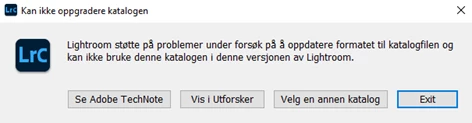
Lightroom faced problems, trying to upgrade the format of the catalogfile and can not use this catalog in this version of Lightroom.

After this I found various recommendations on using LrC 13.2 of 14.0, to make an intermediate version,  for a final import to LrC 15.3. I managed to install LrC 14.0, repeated the conversion-atempt, but received this message:
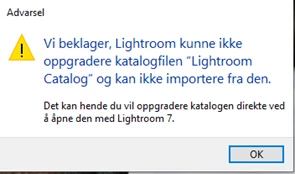
 We’re sorry. Lightroom couldn’t upgrade the catalogfile and can not import from it. You might want to upgrade the catalog, on the direct, by opening i with Lightroom 7.


The question is: Where can I find Lightroom 7, and - does any of you have a suggestion to how I should overcome my problem/challenge?

Regards
Tom Kaasen
Norway

    2 replies

    dj_paige
    Legend
    May 24, 2026

    Perhaps you can successfully convert a recent backup of your catalog file.


    You can probably get 13.2 (or earlier) by contacting Adobe and asking them for a download link. Contact Adobe support by clicking here, https://helpx.adobe.com/contact.html?rghtup=autoOpen
    In the chat field (lower right of screen), Typing “Agent” into the chat text field will bypass the initial chatbot. Be patient, it can take quite a while to reach a human. If you are not able to get to the chat window, then disable your ad-blockers, firewall, enable cookies/scripts on your browser. If it still fails then change your browser/machine/network.

    Tom_Kaa
    Tom_KaaAuthor
    Participant
    May 24, 2026

    Thank you! I will certainly follow your advice.

    Tom_Kaa

    Tom_Kaa
    Tom_KaaAuthor
    Participant
    May 24, 2026

    And btw: When I follow the link on “se Adobe TechNote“, I end up on a “404-page”