
Participant
January 15, 2025
Question

Subfolders are not recognized

  • January 15, 2025
  • 3 replies
  • 737 views

The main folder contains all the photos, but all the subfolders have question marks showing 0 photos (but they all should have several photos on each). The functions "find the missing folder" or "remove folder" don't work for each subfolder. The hard drive contains the same folders. Please advise
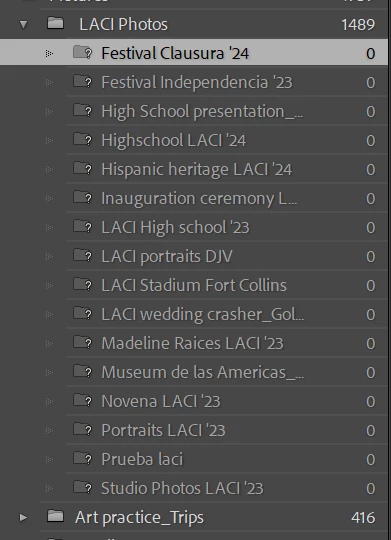
 

3 replies

Rob_Cullen
Community Expert
Community Expert
January 16, 2025

@andhen25   I will let @drtonyb  carry on with answers, but would you try one thing for me-

1) Exit Lightroom-Classic

2) Use File Explorer to RENAME the first sub-folder that is called { Festival Clausura '24 } by removing the { ' } from the folder name. (Use alpha numeric characters only.)

3) Re-open the catalog

4) [Right-click] on { Festival Clausura '24 } and [Find Missing Folder] , choose { Festival Clausura 24 } 

Tell us if the renamed folder re-appears in the catalog.

I am often suspicious of characters in file/folder names that LrC may not accept.   (the forward slash  /  is one definite problem character.)


Regards. My System: Windows-11, Lightroom-Classic 15.3, Photoshop 27.5, ACR 18.3, Lightroom 9.3, Lr-iOS 10.4.0, Bridge 16.0.3 .
Legend
January 16, 2025

@Rob_CullenLrC isn't bothered by the use of the single quote ' in a folder name; I tried it. @andhen25 has other folders with the single quote in their names and there isn't any problem with those.

GoldingD
Legend
January 15, 2025

Did you right click on LACI Photos and Update that folder location?

andhen25Author
Participant
January 15, 2025

Yes, I did. Syncing or updating folder location for the LACI photos folder also does not work 😞 please help!

Legend
January 15, 2025

@andhen25 


How large is your catalog, meaning how many photos?


Is LACI Photos a folder on your main hard drive?


You may try this:


Create a new empty catalog from the menu File > New Catalog...


Use File > Import from Another Catalog... to import all the photos in your main catalog into the new one.


Check the LACI Photos folder in the new catalog and see if the subfolders are present and populated.


I they are, then there may be a corruption in your main catalog, which likely could be fixed.


andhen25Author
Participant
January 15, 2025

Thank you so much for the quick reply. The catalog is ~5k photos (4832).  LACI photos is a folder on my external hard drive. I tried, as you suggested, to create a new catalog. However, the same error reoccurs with that folder's subfolders. Syncing or updating folder location for the LACI photos folder also does not work.  Please advise 

Legend
January 16, 2025

Can you post a screen shot showing more of the Folders panel?


It seems the folder "Art practice_Trips" is on the same external drive. Does this folder's subfolders show their photos correctly?


If you want to send me a private message, we can pursue this further, but our time difference might slow things down a bit.