



tonytea51
Participant
March 20, 2026
Question

Subsequent to upgrading my Synology NAS to a new model Lightroom will not import photos to the correct location. I have tried the adobe solution dated May 2021 but that does not solve the problem.

  • March 20, 2026
  • 3 replies
  • 38 views

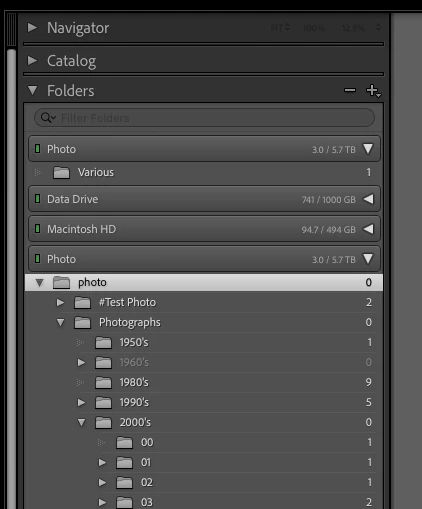
I tried to create a new folder called Various inside Photographs/2000’s/00. However Lightroom created a new instance of the Synology SharePoint folder (Photo) and place it there? It did however create the new folder in the correct location on the NAS. The only change to my setup that I can see is the different ip address for the NAS.
 

    3 replies

    tonytea51
    tonytea51Author
    Participant
    March 23, 2026

    I solved the problem with the help of Claude. I have attached a file with the interaction, hopefully this will assist anyone else with a similar problem.

    Before testing that the fix had worked and to avoid any issues with the catalogue, I loaded a backup that I was confident was taken before the NAS upgrade.

    Basically the NAS share was being mounted twice at exactly the same path /Volumes/photo, both under the same credentials. This was the root cause of everything.

    dj_paige
    Legend
    March 20, 2026

    It might be the capitalization error in Lightroom Classic. https://www.lightroomqueen.com/capitalization-catalog-error/


    PS: your software is “Lightroom Classic” or LrC. It is not “Lightroom” as you said, which is something different.

    tonytea51
    tonytea51Author
    Participant
    March 20, 2026

    Hi, many thanks for your suggestion. There did appear to be a Capitalisation change in the NAS folder name. I followed the solution in Lightroomqueen but it just came back with the same problem. I just can’t seem to add or import anything into the catalogue without it creating another instance of the NAS Shared Folder with the solitary import showing. I even tried changing the NAS Shared Folder from Photo to photo to no avail.

    tonytea51
    tonytea51Author
    Participant
    March 20, 2026

    I have tried the adobe solution dated 16 May 2021 but that does not work.