
Known Participant
July 28, 2024
Question

Support Amount Slider Unavailable

  • July 28, 2024
  • 2 replies
  • 188 views

I'm running the following version of Lightroom Classic :


Lightroom Classic version: 13.4 [ 202406181129-60d181b7 ]
License: Creative Cloud
Language setting: en
Operating system: Windows 10 - Home Premium Edition
 
I've run into a problem I can't seem to solve. The adjustment slider is unavailable on some of the presets I created.
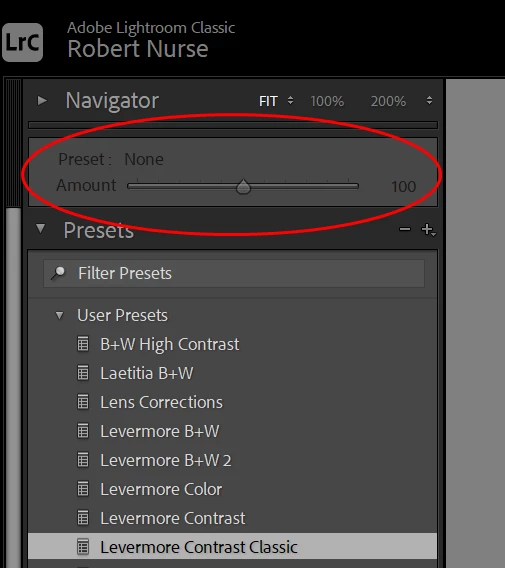


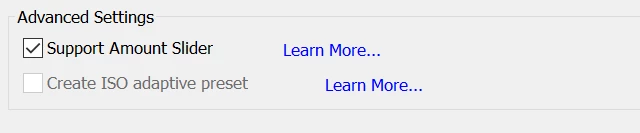
The documentation states: "If you are unable to select the Support Amount Slider option, that indicates the selected settings do not support the Amount slider." But, which settings are incompatible with the slider? When I created the preset, Support Amount Slider is checked.


This topic has been closed for replies.

2 replies

JohanElzenga
Community Expert
Community Expert
July 29, 2024

I don't have a list of all the settings that do not support the amount slider, but often it makes sense and you can predict it. For example: an image is either color or b&w, it can't be 54% color and 46% B&W. Same for the raw profile. You apply the profile or you don't, you can't apply the profile for only 45%. Another one that I think might not be compatible (because it is also a 'yes' or 'no' choice in Lightroom): Remove chromatic abbreviation.


-- Johan W. Elzenga
GoldingD
Legend
July 29, 2024
  • Third party presets, that worked in a prior LrC may not work in the new LrC version, the Amount slider can run afoul of this. You may need to seek an update for the preset.
  • Not all presets support the amount slider
  • Not all presets support non RAW
  • Not all presets that do support the amount slider necessarily support that for non RAW