RamonaSteve
Participating Frequently
November 24, 2016
Answered

Sync Lightroom with Smugmug

  • November 24, 2016
  • 4 replies
  • 19419 views

I am using the latest version of LR CC and the most current Smugmug publish plugin.  It seems like galeries I add to LR sync to Smugmug but not the other way round.  Is there a way to get LR to get galeries and photos from Smugmug?

Thanks.

This topic has been closed for replies.
Correct answer 99jon

Go to Publish Services and select a collection for a SmugMug gallery with zero images. Right-click on the gallery name and choose “Edit Gallery” and then put a check mark in the box “Sync Photos” and click the Edit button. A progress bar will start and the collection will be populated automatically where there is an exact file match.

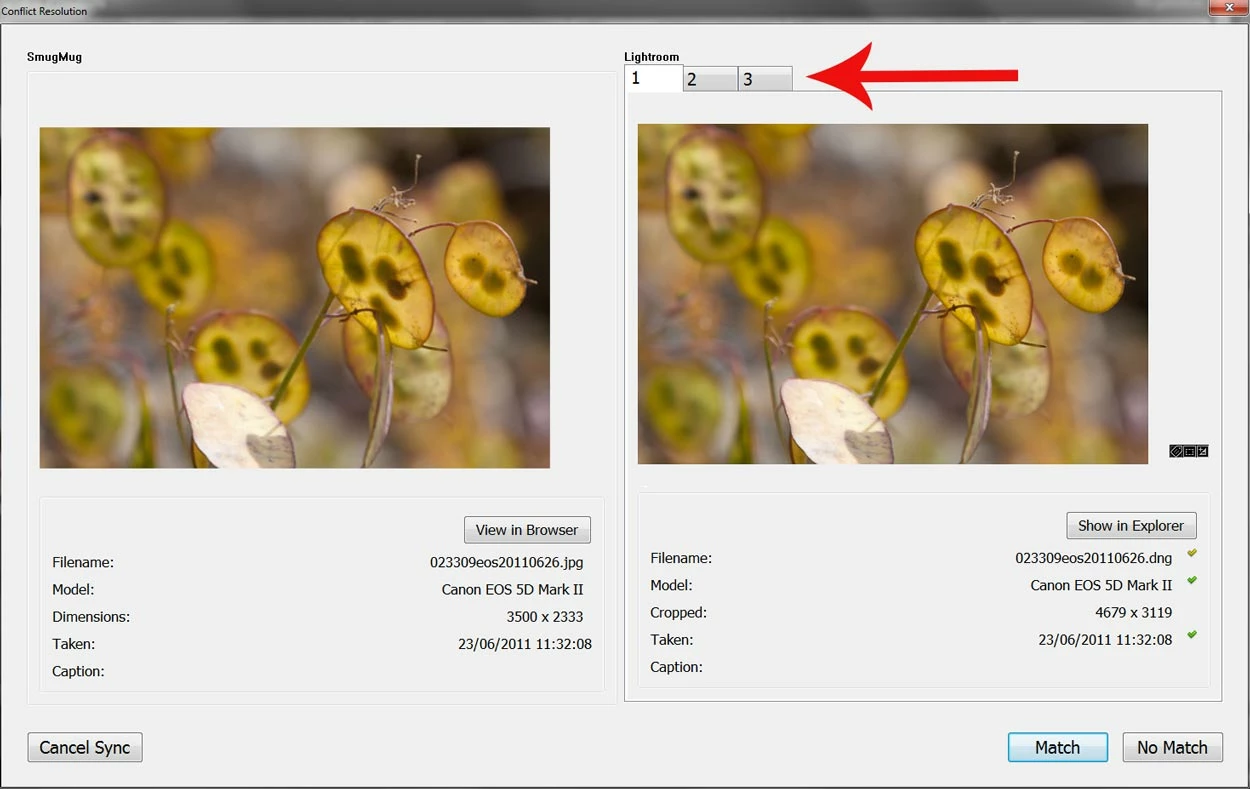
During the process you may need to take action on individual photo suggestions e.g. to accept or reject the suggested match for any images displayed in the left and right panes where there may be more than one match e.g. raw & jpeg, tiff, PSD or different sizes with the same file name. For example if there are two possible matches the right pane will display two tabs at the top. It’s then a simple button press to accept the best match or dismiss in order to find it manually. Click image below to enlarge.

4 replies

ryanal
Participant
August 25, 2021

Here's what Josh, a SmugMug hero, wrote:

1) Double-click on SmugMug in the Publish Services section in LR to open the SmugMug plugin settings.
2) In the Publishing and Syncing section, check the Sync Folders and Galleries box. It’s probably best to leave “sync photos” unchecked (for now). Click Sync Now.

That will sync the current folders/galleries on SmugMug with the plugin, and any new galleries you created should then appear in the plugin. They will initially show 0 photos (this is normal). To get the photos to show within those new galleries, you’d need to ensure that 1) the photos exist within your current LR catalog, and 2) you’ll need to Sync Photos for those galleries. You can sync photos for an individual gallery by right-clicking on any gallery in the plugin > Edit Gallery. Check the Sync Photos box, and save.

Participant
May 13, 2023

Is there a way to keep that "Sync Photos" box checked?  It reverts back to unchecked each time I close that Edit Gallery dialog box.  In other words, I would like to continuously keep that Smugmug gallery synched with Lightroom to reflect any photos added to either location.  It seems that in order to do that, I have to clunk through and find that "Sync Photos" checkbox each time, and worse yet, there is no indication that the folders are out of sync.  I have to discover that for myself.

Community Expert
May 13, 2023

No the plugin is really built with the assumption that you will manage the smugmug galleries from within Lightroom Classic. Classic uses publishing plugins, not syncing plugins is really the basic reason for this. It will really only work well if you only ever upload to smugmug from Classic. It does not do bidirectional well except for that sync photos and galleries button. It has many other problems such as that it does not deal well with smart galleries and collected images that show up in multiple galleries. You can actually get to a situation where one smugmug image that shows up in two galleries through collect or smart gallery gets connected to two different images or different versions of the same image in Classic. You also cannot connect an image on smugmug to a different image in Classic after it has been connected or after you uploaded it using the publish plugin. So you can't for example do a AI denoise and now have the image on smugmug sync from this new source instead of the old raw image. 


Don't get me wrong, I love the smugmug plugin but it has many issues. Some caused by the publish infrastructure just not being that flexible and others caused by the smugmug structure not really mapping well to Classic's structure. They should really fix the collected/smart gallery image issue though. Have submitted that as a bug to smugmug a decade ago.

ferkee
Participant
October 17, 2017

I have a similar question - but what if I created the SmugMug gallery without using LR?  I just started using LR last week but there is a set of galleries I'd like to sync into LR so I can make mods and then sync them back to SM.  Any chance that might work?  I've tried the advice above but it results in 0 pictures synced.

Thanks,

John

99jon
Genius
October 17, 2017

No problem. When you right-click on the SmugMug tab in Publish Services in the LR Library you can do the set-up/edit and log-in to your SmugMug account. A sync button is available to update, whenever you make changes directly on your SmugMug site.

ferkee
Participant
October 17, 2017

No dice.  The sync resulted in 0 images.  The galleries in question were uploaded directly from Windows Explorer to SmugMug galleries/folders via the SmugMug web interface.  What is on the site is more accurate now than what's on my computer so that's why I'd like to pull all the photos into LR.

Keeping fingers crossed that there's a way.

99jon
99jonCorrect answer
Genius
November 24, 2016

Go to Publish Services and select a collection for a SmugMug gallery with zero images. Right-click on the gallery name and choose “Edit Gallery” and then put a check mark in the box “Sync Photos” and click the Edit button. A progress bar will start and the collection will be populated automatically where there is an exact file match.

During the process you may need to take action on individual photo suggestions e.g. to accept or reject the suggested match for any images displayed in the left and right panes where there may be more than one match e.g. raw & jpeg, tiff, PSD or different sizes with the same file name. For example if there are two possible matches the right pane will display two tabs at the top. It’s then a simple button press to accept the best match or dismiss in order to find it manually. Click image below to enlarge.

RamonaSteve
Participating Frequently
November 24, 2016

Not intuative, like many thinks in LR but effective.  Thank you for the help, 99jon.

99jon
Genius
November 24, 2016

It is possible to use the SmugMug publish service plug in to sync galleries to LR desktop. It’s safest to do it one galley at a time and the on-line photos will be matched to the original in the Lightroom catalog where available.

