Participant
July 28, 2025
Answered

Sync Settings Shortcut change

  • July 28, 2025
  • 1 reply
  • 153 views

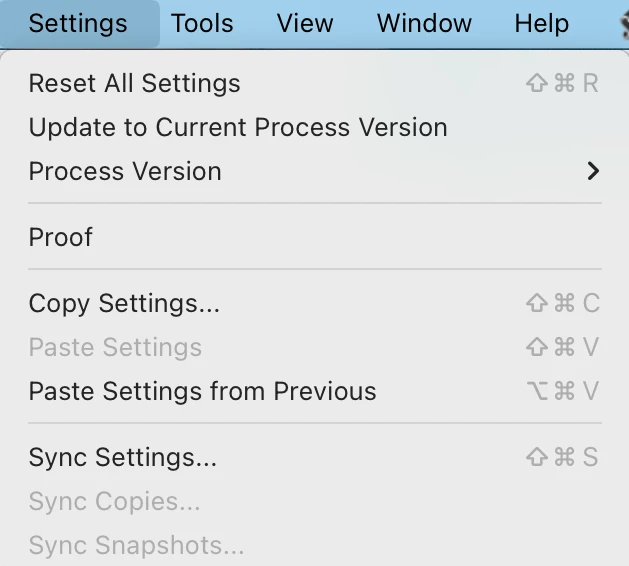
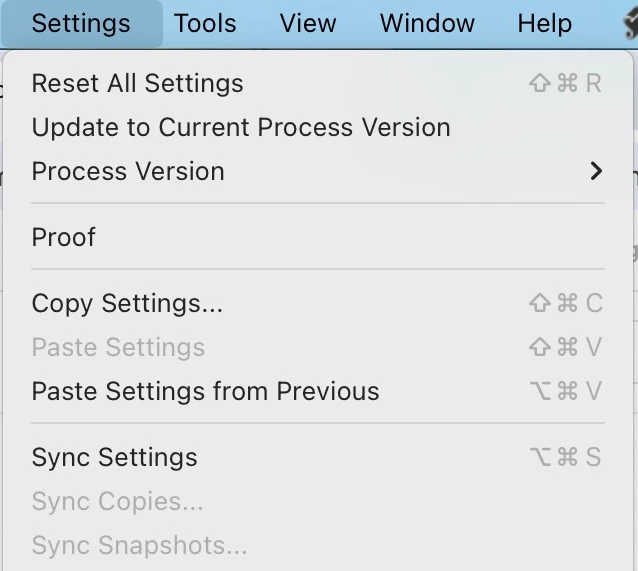
Since the last big update, lightroom changed the shortcut function for Sync Settings (⌥⌘S - for mac) from opening the sync settings dialog selection box to just syncing using your last sync settings. This might not be a negative for most users but I used that setting a lot via a button on my mouse and now there is no shortcut to access the dialog box (that I know of).


I'm wondering if anyone knows a way to create a shortcut to access the sync settings dialog option box that I can use? 


Really wish that instead of swapping a shortcut for a new option that LR folk would just create a new shortcut for that option, that way users can just choose either/or.


I'm on 14.4
Mac OS 13.5.2


Thanks!
 

Correct answer johnrellis

[This post contains formatting and embedded images that don't appear in email. View the post in your Web browser.]


Hmm, I think something is up with your installation. 


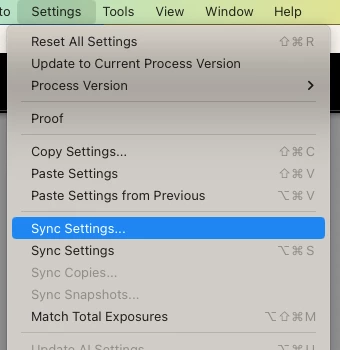
Normally on Mac, Shift Cmd S invokes "Sync Settings..." (dialog):


while Opt Cmd S invokes "Sync Settings" (no dialog):


(Hold down Opt while opening the menu.)


These shortcuts have been unchanged for many years (likely forever).


But your screenshot shows the Settings menu contains both "Sync Settings..." (with no shortcut indicated) and "Sync Settings" (with Opt Cmd S indicated). That shouldn't happen.


Have you changed LR's shortcuts using Mac OS Settings > Keyword?  Or by editing the TranslatedStrings.txt file?  Or by using a plugin?


If the answer to all of those is no, then first, restart your computer. If the problem persists, try resetting LR's preferences:
https://www.lightroomqueen.com/articles-page/how-do-i-reset-lightrooms-preferences/

LR sometimes soils its preferences file, and resetting it can fix all sorts of wonky behavior. That article explains how to restore the old preferences if resetting doesn't help.


1 reply

johnrellis
johnrellisCorrect answer
Legend
July 29, 2025

[This post contains formatting and embedded images that don't appear in email. View the post in your Web browser.]


Hmm, I think something is up with your installation. 


Normally on Mac, Shift Cmd S invokes "Sync Settings..." (dialog):


while Opt Cmd S invokes "Sync Settings" (no dialog):


(Hold down Opt while opening the menu.)


These shortcuts have been unchanged for many years (likely forever).


But your screenshot shows the Settings menu contains both "Sync Settings..." (with no shortcut indicated) and "Sync Settings" (with Opt Cmd S indicated). That shouldn't happen.


Have you changed LR's shortcuts using Mac OS Settings > Keyword?  Or by editing the TranslatedStrings.txt file?  Or by using a plugin?


If the answer to all of those is no, then first, restart your computer. If the problem persists, try resetting LR's preferences:
https://www.lightroomqueen.com/articles-page/how-do-i-reset-lightrooms-preferences/

LR sometimes soils its preferences file, and resetting it can fix all sorts of wonky behavior. That article explains how to restore the old preferences if resetting doesn't help.