
Participating Frequently
July 24, 2024
Question

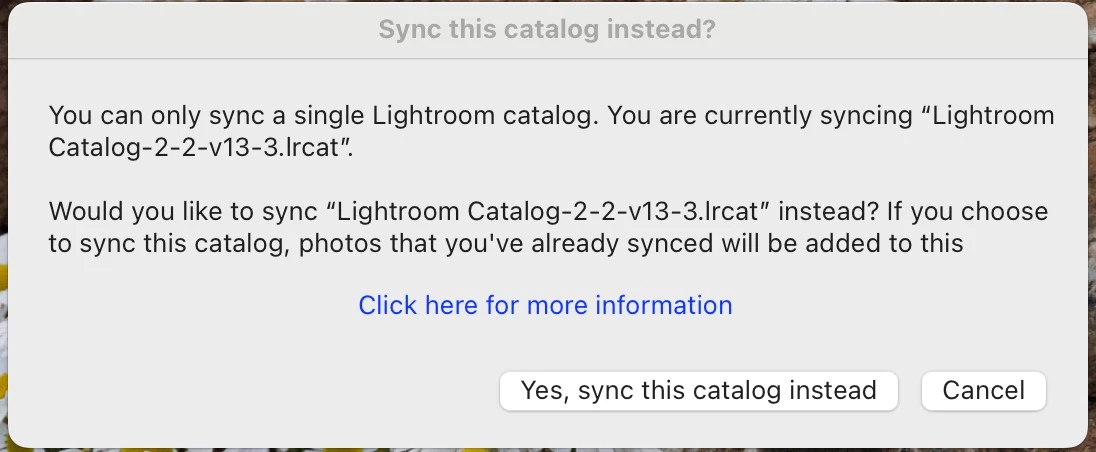
"Sync this catalogue instead.

  • July 24, 2024
  • 1 reply
  • 265 views

I am, on every start up greeted by a dialogue box telling me 'You can only sync one catalogue at a time - you are currently syncing Catalogue -2-2-v13-3.lrcat'  "would you like to synce Catalogue -2-2-v13-3.ircat instead'.  (yes its the identical cat no, unsuprising as i only have one catalogue - How do i stop this from continually appearing at every start up please?

Btw the dialogue box offers two opions - yes sync  or cancel, i have tried both but it still keeps appearing?


Has anyone any thoughts please ?- thanks
This topic has been closed for replies.

1 reply

DdeGannes
Community Expert
Community Expert
July 24, 2024

It's possible you have two Catalogs with the same name in different locations (folders) on your system. First click on the pop up "Click here for more information" and report what you see.

You can use Finder to search for the Catalog file name to locate it/ them.

If there are two check each in the folder to see when they were last altered.

Post the info you get in this thread.

Regards, Denis: iMac 27” mid-2015, macOS 11.7.10 Big Sur; 2TB SSD, 24 GB Ram, GPU 2 GB; LrC 12.5,; Lr 6.5, PS 24.7,; ACR 15.5,; (also Laptop Win 11, ver 24H2, LrC 15.0.1, PS 27.0; ) Camera Oly OM-D E-M1.
Barry QAuthor
Participating Frequently
July 30, 2024

Thank you for this answer, it led me to the souce of the problem, namely i have LR on both my laptop and desktop, whilst images on my laptop are only there temporarily the catalogue details are indeed identical and therefore likely to be causing the messages i have been getting. I'm now trying to work out how to rename my Laptop Catalogue, which is not as straightforward as i had hoped - Thank you for taking the time to respond to my query.