


Participating Frequently
May 9, 2025
Answered

Sync with Adobe cloud

  • May 9, 2025
  • 2 replies
  • 689 views

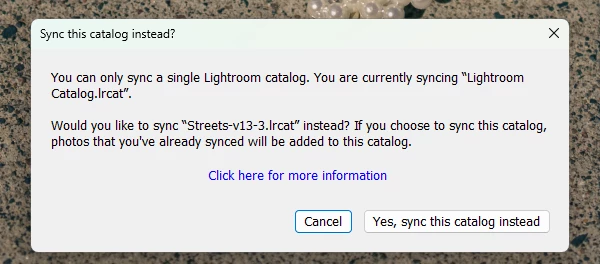
I am using lightroom in Windows 11 machine, everytime I open the lightroom it ask me to to sync with the adobe cloud, I can't turn it off so it is only poused till next time that I open  the lightroom and it ask again. It has become a nuisance. Any solution?
Correct answer JohanElzenga

Try this: Open your Lightroom Classic catalog folder and delete 'catalogname Sync.lrdata'. Now Lightroom Classic should stop asking for syncing this catalog.


2 replies

JohanElzenga
Community Expert
JohanElzengaCommunity ExpertCorrect answer
Community Expert
May 18, 2025

Try this: Open your Lightroom Classic catalog folder and delete 'catalogname Sync.lrdata'. Now Lightroom Classic should stop asking for syncing this catalog.


-- Johan W. Elzenga
ashadpourAuthor
Participating Frequently
May 18, 2025

Johan, thank you so much, it did work!

Rob_Cullen
Community Expert
Community Expert
May 9, 2025

You are using Lightroom-CLASSIC. 

Lightroom-Classic can only sync ONE catalog.

You are asking to change the catalog you want to sync.

So which catalog do you want to sync? [Lightroom Catalog.lrcat]  OR  [Streets-v13-3.lrcat]  ?


Swapping the 'Synced' catalog comes with problems as LrC always downloads all images in the Lightroom Cloud.

Click [Cancel] if  [Lightroom Catalog.lrcat] is the catalog you want to always sync.


Regards. My System: Windows-11, Lightroom-Classic 15.1.1, Photoshop 27.3.1, ACR 18.1.1, Lightroom 9.0, Lr-iOS 10.4.0, Bridge 16.0.2 .
ashadpourAuthor
Participating Frequently
May 9, 2025

Rob thank you for reply, no I don't want to change the catalog to be synced so I click cancel but it show up again the next time I open the Lightroom. I have never sat it up to sync any catalog but if it wants to sync that catalog it is fine with me, it is the default catalog created by Lightroom, it is an empty catalog. Unfortunately by clicking cancel it does not go away for ever it comes back the next time I open the Lightroom!

Rob_Cullen
Community Expert
Community Expert
May 10, 2025

If you are not using the [Lightroom Catalog.lrcat] catalog -"it is an empty catalog". You can delete it from your system (It is just taking up space on your drives.).  I suggest opening it to double-check before you delete.

What do you see when you click on the Cloud icon?  To not sync at all you would select [Pause Syncing].

If the 'Change Sync' dialog keeps re-appearing, a reset of the Preferences file might help. (Make a copy before you reset enables a return to previous preference settings.)

PREFERENCES RESET (Lr Queen)


Regards. My System: Windows-11, Lightroom-Classic 15.1.1, Photoshop 27.3.1, ACR 18.1.1, Lightroom 9.0, Lr-iOS 10.4.0, Bridge 16.0.2 .
