
Participant
May 27, 2024
Question

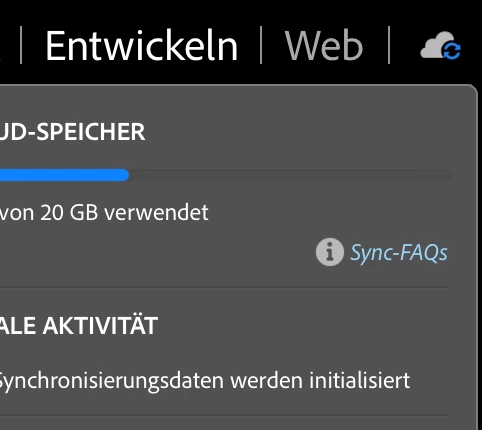
Synchronisierungsdaten werden initialisiert

  • May 27, 2024
  • 5 replies
  • 1468 views

Hallo zusammenm


Nach dem Update auf Lightroom Classic 13.3 steht nun trotz mehrmaliger Neustarts von Mac OS beim Synchronisierungsstatus mit der Cloud seit ca. 36 Stunden Synchronisierungsdaten werden initialisiert.


Leider keine Uploads mehr seither. Der Chatsupport wirkt überfordert und versteht das Problem nicht.


Geht oder ging es jemandem ähnlich, bzw. kennt jemand eine Lösung?


Vielen Dank an die Community und viele Grüße

Philipp
 

This topic has been closed for replies.

5 replies

dunaz
Inspiring
July 1, 2024

Same issue here. Updated to 13.4 but there are still two images syncing. I did a sync report, and it does tell me what are the images it's having issue with, but I don't know what to do about them. They are both keepers, so I don't want to delete the images. 

What does this mean, from the sync report: 

  • 2024-07-01T17:51:13.691Z WFCatSyncClientBase: WFCatNotificationSync is disabled on Classic platform
  • 2024-07-01T17:51:13.691Z WFCatSyncClientBase: WFCatSpaceFeedsManager is disabled on Classic platform
Participating Frequently
July 2, 2024

Hey default6bxynus14oi7, ylnv, derwiegelmann, & dunaz 


I'll need more info to help you figure this out. Before troubleshooting, please update Lightroom Classic to the latest version (v13.3.1) via the Creative Cloud desktop app.


Where is your Lightroom catalog stored? Is it on an internal or external drive? Do you have a recent catalog backup? 


Please share the system info of Lightroom from Help > System info > Copy and paste into a text document > Upload as an attachment here.


@ylnv You can upload as an attachment here or copy and paste here in this thread.


Thanks! 

Shivani 

dunaz
Inspiring
July 2, 2024

LrC is v13.4. 

Attached is the System Report, created this morning. Also attached is the sync report from yesterday.

This morning it is syncing 20 photos (the number of images goes up and down), but I did some work yesterday. I also noticed that a bunch of collections were not set to sync, so I clicked the box next to those, and now it's syncing about 1500 images. 


There are two offending images listed in the sync report. I tried renaming them but that didn't help so I put them back to their original names. FWIW, the images are showing in the web version. One of them is a keeper, and part of a collection that has been shared with the people in the images; the other, I believe, is something that can be deleted. Once the current sync is finished, I will remove the one that can be tossed from its collection to see if that nets anything.


So, I guess I just wait and see for now since I have collections are syncing. Looking forward to a resolution, thank you. 


Adobe Employee
June 7, 2024

Can you please share the full diagnostic report with us ? 
Preferences > Lightroom Sync > hold alt/option > Generate Diagnostic report 
Please share the zip file with us. 

Participant
June 22, 2024

This forum won't allow me to share my full diagnostic report as requested. Zip files are not permitted and 2 of the diagnostic files exceed the maximum size allowed. If there is another method to share please advise.


suhas_mutmurdu
Adobe Employee
Adobe Employee
July 10, 2024

You can share it from your convinience. Dropbox is a feasible option.

-S
derwiegelmann
Participant
May 31, 2024

Nachtrag meinerseits: 3 Bilder (soweit ich das sehen kann) syncen jetzt seit 2 Tagen nicht. Werde jetzt mal ein paar Tests machen. Habe gesehen hier findet man ein paar Infos: https://helpx.adobe.com/de/lightroom-classic/kb/sync-faq.html#sync-status aber so richtig viel bringen einem die Infos nicht, leider. 

derwiegelmann
Participant
May 31, 2024

Bei mir ist es genauso und der Sync funktioniert aktuell auch nicht leider 😞 sehr nervig! 

Participant
May 27, 2024

I have the same problem. I updated to 13.3 several days ago and since then it is showing syncing 3 photos. I have searched for missing photos, there are none. The Catalog panel does not show any sync errors. In the LR cloud version it states syncing is complete. In classic I can still create a collection and it syncs to the cloud OK. 
I am on macOS sonoma 14.5
My LR Classic Diagnostic Log is attached.