
Participating Frequently
October 3, 2018
Question

Syncing counting up and down

  • October 3, 2018
  • 1 reply
  • 979 views

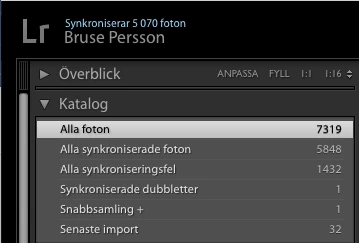
I had over 10 000 pictures in lightroom and remove approximately 3000 pictures so now I have 7319 pictures.

But the status with tells how many pictures is syncing, counting up and down. And the Catalog "all syncronisations error" counting up and down.

Se picture (in Swedish)

When I look at lightroom.adobe.com I still have over 10 000 pictures.

This has going on now 24 hours a day in 4 days! Hor long should it do that? I want to use my Mac myself, but Lightroom take all CPU and meme.

What is wrong and what should I do?

Adobe Photshop Lightroom Classic CC 7.5

MacOS 10.14
    This topic has been closed for replies.

    1 reply

    Sahil.Chawla
    Adobe Employee
    Adobe Employee
    October 3, 2018

    Hi Brusep,

    Sorry to hear about the syncing errors, could you please go into Lightroom's Preferences > Lightroom Sync and check under Sync Activity and see if you're able to see the files with errors. Try removing those files and see if it helps.

    Regards,
    Sahil

    Participating Frequently
    October 3, 2018

    "No syncing activities" (but in swedish),

    I looked now at https://lightroom.adobe com and my iPhone ap, there is it now the correct amount of 7319 pictures.
    On my desktop it is "all photos" 7319. But all synchronised photo 6551 and counting up and down and Syncing errors 706 and counting down, and up....

    Summary: the same behaviour.

    Sahil.Chawla
    Adobe Employee
    Adobe Employee
    October 3, 2018

    Thank you for the information, could you please have a look at this forum thread and let us know if it helps? How to troubleshoot sync errors?

    Also, do you have any videos in your catalog? Could you try removing them?