Participating Frequently
March 10, 2023
Answered

Tastaturbefehle in den jeweiligen Modulen anzeigen (cmd + <) geht nicht (Schweizer Tastatur)

  • March 10, 2023
  • 1 reply
  • 538 views

Hallo, ich habe Ventura (letzte Version) und LrC (letztes update) installiert und kann momentan nicht mehr die Tastaturbefehle in den verschiedenen Modulen aufrufen. (s. Hilfe -> Tastaturbefehle für das Modul XXX).

Ich habe deshalb kurzfristig das Programm auf englisch umgestellt (dann lautet der Kurzbefehl cmd + /) und da klappt es. 

Ich nutze es nicht ständig - aber es wundert mich, dass es plötzlich nicht mehr geht. Wenn ich diese Tastenkombination (cmd + <) anklicke, erscheint ein gestricheltes Quadrat mit einer +Lupe in der unteren rechten Ecke.

Könnte jemand aus der Community das vielleicht mal ausprobieren und mir feedback geben. Vielen Dank. 
 

This topic has been closed for replies.
Correct answer johnrellis

[This post contains formatting and embedded images that don't appear in email. View the post in your Web browser.]


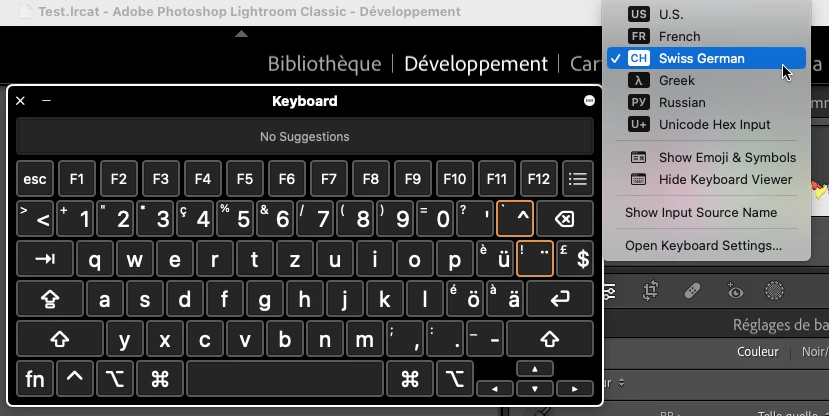
I don't have a Swiss QWERTZ keyboard, but I used the Mac OS Keyboard Viewer to present a virtual Swiss German keyboard while running LR in German:


Selecting Cmd < on that virtual keyboard correctly displayed Help > Develop Module Shortcuts (Hilfe > Tastaturbefehle für das Modul "Entwickeln"...).


LR has some bugs with particular keyboard layouts, e.g. French AZERTY, so it's certainly possible there's a bug with Swiss QWERTZ keyboards.  But that would mean the virtual Keyboard Viewer isn't exactly emulating the keyboard hardware (certainly possible).  Or there's something particular to your LR configuration.


A couple more thoughts:


1. Try resetting LR's preferences:
https://www.lightroomqueen.com/articles-page/how-do-i-reset-lightrooms-preferences/


LR sometimes soils its preferences file, and resetting it can fix all sorts of wonky behavior. That article explains how to restore the old preferences if resetting doesn't help.   Corrupt preferences is more likely not the cause of your problem, but it's easy to try.


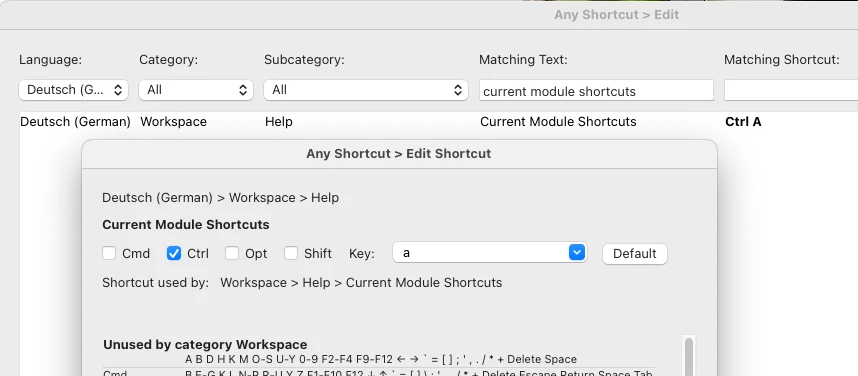
2. Use the Any Shortcut plugin to assign a different shortcut, e.g. Ctrl A, to the command Current Module Shortcuts:


1 reply

johnrellis
Legend
March 10, 2023

1. In which language were you originally running LR (German, French, Italian) before switching to English?


2. Is your keyboard similar to this layout (Swiss QWERTZ):

https://www.apple.com/shop/product/MK2A3SM/A/magic-keyboard-swiss 


or is it an AZERTY layout?


I successfully tried the various shortcuts for Help > Develop Module Shortcuts in those languages on my English QWERTY and French AZERTY keyboards, and they worked in my LR 12.2.1 / Mac OS 13.2.1.


Participating Frequently
March 11, 2023

I am running LrC in German - my keyboard has the Swiss QWERTZ layout. Thank you very much for your answer. I guess I just have to wait and see if this is some kind of bug. I can totally live with it - but again : thank you. 

johnrellis
johnrellisCorrect answer
Legend
March 11, 2023

[This post contains formatting and embedded images that don't appear in email. View the post in your Web browser.]


I don't have a Swiss QWERTZ keyboard, but I used the Mac OS Keyboard Viewer to present a virtual Swiss German keyboard while running LR in German:


Selecting Cmd < on that virtual keyboard correctly displayed Help > Develop Module Shortcuts (Hilfe > Tastaturbefehle für das Modul "Entwickeln"...).


LR has some bugs with particular keyboard layouts, e.g. French AZERTY, so it's certainly possible there's a bug with Swiss QWERTZ keyboards.  But that would mean the virtual Keyboard Viewer isn't exactly emulating the keyboard hardware (certainly possible).  Or there's something particular to your LR configuration.


A couple more thoughts:


1. Try resetting LR's preferences:
https://www.lightroomqueen.com/articles-page/how-do-i-reset-lightrooms-preferences/


LR sometimes soils its preferences file, and resetting it can fix all sorts of wonky behavior. That article explains how to restore the old preferences if resetting doesn't help.   Corrupt preferences is more likely not the cause of your problem, but it's easy to try.


2. Use the Any Shortcut plugin to assign a different shortcut, e.g. Ctrl A, to the command Current Module Shortcuts: