
jennad81441047
Participant
October 12, 2019
Question

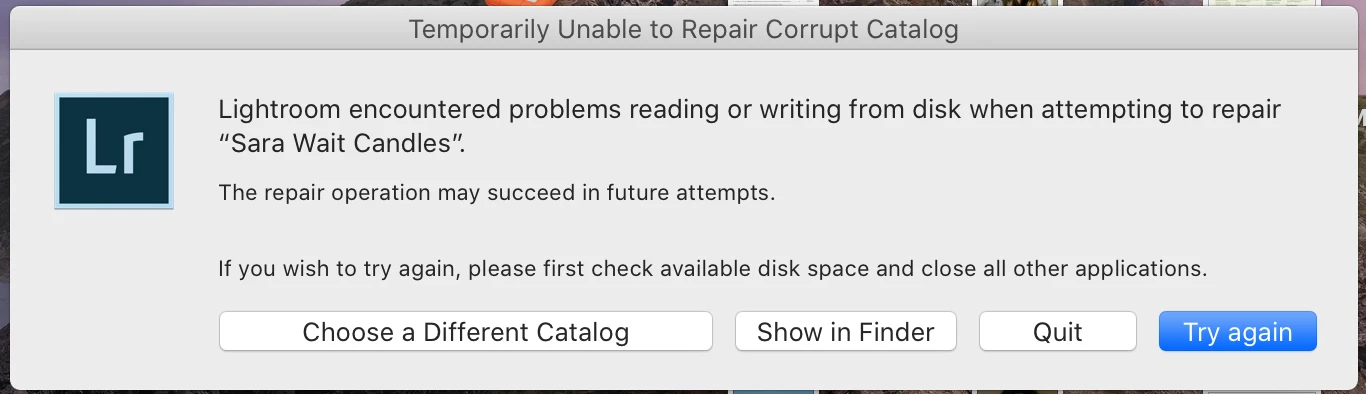
Temporarily Unable to Repair Corrupt Catalog?

  • October 12, 2019
  • 2 replies
  • 2336 views

Hello! 


Has anyone else encountered this before? I haven't been able to open this catalog and keep getting the "unexpected error" message, so I tried to test and repair the catalog. Is there anything else I can do? Or does this mean that this catalog is permanently broken? I'm having this same issue with several other catalogs as well, but not all of them on my hard drive strangely.
 

This topic has been closed for replies.

2 replies

Randy Hufford
Community Expert
Community Expert
October 28, 2021

Do you do regular catalog backups?

nikunj.m
Legend
October 23, 2019

Hi there,


We are sorry about the issue you are facing while trying to open the Lightroom Catalogs. This may happen due to Lightroom not having the correct permissions to the location where the catalogs are stored.


Would you mind sharing some more information like where the catalogs are stored (on the computers local storage or an external drive)? Also, are you using a Mac or a Windows computer (the operating system version would also be helpful)?


Please try and give permissions to the folder in which you have the catalogs by following the steps mentioned in the link below and then restart the computer prior to opening the catalogs with Lightroom Classic again to check if that helps.

https://support.apple.com/en-in/guide/mac-help/mchlp1203/mac


Regards,

Nikunj


Daryl Gilbert
Participant
June 6, 2021

Nikunj,

     I am having similar catalog issues.  I thought it may have been due to a shortage of disk space so I installed a new external hard drive.  But, to no avail.  I did reset my permissions as well.  Can you offer any other suggestions to help?


Thanks,

Daryl Gilbert

nikunj.m
Legend
June 7, 2021

Hi,


Sorry about the experience with the Lightroom Classic catalog. Would you mind telling us which version of Lightroom Classic you are using along with your computers operating system? Is the catalog saved on an external drive? If yes, try moving the catalog to your computers local storage to check if that helps.


You can also try launching Lightroom Classic with the Ctrl/Command + shift keys pressed & you should get a window to select the catalog you wish to open. Select your catalog from the list, check the box to run an integrity check on the catalog & then try to open it.


Please let us know how it goes!

Regards,

Nikunj


Regards,

Nikunj