Inspiring
May 3, 2022
Question

The Colour of the exported image from Lightroom to Photoshop looks different

  • May 3, 2022
  • 4 replies
  • 2684 views

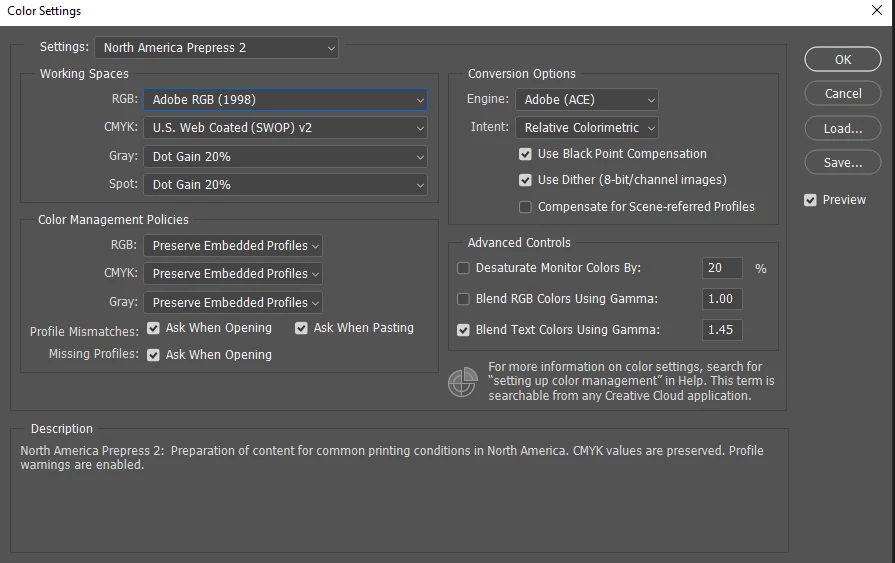
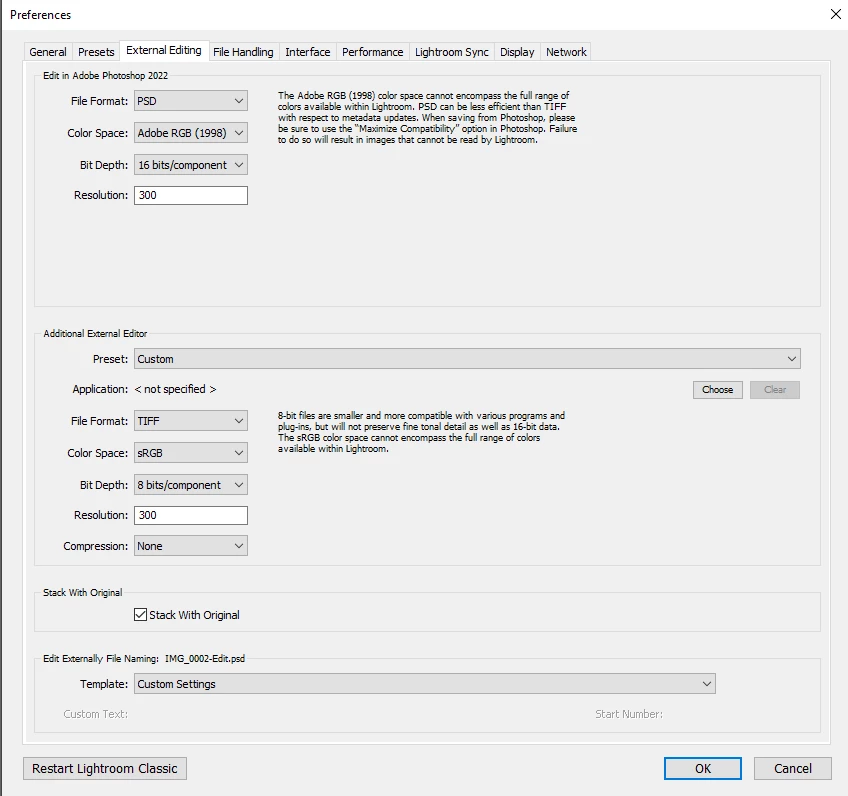
I did everything step by step, set the same color settings in Photoshop and Lightroom but when I export an image from Lightroom to Photoshop the colours in Photoshop are way different than in Lightroom, the image in Photoshop has more magenta, and pinky colours, can't understand where the issue is? I try to open a RAW image in Camera RAW and then in Photoshop in this way colours look the same as in Lightroom but aging if I export from Lightroom to Photoshop colours are different.


Color settings
Lightroom - Photoshop
This topic has been closed for replies.

4 replies

Todd Shaner
Legend
May 4, 2022

Also upload the file(s) to a file sharing site so we can see what you're seeing.

TheDigitalDog
Inspiring
May 4, 2022

This is a total mess. You post in the Lightroom forum and show a screen capture of LR preferences, then talk of JPEGs in Camera Raw. I have no idea what you are doing and thus how to help. I suggest a new post, starting from scratch and explain exactly what you are doing.

Author “Color Management for Photographers" & "Photoshop CC Color Management/pluralsight"
Inspiring
May 4, 2022

The total mess is an Adobe!!! no support, no help, can't contact any technical team and etc, they are hiding from they're customers!!!! no way to contact anybody, here is your forum and go there and try to figure out. 


TheDigitalDog
Inspiring
May 4, 2022

@nataliao29513971 wrote:

The total mess is an Adobe!!! no support, no help, can't contact any technical team and etc, they are hiding from they're customers!!!! no way to contact anybody, here is your forum and go there and try to figure out. 


Confused again and just wrong. This is a user-to-user support forum and we are trying to help you but you're off on so many tangents, we can't keep track and assist you. Further, there IS support outside of the forums:

https://www.adobe.com/about-adobe/contact.html

IF and when you can complete a coherent post specifically describing your issues, with specific software, versions of software and so forth, assistance will follow. 

THIS is what YOU need to produce in a new post here if you wish to get help, answering:

Problem Description:

Steps to Reproduce:
1.
2.
3.
4.

Actual Result:

Expected Result:

Any Workarounds:

Select the build of the product, your OS, your local if not English. 

Until you can do so, this is all a pointless mess. 

Start over again, providing the necessary information for help! 

Author “Color Management for Photographers" & "Photoshop CC Color Management/pluralsight"
TheDigitalDog
Inspiring
May 4, 2022

when I export an image from Lightroom to Photoshop the colours in Photoshop are way different than in Lightroom


To be clear, you are using Export or, as you've shown us, the Edit in Photoshop command? 

For the image in LR, you must view it in Develop and ideally at 1:1, and as you are apparently 'exporting' in Adobe RGB, you need to soft proof it to Adobe RGB in develop module. Then compare the image in Photoshop at 100% zoom. Apples to apples. 

Author “Color Management for Photographers" & "Photoshop CC Color Management/pluralsight"
Inspiring
May 4, 2022

In Develop mode
- right-click on image > Edit in > Edit in  Adobe Photoshop 2022
Here is a screenshot of how the image looks in Lightroom and then how it looks after opening in Photoshop

Inspiring
May 3, 2022

Forgot to attach images. So this how image color look in Lightroom


and after exporting to Photoshop from Lightroom


TheDigitalDog
Inspiring
May 3, 2022

Reset your Photoshop preferences. This is a known bug wereby the round trip doesn't honor the profile, Adobe is aware if this and the reset should clear it up in the meantime.

Press and hold Alt+Control+Shift (Windows) or Option+Command+Shift (Mac OS) immediately after launching Photoshop. You will be prompted to delete the current settings. You can also reset preferences upon a quit if Photoshop is running by going into General Preferences>General>Reset on Quit.


Author “Color Management for Photographers" & "Photoshop CC Color Management/pluralsight"
Inspiring
May 3, 2022

Thank you for help and I did this before, I even reset both Lightroom and Photoshop but not changes, still the same, colors are off 😑